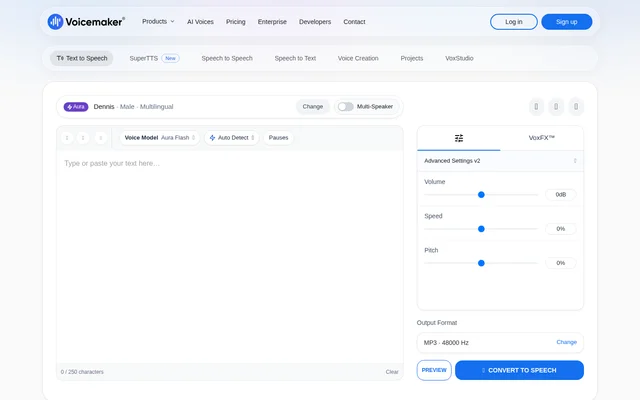
What Voicemaker can do
Voicemaker combines speech generation with controls for pronunciation and delivery. Users can select voices by attributes such as accent, gender, age, and category, then adjust pauses, pitch, speed, and effects. Voicemaker also supports subtitle generation and several audio output formats, including MP3, WAV, OGG, AAC, Opus, and μ-law.
- Voicemaker converts text into multilingual speech.
- Voicemaker transforms recorded speech into another voice while retaining meaning, emotions, and delivery.
- Voicemaker clones voices from recordings and designs voices from written descriptions.
- Voicemaker transcribes uploaded or recorded audio and video.
- Voicemaker assembles multi-voice scripts with music into a single file.
- Voicemaker splits music into stems and isolates speech from background noise.
- Voicemaker generates voices, ambience, and effects together through SuperTTS.
How Voicemaker works
Voicemaker accepts typed scripts and can extract text from uploaded PDF, text, or Word files. Users choose a voice and configure delivery settings before generating speech. For recording-based tools, Voicemaker provides file uploads and microphone recording. Transcription results can be copied, downloaded as TXT or SRT, or opened in an editor.
Voicemaker offers custom voice creation through either an audio sample or a written description. Voice cloning requires at least 20 seconds of clear audio, with 1–2 minutes recommended. Voice design produces three versions for users to preview and select. Saved clones appear in the voice library, while saved designed voices appear under Custom Voices and Voice Selection.
Who Voicemaker is for
Voicemaker supports creators working on spoken content for videos, presentations, advertising, and podcasts. Voice categories include narration, characters, social media, educational content, and IVR and chatbot uses. Voicemaker also provides tools for people editing existing recordings, whether the task involves extracting speech, changing a recording's sound, or separating musical parts.
- Voicemaker supplies generated narration for videos and presentations.
- Voicemaker creates custom-voice speech for advertisements and podcasts.
- Voicemaker combines multiple speakers and music for scripted stories.
- Voicemaker removes vocals for karaoke and separates instruments from songs.
- Voicemaker converts recordings into editable transcripts and subtitle files.
Voicemaker pricing and plans
Voicemaker offers free access alongside paid plans. Free accounts provide pronunciation editing and reusable voice profiles. Voice creation is included in Starter, Pro, Creator, Teams, and Business plans. The transcription settings list a free Lite option allowing 5 files every 12 hours and a paid Flagship option charged at 10 credits per second. Voice-design previews use ProPlus credits, and saving a designed voice consumes a voice slot.
Voicemaker strengths and limitations
Voicemaker brings multilingual speech generation, custom voices, transcription, and recording tools into a browser-based workflow. Saved voice profiles preserve speed, pitch, and effects, while pronunciation word lists support import and export. These capabilities sit alongside plan requirements, credit-based operations, and file limits that affect which tasks users can complete through a given feature.
- Voicemaker restricts voice creation to paid plans.
- Voicemaker limits transcription uploads to 100MB and 30 minutes.
- Voicemaker limits VoxStudio uploads to 50MB.
- Voicemaker supports ID3 metadata tags for MP3 files only.
Voicemaker FAQ
Is Voicemaker free?
Voicemaker offers free access and paid plans. Free accounts unlock pronunciation editing and saved voice profiles, while voice creation requires a paid plan. The transcription settings also list a free Lite option and a paid Flagship option.
Can Voicemaker clone a voice?
Voicemaker can clone a voice from uploaded audio or a microphone recording on a paid plan. Voicemaker requires at least 20 seconds of clear audio and recommends 1–2 minutes. Users must confirm the necessary rights or consents for uploaded samples and voice clones.
What audio formats does Voicemaker support?
Voicemaker lists MP3, WAV, OGG, AAC, Opus, and μ-law as speech output formats. Voicemaker also generates SRT and TXT subtitle files alongside audio, while audio-file metadata tags are supported for MP3 only.
Can Voicemaker transcribe audio and video?
Voicemaker transcribes uploaded or recorded audio and video into editable text, with TXT and SRT downloads. Voicemaker accepts transcription files up to 100MB and 30 minutes, and the Flagship transcription model supports 90+ languages.
Can Voicemaker remove background noise or vocals?
Voicemaker includes a Voice Isolator for separating speech from background noise and a Stem Splitter for separating vocals and instruments. Voicemaker lists wind, street noise, background music, crowd chatter, echo, and hum among removable background sounds.
From the community
No reviews yet
Be the first to review this tool. What you write helps the next person choose.