What is Weet?
Weet is an AI video creation, editing and sharing tool focused on training content. Weet helps individuals and teams convert documents into narrated avatar videos, record demonstrations and publish interactive tutorials. The website presents uses ranging from product walkthroughs and how-to guides to e-learning and video standard operating procedures.
Weet brings recording, editing, subtitles, translation, interactivity and viewing analytics into the same tool. Training content can be organized in workspaces and channels so teams can find videos in a shared library. A Free plan supports quick video creation, while Business and Enterprise plans add capabilities for team management and training administration.
What Weet can do
Weet supports several ways to produce training videos, including document conversion, text-based generation, screen capture and uploaded footage. Weet also provides editing and interaction tools for turning those materials into instructional content. Subtitle and audio translation extend the workflow to training delivered in different languages.
- Weet converts uploaded documents into videos with an avatar and voice.
- Weet generates AI voiceovers from typed text or uploaded documents.
- Weet records screens and webcams and accepts existing video uploads.
- Weet generates subtitles and supports manual subtitle timing adjustments.
- Weet trims videos and removes background noise.
- Weet adds links, images, text, buttons and chapters to videos.
- Weet tracks viewing activity and video engagement.
How Weet works
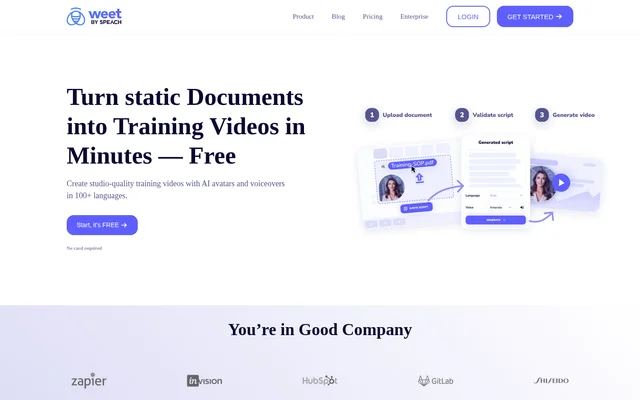
Weet describes a document-to-video workflow in which users upload a document and select an avatar and voice. Weet also supports typing text to generate videos with avatars, slides and narration. Users working with existing material can upload videos or record their screen and webcam instead.
Weet provides editing tools after content creation, including trimming, subtitle correction and re-recording parts of a video. Teams can add interactions, collaborate through comments and organize videos into workspaces and channels. Publishing and tracking tools provide notifications and engagement information, and the website offers a Chrome extension download.
Who Weet is for
Weet serves individuals recording quick tutorials and teams producing repeatable training materials. The website includes examples from technical trainers, training managers and continuous improvement managers. Weet also positions its Business plan for teams needing custom features and its Enterprise plan for organizations needing advanced statistics, administration and security.
- Weet turns existing documents into narrated training videos.
- Weet supports demonstrations of products and software updates.
- Weet helps teams share best practices and how-to instructions.
- Weet supports video standard operating procedures and e-learning content.
Weet pricing and plans
Weet offers Free, Business and Enterprise plans. The Free plan costs $0 and allows up to 3 weets, with AI avatars, screen and webcam recording, editing options and automatic transcription. Weet states that starting free does not require a card. Free recording quality is listed as up to 720p.
Weet lists Business at $24 per creator per month with yearly billing or $29 with monthly billing. Business includes unlimited weets, custom branding, custom thumbnails, video downloads and user management. Enterprise includes Business features plus interactive quizzes, Single Sign On, learning paths, advanced statistics and dedicated support, with pricing available through sales.
Weet strengths and limitations
Weet combines multiple stages of training video production rather than focusing only on recording or generation. Document conversion, editable subtitles, partial re-recording and interactive elements support creating and maintaining instructional content. Shared workspaces, channels and comments provide collaboration options, while viewing analytics help teams assess engagement after publication.
- Weet restricts Free workspaces to up to 3 weets.
- Weet lists Free recording quality as up to 720p.
- Weet places interactive quizzes, learning paths and Single Sign On in Enterprise.
Weet FAQ
What is Weet?
Weet is an AI training video creation, editing and sharing tool. Weet converts documents and text into videos with AI avatars and narration, and supports screen recording, subtitles, translation, interactive elements and viewing analytics for instructional content.
Is Weet free?
Weet offers a Free plan at $0 with up to 3 weets and no card required to start. Weet also offers paid Business subscriptions and an Enterprise plan available through sales for organizations needing additional training, administration and security features.
How does Weet turn documents into videos?
Weet turns documents into videos through a workflow that involves uploading a document and selecting an avatar and voice. Weet also supports generating training videos from typed text, including AI avatars, slides and narration.
Can Weet add subtitles and translate videos?
Weet automatically generates subtitles and supports translating subtitles and audio into more than 100 languages. Weet also lets users manually edit subtitles and adjust their timing, alongside generating AI voiceovers from text or uploaded documents.
Who is Weet for?
Weet is for individuals, trainers and teams creating tutorials, demonstrations and training videos. Weet lists use cases including best-practice sharing, how-to instructions, e-learning, product updates and video standard operating procedures, with paid plans for team and enterprise requirements.
How much does Weet Business cost?
Weet Business costs $24 per creator per month with yearly billing or $29 per creator per month with monthly billing. Weet Business includes unlimited weets, interactive video annotation, custom branding, custom thumbnails, video downloads and user and video management.
From the community
No reviews yet
Be the first to review this tool. What you write helps the next person choose.