What is Yepic Studio?
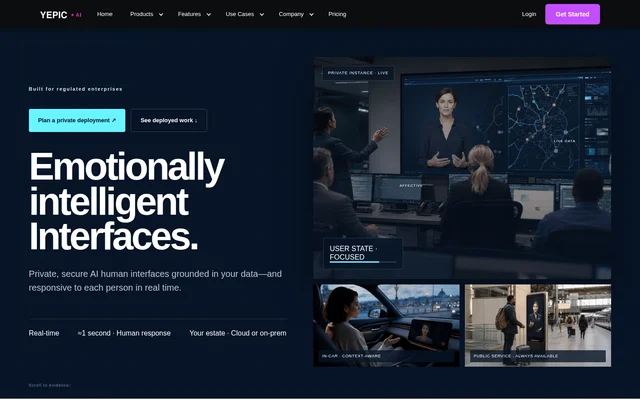
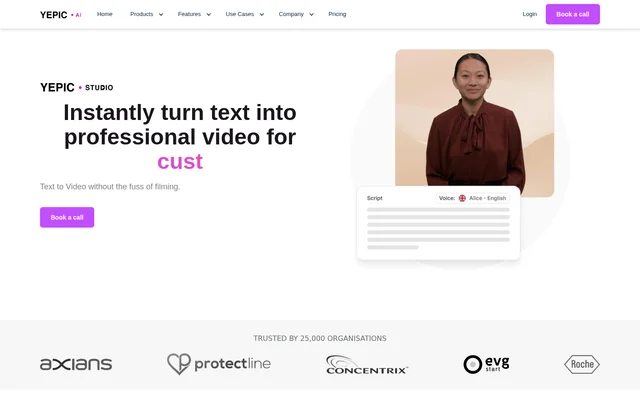
Yepic Studio is an AI video creation tool for organisations that want to produce video content without filming. Yepic Studio combines text-to-video generation, talking photos and avatars with multilingual voice options. The website presents applications across marketing and sales, customer service, corporate communications, employee onboarding and education.
Yepic Studio is currently offered through a consultative access model rather than self-service SaaS plans. The pricing page describes managed cloud evaluation, commercial API access and on-premise deployment. Organisations discuss their requirements with the team before an account or deployment is provisioned, with commercial terms scoped around the intended environment and usage.
What Yepic Studio can do
Yepic Studio provides video generation and editing capabilities for avatar-led and multilingual content. The feature list covers photo animation, voice selection and visual customisation, while API access connects video generation to an organisation’s own applications. The website also describes exporting avatars for use in video chatbot flows.
- Yepic Studio turns text descriptions into videos.
- Yepic Studio converts uploaded photos into talking videos.
- Yepic Studio provides high-quality avatars for video content.
- Yepic Studio supports over 110 languages and 450+ voices.
- Yepic Studio allows music, transitions, videos, images, text and illustrations to be added.
- Yepic Studio supports automated video generation through an API.
How Yepic Studio works
Yepic Studio’s product page outlines a workflow that begins with a detailed text description of the desired video. Users then configure duration, style, motion dynamics and visual effects before generating a result. The page describes previewing completed videos, downloading or sharing them, and creating variations when needed.
Yepic Studio’s current access process begins with a meeting about what the avatar needs to do and where the system must operate. The team then scopes infrastructure, integrations, security, usage and support. Depending on the agreed arrangement, the team provisions a managed demo, an API environment or a private deployment.
Who Yepic Studio is for
Yepic Studio addresses business teams creating customer-facing and internal video content, as well as developers embedding avatars or AI video into products. The website lists marketing, customer service and learning applications. The on-premise option specifically targets governments, banks and regulated enterprises that need deployment within their own infrastructure and security perimeter.
- Marketing teams can create prospecting videos and campaigns for new markets.
- Customer service teams can use avatars in video chatbot flows.
- HR teams can personalise onboarding and training programmes.
- Educators can create multilingual courses and tailored language-learning examples.
- Developers can integrate video experiences into their own solutions through the API.
Yepic Studio pricing and deployment options
Yepic Studio uses custom commercial pricing rather than published self-service plans. The pricing page states that every engagement is priced around infrastructure, usage, integration and support requirements. No fixed subscription prices are listed. Organisations begin by booking a deployment meeting so the team can define an appropriate commercial model.
Yepic Studio offers a managed cloud demo for evaluating avatar quality, latency and workflows. Commercial API access is scoped around usage, concurrency, support and data boundaries. On-premise deployment runs inside the organisation’s environment, using its GPUs and security perimeter. These options support evaluation, product integration or deployment on customer-controlled infrastructure.
Yepic Studio strengths and limitations
Yepic Studio combines multilingual voices, talking photos, avatars and visual customisation with deployment options for different organisational requirements. API integration supports video generation within existing products, while on-premise deployment keeps the installation within the customer’s environment. Access nevertheless requires coordination with the team, rather than immediate signup for a self-service SaaS plan.
- Yepic Studio no longer offers self-service SaaS plans.
- Yepic Studio requires commercial and deployment requirements to be scoped with the team.
- Yepic Studio’s on-premise option depends on the customer’s own infrastructure and GPUs.
Yepic Studio FAQ
What is Yepic Studio?
Yepic Studio is an AI video creation tool that turns text and uploaded photos into video content. Yepic Studio includes avatars, multilingual voices and visual customisation for marketing, customer service, onboarding and training applications.
Is Yepic Studio free?
Yepic Studio does not list a free plan, and the pricing page states that self-service SaaS plans are no longer offered. Commercial pricing is scoped around infrastructure, usage, integration and support, with access arranged through a deployment meeting.
Does Yepic Studio have an API?
Yepic Studio offers commercial API access for integrating real-time avatars and AI video into an organisation’s own product or service. API arrangements are scoped around usage, concurrency, support and data boundaries, with integration support included in the offering.
Can Yepic Studio be deployed on-premise?
Yepic Studio offers on-premise deployment inside an organisation’s environment, using its own GPUs and security perimeter. The website identifies governments, banks and regulated enterprises as intended audiences for this deployment option.
Which languages and voices does Yepic Studio support?
Yepic Studio supports video creation in over 110 languages with 450+ voices. The website presents multilingual courses, language-learning examples and campaigns entering new markets as applications for multilingual video content.
How do organisations get access to Yepic Studio?
Yepic Studio access begins with a meeting to discuss avatar requirements and the intended operating environment. The team scopes infrastructure, integrations, security, usage and support before provisioning a managed cloud demo, API environment or private deployment.
From the community
No reviews yet
Be the first to review this tool. What you write helps the next person choose.