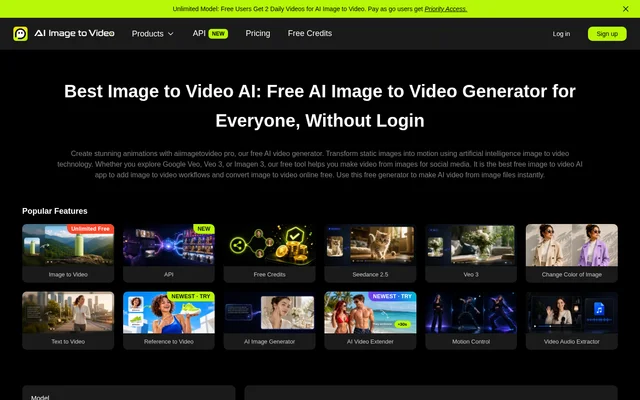
What is AI Image to Video?
AI Image to Video is an online generator for turning still images into short video clips. A photo can serve as the starting point, and a text prompt can describe the motion or effects to add. The page presents the tool for creative and marketing work, with examples such as animated product shots and scenes that follow a moving subject.
What AI Image to Video can do
AI Image to Video offers image-to-video, text-to-video, and reference-to-video modes. Image-to-video starts with an uploaded picture, while text-to-video provides an option when there is no source image. The reference mode accepts images, video clips, and audio files. The site also lists separate tools for video extension and motion control.
- AI Image to Video animates an uploaded still image.
- AI Image to Video generates clips from text prompts.
- AI Image to Video accepts image, video, and audio references.
- AI Image to Video offers aspect ratio, duration, and resolution settings.
- AI Image to Video lets users preview the result before export.
How AI Image to Video works
AI Image to Video starts with an upload for the image-to-video workflow. The interface accepts PNG, JPG, JPEG, and WEBP files up to 20 MB for the main image. Users can crop or frame the image for the intended aspect ratio, then describe the motion or leave the prompt field blank.
AI Image to Video then lets users select settings such as duration and resolution before rendering. The displayed interface includes vertical, landscape, and square aspect ratios, along with other framing options. After rendering, users can preview the clip to judge how the motion and effects look before exporting.
Who AI Image to Video is for
AI Image to Video is aimed at creators, marketers, and designers who want to make short motion clips from still assets. Product photos can become ad clips or showcases, while travel photos can become short stories. The page also describes using the generator to animate presentation visuals and turn real estate photos into property clips.
- Animate a product photo for a short ad.
- Create a motion clip for a presentation demo.
- Turn a travel photo into a short video.
- Create a property clip from a listing photo.
AI Image to Video pricing and plans
AI Image to Video offers a free plan for trying image-to-video generation. The FAQ mentions daily credits but does not specify the credit allowance in the supplied page text. The page also shows a discount offer without detailing paid plan prices. Although the structured listing says no sign-up, the FAQ says registration is free and an account is required.
AI Image to Video strengths and limitations
AI Image to Video gives users a choice between animating a photo without a prompt and adding text to describe a specific effect. A preview is available before export, and the page advertises watermark-free HD output. Projects that rely on several media references need to fit the upload and duration limits shown in the interface.
- The main image upload is capped at 20 MB.
- Reference mode accepts up to 9 images.
- Reference video and audio each have a 15-second total limit.
AI Image to Video FAQ
What is AI Image to Video?
AI Image to Video is an online video generator that animates still images, with an optional text prompt to guide the motion. AI Image to Video also offers text-to-video and reference-to-video modes for users who want to start from a description or use other media as references.
Is AI Image to Video free?
AI Image to Video offers a free plan with credits for testing image-to-video generation. The FAQ mentions daily credits but does not specify the allowance in the page text, and it says free registration is required to use the generator.
Does AI Image to Video require an account?
AI Image to Video requires an account according to the page FAQ, which says registration is free and lets users save projects. The structured listing on the same page says no sign-up, so the two statements conflict.
Can AI Image to Video animate a photo without a prompt?
AI Image to Video can animate an uploaded photo without a text prompt. The page says users can leave the prompt field blank, or enter a description if they want to guide the motion or effects before rendering.
What files can AI Image to Video use as references?
AI Image to Video accepts PNG, JPG, JPEG, and WEBP images, MP4, MOV, and WEBM videos, and MP3 and WAV audio as references. Reference videos and reference audio each have a total duration limit of 15 seconds.
From the community
No reviews yet
Be the first to review this tool. What you write helps the next person choose.