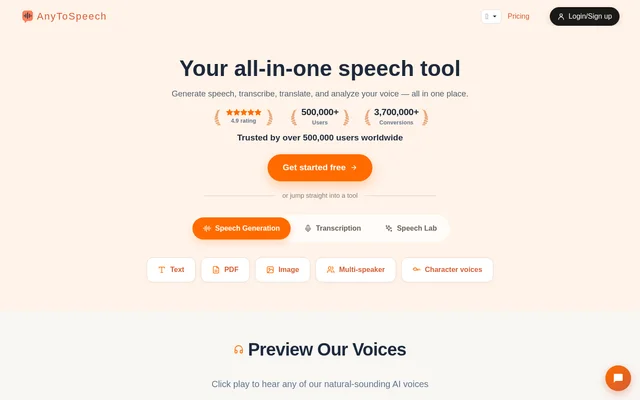
What is AnyToSpeech?
AnyToSpeech is an AI speech tool that combines audio generation, transcription, translation, and voice analysis. AnyToSpeech serves readers who want to listen to written material, creators producing spoken content, and agencies with larger production needs. The service accepts written documents and media files, with separate tools for narration, podcasts, music, and vocal feedback.
AnyToSpeech extends beyond plain text-to-speech conversion. Document tools cover PDFs, PowerPoint presentations, images, and webpages, while voice tools support cloning and voice design from a written description. AnyToSpeech also provides character-style voices and tests for singing, pronunciation, accent, perceived vocal age, and other vocal characteristics.
What AnyToSpeech can do
AnyToSpeech groups speech generation, transcription, and voice experimentation into a collection of tools. Users can generate downloadable MP3 audio, extract spoken content from recordings, or create conversations using distinct voices. Voice analysis tools provide feedback on recorded clips, while translation tools support both media files and text extracted from images.
- AnyToSpeech converts text, PDFs, DOCX files, and webpages into speech.
- AnyToSpeech extracts text from images for speech or translation.
- AnyToSpeech transcribes uploaded audio and video files.
- AnyToSpeech creates voice clones from short recordings.
- AnyToSpeech designs voices from plain-text descriptions.
- AnyToSpeech generates podcasts from topics, scripts, and documents.
- AnyToSpeech generates songs from descriptions or supplied lyrics.
- AnyToSpeech evaluates singing, accent, and pronunciation.
How AnyToSpeech works
AnyToSpeech provides a PDF-to-MP3 workflow in which users upload a PDF, select a voice, adjust the speaking rate if needed, and start conversion. The resulting audio can be played in the browser or downloaded as an MP3. Transcription tools instead accept uploaded audio or video, with translation available for the resulting text.
AnyToSpeech connects to supported AI assistants through MCP after an account connection. The website names ChatGPT, Claude, Cursor, Perplexity, and Meta Muse. Connected assistants can request tasks such as converting text and PDFs to audio, transcribing recordings, cloning voices, and making podcasts using the user's existing plan. AnyToSpeech also offers iPhone and Android apps.
Who AnyToSpeech is for
AnyToSpeech addresses document listening, content production, transcription, and voice practice. Readers can convert books and research papers into audio, while creators can produce narration or podcasts. The website describes Hobby as suitable for personal projects and beginning creators, Standard for regular creators, and Pro for heavy production and agencies.
- AnyToSpeech turns documents into audio for listening on the go.
- AnyToSpeech transcribes meetings and interviews.
- AnyToSpeech creates podcast conversations from presentation slides.
- AnyToSpeech provides pronunciation and accent feedback.
- AnyToSpeech supports character and brand voice design.
AnyToSpeech strengths and limitations
AnyToSpeech combines document conversion, audio production, transcription, and voice feedback within the same service. Support for different input types makes the tools applicable to reading, recording, and content creation workflows. Free trials and account-free tools allow testing before payment, but ongoing usage and access to premium capabilities depend on the selected plan.
- AnyToSpeech limits free speech conversions to approximately 30 seconds.
- AnyToSpeech excludes commercial use and voice cloning from the free plan.
- AnyToSpeech accepts only selectable-text PDFs up to 50 MB for PDF-to-podcast conversion.
- AnyToSpeech limits image-to-podcast uploads to 10 MB.
AnyToSpeech FAQ
What is AnyToSpeech?
AnyToSpeech is an AI speech tool for generating audio, transcribing recordings, translating content, and analyzing voices. AnyToSpeech also offers voice cloning, text-based voice design, podcast generation, and music creation for readers and content creators.
Is AnyToSpeech free?
AnyToSpeech offers a free plan with 5,000 characters per month and approximately 30 seconds per conversion. Selected tools and text-to-speech trials work without registration. Paid subscriptions add premium voices, voice cloning, commercial use, and higher usage allowances.
How do you convert a PDF to MP3 with AnyToSpeech?
AnyToSpeech converts PDFs to MP3 after users upload a file, choose a voice, optionally adjust the speaking rate, and start conversion. The completed audio can be downloaded as an MP3 or played directly in the browser.
Can AnyToSpeech clone a voice?
AnyToSpeech creates a voice clone from three short recordings and makes the clone available across its tools, including text-to-speech and PDF conversion. Voice cloning is included in paid plans and is not included in the free plan.
Does AnyToSpeech connect to AI assistants?
AnyToSpeech supports MCP connections for ChatGPT, Claude, Cursor, Perplexity, and Meta Muse. After connecting an account, users can ask supported assistants to generate audio, transcribe recordings, clone voices, or create podcasts using their existing plan.
Do unused AnyToSpeech characters roll over?
AnyToSpeech rolls unused characters into the next month. The monthly character allocation renews each month, and remaining characters are added to the new allocation, according to the website's pricing FAQ.
From the community
No reviews yet
Be the first to review this tool. What you write helps the next person choose.