What is Article Audio?
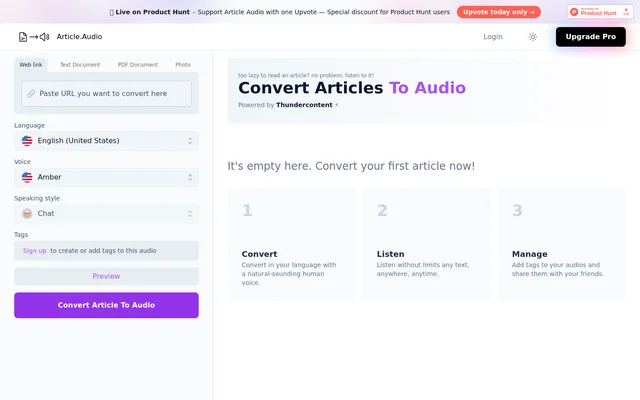
Article Audio is an article-to-audio tool for people who want to listen to written content rather than read it. Article Audio is powered by Thundercontent, and the website presents conversion, listening, and audio management as its main activities. The input selector extends beyond web links to include text documents, PDF documents, and photos, giving users several starting points for creating spoken versions of their content.
Article Audio combines content conversion with language and voice selection. The page describes conversion using a natural-sounding human voice and provides named voices alongside speaking-style options. Article Audio also includes tools for organizing and sharing audio, so the stated workflow covers both producing spoken content and managing the resulting listening material.
What Article Audio can do
Article Audio provides controls for choosing the source material and configuring its spoken delivery. The language list contains regional variants, while the voice selector lists named voices. A separate speaking-style selector includes conversational, emotional, narration, and newscast choices. Article Audio also displays a preview control before the conversion action.
- Article Audio accepts web links, text documents, PDF documents, and photos as input options.
- Article Audio offers regional language choices, including English, French, Spanish, and Arabic variants.
- Article Audio lets users select named voices.
- Article Audio lists styles such as calm, cheerful, whispering, and professional narration.
- Article Audio provides preview and article-to-audio conversion controls.
- Article Audio supports audio tags and sharing with friends.
How Article Audio works
Article Audio presents a source selector followed by language, voice, and speaking-style controls. Users choose the type of material they want to convert and configure the available speech settings. Article Audio then provides Preview and Convert Article To Audio controls. The page describes the broader sequence as converting content, listening to audio, and managing audio through tags and sharing.
Article Audio offers a Google sign-in option and an email access flow that asks users to confirm their email. The tagging area explicitly asks users to sign up to create or add tags to audio. The supplied page does not state prices or plan details, so the displayed access options do not establish whether conversion requires payment.
Who Article Audio is for
Article Audio is aimed at people who prefer listening to articles and other text. The document and photo input choices also make the tool relevant when source material is not a web article. Regional language options and selectable voices provide choices for spoken delivery, while tagging and sharing support users who want to organize audio or pass it to friends.
- Article Audio can turn web articles into listening material.
- Article Audio can use text documents or PDF documents as conversion sources.
- Article Audio lets users select language variants and speaking styles for audio.
- Article Audio lets registered users organize audio with tags.
Article Audio strengths and limitations
Article Audio brings source-format selection, regional language choices, named voices, and speaking styles into the same conversion interface. Audio tagging and sharing add management options beyond conversion alone. The explicit account restriction concerns creating or adding tags: the page requires sign-up for that activity. The supplied text does not establish other account restrictions, conversion quotas, or paid-plan differences.
Article Audio FAQ
What is Article Audio?
Article Audio is an article-to-audio tool powered by Thundercontent. Article Audio converts written content into spoken audio and offers web link, text document, PDF document, and photo input options, alongside language, voice, and speaking-style selectors.
What types of content can Article Audio convert?
Article Audio lists web links, text documents, PDF documents, and photos as source options. Article Audio provides language, voice, and speaking-style controls for configuring the audio, along with preview and conversion actions.
Can you choose languages and voices in Article Audio?
Article Audio offers language selection with regional variants and a list of named voices. Article Audio also lists speaking styles such as calm, cheerful, friendly, whispering, professional narration, relaxed narration, and newscast styles.
Does Article Audio require an account?
Article Audio explicitly requires sign-up to create or add audio tags. Article Audio offers Google access and an email confirmation flow, but the supplied page does not establish whether an account is required for every conversion or listening activity.
Can you organize and share audio with Article Audio?
Article Audio supports adding tags to audio and sharing audio with friends. Article Audio requires sign-up for creating or adding tags, making registration an explicit condition for that organization feature.
From the community
No reviews yet
Be the first to review this tool. What you write helps the next person choose.