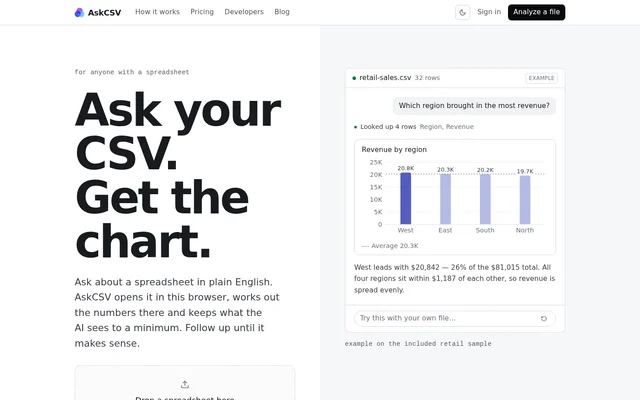
What is AskCSV?
AskCSV is an AI spreadsheet analysis tool that answers plain-English questions with charts and calculated results. AskCSV is intended for anyone with a spreadsheet, including people exploring sales figures, survey results, totals or trends. Files open in a modern web browser, where the data is loaded and queried rather than uploaded.
AskCSV separates question interpretation from calculation: the AI determines the query, while the database produces the numbers. Charts use the actual query result, and code computes totals and shares. This approach gives users an underlying query and exact values to inspect instead of relying only on a written explanation.
What AskCSV can do
AskCSV combines conversational spreadsheet questions with charts and inspectable results. AskCSV retains the context of the file and previous answers, allowing users to narrow a question, switch a chart or request totals without starting the analysis again. The supported inputs include uploaded-file selection, drag-and-drop and pasted spreadsheet cells.
- AskCSV reads CSV, TSV and Excel files, including every Excel sheet.
- AskCSV accepts cells pasted from a spreadsheet.
- AskCSV builds pivot-style summaries from plain-English questions.
- AskCSV draws charts from query results.
- AskCSV provides a Table view with exact numbers.
- AskCSV exposes the SQL behind every chart.
- AskCSV maintains context across follow-up questions.
How AskCSV works
AskCSV starts with a selected file, a dropped spreadsheet, pasted cells or an included sample. Users ask a question in plain English and continue with follow-ups as needed. Every query runs in the current browser tab. AskCSV also provides retail sales, baseball players, and height and weight samples for exploring the workflow.
AskCSV sends OpenAI the question, file name and row count, selected columns with up to 10 sample rows, and up to 100 rows of each query result plus summary figures. Earlier chat messages are also shared. The spreadsheet file itself is not uploaded, and signing in does not upload files already open in the browser.
Who AskCSV is for
AskCSV is for spreadsheet users who want to investigate data by asking questions rather than manually building pivot tables or wrangling formulas. The examples and guides cover sales analysis, survey results, spreadsheet summaries and data quality. AskCSV also supports checking the underlying numbers when an answer needs verification.
- AskCSV can compare revenue by region.
- AskCSV can chart monthly revenue by channel.
- AskCSV can calculate revenue, profit and margin totals.
- AskCSV can support analysis of survey results from CSV files.
AskCSV pricing and plans
AskCSV offers guests $0.25 in free credits without sign-in, enough for about 5 answers; guest credits expire after 7 days. The subscription costs $5/month and includes $5 of monthly usage, or about 100 answers. Opening files and viewing charts is free. Answer costs vary with the amount of text the AI reads and writes.
AskCSV requires Google sign-in to subscribe and offers additional credits from $10 to subscribers. Included monthly usage does not roll over. Purchased credits last 12 months after the latest top-up, and each purchase extends existing purchased credits. Subscribers can cancel through Settings and Manage billing while retaining access through the current billing period.
AskCSV strengths and limitations
AskCSV combines browser-local file processing with visible SQL, exact result tables and conversational follow-ups. These capabilities make the source of a chart easier to inspect while limiting what reaches the AI. AskCSV does not keep all information away from OpenAI: selected samples, result rows, summary figures and chat context are shared.
- AskCSV supports files and pasted cells, not live database or Google Sheets connections.
- AskCSV can run out of browser memory when processing very large files.
- AskCSV can produce incorrect AI answers, so important numbers need checking.
- AskCSV suggests splitting large files or closing other tabs when memory is insufficient.
AskCSV FAQ
What is AskCSV?
AskCSV is a browser-based AI spreadsheet analysis tool that answers plain-English questions with charts and calculated results. AskCSV supports CSV, TSV, Excel and pasted cells, with follow-up questions, exact result tables and access to the SQL behind charts.
Is AskCSV free?
AskCSV offers $0.25 in free guest credits without sign-in, covering about 5 answers and expiring after 7 days. Opening files and viewing charts is free. A $5/month subscription includes $5 of usage, or about 100 answers, with extra credits available.
Does AskCSV upload spreadsheet files?
AskCSV does not upload the spreadsheet file; files and queries stay in the browser. OpenAI receives the question, file name and row count, selected columns with up to 10 sample rows, up to 100 result rows plus summary figures, and earlier chat messages.
Can AskCSV connect to Google Sheets or a live database?
AskCSV does not currently offer live database or Google Sheets connections. AskCSV works with CSV, TSV, Excel files and pasted spreadsheet cells, with support for every sheet in an Excel workbook.
How can users check AskCSV answers?
AskCSV provides a Table view with exact numbers and access to the SQL behind every chart. Charts come from actual query results, while totals and shares are computed by code. AskCSV warns that AI can be wrong and recommends checking important numbers.
Can AskCSV handle very large files?
AskCSV loads files and runs queries in the browser tab, so very large files can exceed available memory. AskCSV suggests splitting the file or closing other tabs when the browser runs out of room.
From the community
No reviews yet
Be the first to review this tool. What you write helps the next person choose.