What is BabyCommandAGI?
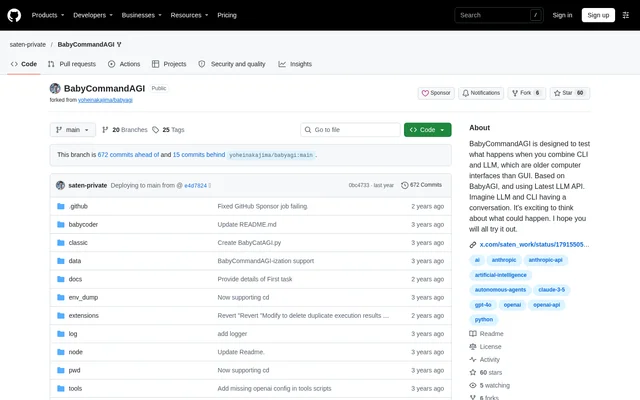
BabyCommandAGI is an open-source Python project that connects language models with a command-line interface to plan tasks and execute commands. Based on BabyAGI, BabyCommandAGI explores automated computer operations through interaction between an LLM and a CLI. The documented examples focus on programming, environment setup, and information retrieval.
BabyCommandAGI simplifies the thinking component inherited from BabyAGI to execute commands efficiently. The repository describes the project as being in its early stages and aiming for simplicity. Developers and technical experimenters are the natural audience for a workflow involving API credentials, containers, shell commands, and execution logs.
What BabyCommandAGI can do
BabyCommandAGI combines task planning, command execution, and user feedback in a continuous loop. The documentation presents application creation and environment configuration as useful examples rather than guaranteed outcomes. BabyCommandAGI also records execution information so users can inspect activity and resume work after a failure.
- BabyCommandAGI uses an LLM to create task lists around an objective.
- BabyCommandAGI executes command tasks through the CLI.
- BabyCommandAGI analyzes execution history and replans after command failures.
- BabyCommandAGI accepts user feedback while commands are running.
- BabyCommandAGI saves generated files in the workspace folder.
- BabyCommandAGI stores logs, executed tasks, the last directory, and environment-variable dumps.
How BabyCommandAGI works
BabyCommandAGI starts with a planning task and repeatedly takes the next task from a list. Command tasks execute directly, while planning tasks use the LLM, execution history, and objective to generate a new list. Failed commands also trigger analysis and replanning. User feedback can change subsequent planning.
BabyCommandAGI accepts feedback through the f input, allowing users to supply information unavailable through the CLI, such as GUI observations. The a input enables a mode for answering prompts from running commands. Changing the objective clears future tasks and objective feedback, while rerunning after failure can resume previous work.
Who BabyCommandAGI is for
BabyCommandAGI suits developers and technical users exploring how language models can operate command-line environments. The source describes concrete programming and setup experiments, including app creation through feedback. These examples demonstrate intended uses, but the repository explicitly warns that BabyCommandAGI may fail to achieve an objective.
- BabyCommandAGI can be used to create an application with user feedback.
- BabyCommandAGI documents Reversi and Snake game programming examples.
- BabyCommandAGI can install Flutter and create an app in a Linux container.
- BabyCommandAGI documents launching a web server accessible outside the container.
- BabyCommandAGI includes weather retrieval as an example use case.
BabyCommandAGI pricing and access
BabyCommandAGI is available as an open-source project through its GitHub repository rather than a hosted subscription described in the documentation. Running BabyCommandAGI requires an Anthropic API key or an OpenAI API key. External API usage may incur costs, and unsuccessful loops can increase that usage without completing the objective.
BabyCommandAGI strengths and limitations
BabyCommandAGI provides a documented command-execution workflow with user feedback, persistent execution information, and recovery after failure. Anthropic and OpenAI configuration options give users a choice of model providers. However, the repository emphasizes operational risks and recommends running BabyCommandAGI in an isolated environment such as Docker.
- BabyCommandAGI may unintentionally destroy the execution environment.
- BabyCommandAGI may loop indefinitely and increase API usage costs.
- BabyCommandAGI requires an explicit stop command rather than Ctrl+C alone.
- BabyCommandAGI backs up workspace files but not the container environment or project data.
Getting started with BabyCommandAGI
BabyCommandAGI setup begins by cloning the repository, entering its directory, and copying .env.example to .env. Users then set ANTHROPIC_API_KEY or OPENAI_API_KEY and optionally configure OBJECTIVE. Docker execution requires Docker and docker-compose. The documented launch command is docker-compose up -d && docker attach babyagi, and docker-compose stop stops execution.
BabyCommandAGI FAQ
What is BabyCommandAGI?
BabyCommandAGI is an open-source Python project based on BabyAGI that combines language models with CLI command execution. BabyCommandAGI plans tasks, runs commands, and revises task lists using execution history and user feedback.
Is BabyCommandAGI free?
BabyCommandAGI is available as an open-source project on GitHub, but running BabyCommandAGI requires an Anthropic or OpenAI API key. External API usage may incur costs, especially when the agent loops without achieving its objective.
What can you use BabyCommandAGI for?
BabyCommandAGI can be used for automated programming, environment setup, and weather retrieval. Documented examples include creating apps with feedback, building Reversi and Snake games, and installing Flutter in a Linux container before launching a web server.
How do you run BabyCommandAGI?
BabyCommandAGI runs from a cloned GitHub repository after users configure environment variables and an API key. The documented Docker workflow requires Docker and docker-compose, launches with docker-compose up -d && docker attach babyagi, and stops with docker-compose stop.
Which AI models does BabyCommandAGI support?
BabyCommandAGI documents support for Claude 3.7 Sonnet, including extended thinking, and o3-mini-hight through OpenRouter. The setup also provides Anthropic and OpenAI API key configuration. The repository recommends Claude 3.7 Sonnet or higher.
Is BabyCommandAGI safe to run on a normal working environment?
BabyCommandAGI may unintentionally destroy the execution environment, so the repository recommends isolation such as Docker. BabyCommandAGI may also loop indefinitely, increasing API usage, and exiting with Ctrl+C does not stop execution without an explicit stop command.
From the community
No reviews yet
Be the first to review this tool. What you write helps the next person choose.