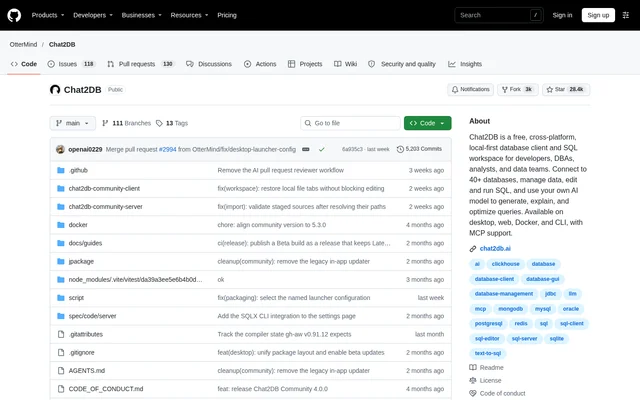
What is Chat2DB?
Chat2DB is a local-first database client and SQL workspace for developers, database administrators, analysts, and data teams. The open-source project combines database management tools with an AI assistant connected to a model supplied by the user. The free Community edition runs entirely on the user's machine and supports Windows, macOS, and Linux.
Chat2DB connects to 40+ databases, including MySQL, PostgreSQL, Oracle, SQL Server, ClickHouse, MongoDB, Redis, SQLite, Snowflake, and BigQuery. Additional databases are available through plugins, and new JDBC databases can be added through configuration without code changes. Desktop, web, Docker, and CLI options cover different ways of accessing the database workspace.
What Chat2DB can do
Chat2DB brings SQL work, database administration, and data visualization into the same client. The SQL workspace includes both query-writing tools and execution records, while the database management interface supports inspecting structures and changing data. AI assistance focuses on generating, explaining, and optimizing SQL through natural-language requests.
- Chat2DB edits, completes, formats, and executes SQL.
- Chat2DB saves SQL and records execution history.
- Chat2DB generates, explains, and optimizes SQL with a connected AI model.
- Chat2DB browses metadata and manages tables and database objects.
- Chat2DB edits data in place and supports data import and export.
- Chat2DB provides dashboards, charts, and ER diagrams.
- Chat2DB offers an open-source CLI with MCP support.
How Chat2DB works
Chat2DB desktop setup starts with downloading an installer from GitHub Releases, installing the application, and connecting to databases. The repository states that no further setup is required for this desktop path. Users connect their own AI model to enable the SQL assistant rather than relying on hosted AI included with the Community edition.
Chat2DB can also run in Docker and be opened in a browser. The documented container workflow begins by creating an encryption key from a repository checkout, then starting a container or using the bundled Compose definition. Web and headless startup require a valid key, while Desktop mode automatically creates a missing key.
Who Chat2DB is for
Chat2DB serves developers, database administrators, analysts, and data teams that work with databases and SQL. The Community edition is a single-user application, so the intended audience includes individual practitioners within those groups rather than a shared, multi-user service. The supported workflows span query development, database maintenance, data movement, and visual exploration.
- Chat2DB helps developers write and test database queries.
- Chat2DB helps database administrators inspect metadata and manage tables and objects.
- Chat2DB helps analysts explore data with SQL, dashboards, and charts.
- Chat2DB supports data import and export workflows.
Chat2DB pricing and plans
Chat2DB offers a free Community edition containing the full local database client described in the repository, including custom AI model support. Commercial Pro and Enterprise editions build on the same core and add hosted AI services, user accounts, cloud storage, multi-device sync, and team collaboration and governance features. The repository directs readers to the product website for commercial edition details.
Chat2DB strengths and limitations
Chat2DB combines broad database connectivity, cross-platform desktop support, local execution, and user-selected AI models. Chat2DB encrypts stored datasource passwords and AI model API keys using a per-installation key. That key must be backed up separately and preserved across upgrades and container rebuilds because losing or replacing the key makes previously stored credentials unreadable.
- Chat2DB Community has no user accounts or authorization boundaries between users.
- Chat2DB Community must not expose its HTTP service to other users or untrusted networks.
- Chat2DB custom JDBC drivers execute Java code and should come only from trusted sources.
- Chat2DB web and headless deployments fail to start without a valid encryption key.
Chat2DB FAQ
What is Chat2DB?
Chat2DB is a local-first database client and SQL workspace for developers, database administrators, analysts, and data teams. Chat2DB connects to 40+ databases and combines SQL editing, database management, data visualization, and AI assistance through a user-supplied model.
Is Chat2DB free?
Chat2DB offers a free Community edition with the full local database client and custom AI model support. Chat2DB also has commercial Pro and Enterprise editions that add hosted AI services, user accounts, cloud storage, multi-device sync, and team collaboration and governance features.
Which databases does Chat2DB support?
Chat2DB supports 40+ databases, including MySQL, PostgreSQL, Oracle, SQL Server, ClickHouse, MongoDB, Redis, SQLite, Snowflake, and BigQuery. Chat2DB also supports additional databases through plugins and allows new JDBC databases to be added through configuration without code changes.
Can Chat2DB use my own AI model?
Chat2DB lets users connect their own AI model to generate, explain, and optimize SQL through natural-language requests. Chat2DB includes custom model support in the free Community edition, while hosted AI services are listed among the additions in the commercial editions.
How do you install Chat2DB?
Chat2DB provides desktop installers for Windows, macOS, and Linux through GitHub Releases. Chat2DB also supports Docker deployment and building from source. The desktop path requires installation followed by database connections; Docker and web deployments require an initialized encryption key.
Does Chat2DB support MCP?
Chat2DB provides an open-source CLI with MCP support. Chat2DB also documents an early preview with an optional local agent runtime that supports skills, external MCP servers, and file and terminal tools; that preview is separate from the stable release.
From the community
No reviews yet
Be the first to review this tool. What you write helps the next person choose.