What is dbx?
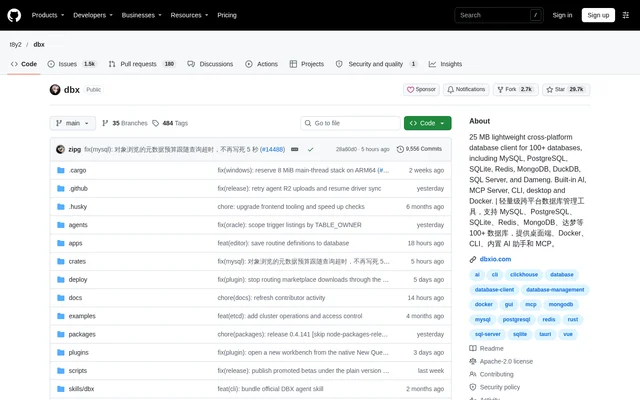
dbx is an open-source database client that brings database querying, data editing, schema inspection, and AI assistance into a shared workspace. dbx supports 100+ databases, including MySQL, PostgreSQL, SQLite, Redis, MongoDB, DuckDB, and SQL Server. The project serves people working across multiple database systems and teams connecting those systems to AI coding agents.
dbx offers native applications for macOS, Windows, and Linux, together with Docker self-hosting, browser access, and a CLI. The repository describes an approximately 25 MB application without a bundled Chromium browser, Java JRE, or Python virtual environment. Message queue and middleware consoles extend its scope beyond conventional database management.
What dbx can do
dbx combines SQL development tools with database administration and data movement capabilities. The editor supports syntax highlighting, metadata-aware autocomplete, formatting, diagnostics, saved snippets, and persistent query history. The data grid supports inline editing and SQL previews before saving, while schema tools expose database structures and relationships.
- dbx generates, explains, optimizes, and repairs SQL using an AI assistant.
- dbx visualizes table relationships with ER diagrams and displays query execution plans.
- dbx compares schemas across connections and compares table data.
- dbx imports CSV and Excel data and transfers data between databases.
- dbx exports results as CSV, JSON, Markdown, XLSX, or INSERT statements.
- dbx provides consoles for Kafka, RabbitMQ, RocketMQ, Pulsar, and MQTT.
- dbx extends connection types and tools through signed, sandboxed plugins.
How dbx works
dbx follows a download, install, and connect workflow for desktop use. Users can import connection profiles from DBeaver or Navicat, configure SSH tunnels and proxy settings, then work with queries, schemas, and records. The AI assistant accepts plain-language requests inside the editor and works with Claude, OpenAI, local models through Ollama, or other OpenAI-compatible endpoints.
dbx connects AI coding agents through a separately distributed Rust-powered MCP server. The documented command is npx @dbx-app/mcp-server, with client configuration added to .mcp.json. Connection allowlists and Read only, Data read/write, and Full access modes are managed in dbx settings. Installing the desktop application does not automatically install the MCP executable.
Who dbx is for
dbx supports developers and database users who need to work across different data systems without switching between separate clients. Docker self-hosting provides a team-access option, while browser access serves browser-only environments. AI coding agent users can reuse configured database connections through MCP with explicit connection scopes and access modes.
- dbx helps SQL users write queries and investigate query errors.
- dbx helps database users inspect schemas, edit records, and review data differences.
- dbx lets Claude Code, Cursor, and Windsurf query configured databases through MCP.
- dbx lets teams inspect queue messages and middleware configuration alongside database data.
dbx licensing and access
dbx is published as an open-source project in a public GitHub repository under the Apache-2.0 license. The supplied page presents desktop, Docker, web, and CLI access rather than subscription plans. The repository also provides contribution resources, a security policy, and plugin development tools for extending the application with Go or TypeScript.
dbx strengths and limitations
dbx combines broad database coverage with AI assistance, schema tools, data operations, and middleware consoles. Safety features include checks on AI-generated SQL, confirmation dialogs for destructive operations, encrypted configuration import and export, and MCP access controls. Database coverage and functionality still depend on the relevant native driver, agent-based profile, or optional JDBC support.
- dbx requires separate installation and configuration of the MCP server.
- dbx supports object source editing only where the connected engine allows it.
- dbx provides reviewable table structure changes for supported engines.
- dbx uses agent-based profiles for some database systems.
dbx FAQ
What is dbx?
dbx is an open-source, cross-platform database client supporting 100+ databases. dbx combines a SQL editor, editable data grid, schema tools, AI SQL assistance, and message queue consoles, with desktop, Docker, web, and CLI access.
Which databases does dbx support?
dbx supports MySQL, PostgreSQL, SQLite, Redis, MongoDB, DuckDB, SQL Server, Oracle, ClickHouse, and many other databases. dbx also uses agent-based profiles for systems including Snowflake, BigQuery, Neo4j, Cassandra, and custom JDBC connections.
Can dbx generate SQL with AI?
dbx generates SQL from plain-language requests and can explain queries, optimize SQL, and fix errors. dbx works with Claude, OpenAI, local models through Ollama, and OpenAI-compatible endpoints, with built-in safety checks for AI-generated SQL.
Does dbx work with Claude Code and Cursor?
dbx lets Claude Code, Cursor, Windsurf, and other AI coding agents query databases through a separate MCP server. dbx manages connection allowlists and access modes in settings, but the MCP executable must be installed separately from the desktop application.
Can dbx be self-hosted?
dbx supports self-hosting through Docker for team access and offers a web version for browser-only environments. dbx also provides native desktop applications for macOS, Windows, and Linux, alongside CLI access.
Is dbx open source?
dbx is an open-source project published in a public GitHub repository under the Apache-2.0 license. dbx provides contribution documentation, a security policy, and Go and TypeScript SDKs for building plugins.
From the community
No reviews yet
Be the first to review this tool. What you write helps the next person choose.