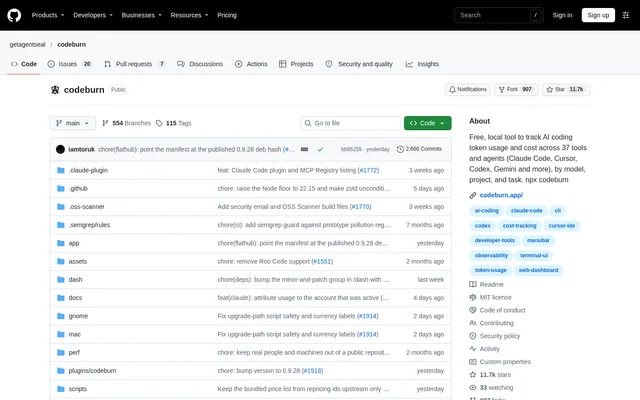
What is CodeBurn?
CodeBurn is a free, local, open-source project for tracking AI coding token usage and costs. CodeBurn serves developers working with tools such as Claude Code, Cursor, Codex and Gemini CLI. Rather than relying on a monthly bill alone, CodeBurn reads the session files those tools already write and produces breakdowns that connect spending to the work performed.
CodeBurn offers several views of the same underlying data, including a terminal interface, desktop app and browser dashboard. Desktop status views provide shorter summaries near the clock or screen edge. CodeBurn does not sit between a developer and an agent, and the repository states that prompts, code and project names remain on the computer.
What CodeBurn can do
CodeBurn connects spending summaries to individual sessions and turns, making the underlying activity inspectable. CodeBurn also provides comparisons, optimization findings and capacity monitoring. The Spend page groups costs in several ways, while the Pull requests page matches spending to pull requests recorded in sessions to show which spending was associated with shipped work.
- CodeBurn breaks down spending by project, git branch, model and task.
- CodeBurn shows tokens and costs for individual sessions and turns.
- CodeBurn compares spending across selected date ranges.
- CodeBurn identifies potential token savings in sessions and configuration.
- CodeBurn tracks subscription usage and reads live provider limits.
- CodeBurn adds configurable Claude Code spending warnings and stops.
- CodeBurn exposes local usage data through an MCP server.
How CodeBurn works
CodeBurn starts from the command line with npx codeburn and automatically looks in the folders supported tools already use. CodeBurn requires no account or sign-up, and supported tools appear when their session files are present. The terminal interface provides period navigation and tool switching, while codeburn web opens the browser view of the data.
CodeBurn can also be installed globally through npm or Homebrew, with Node.js 22.15+ listed as a requirement. Windows users can obtain the desktop app through the Microsoft Store or a direct installer. CodeBurn provides a macOS menu bar view, a Windows tray view and a Linux GNOME Shell extension. The Claude Code plugin configures the local MCP server.
Who CodeBurn is for
CodeBurn is for developers who use AI coding agents and need more detail than a total bill provides. CodeBurn supports investigating expensive sessions, measuring changes to models or workflows, and checking capacity before a long run. Project and branch views connect costs to development work, while optimization reports help distinguish configuration fixes from changes in working habits.
- Developers can inspect the turns responsible for an expensive session.
- Developers can compare costs after changing a model, workflow or prompt.
- Developers can review accumulated session costs for a feature branch.
- Developers can query spending from inside a Claude Code conversation.
CodeBurn pricing and access
CodeBurn is offered free and is MIT licensed, with development taking place in the public repository. CodeBurn does not require an account or API key. The repository offers sponsorship to support ongoing integration maintenance, but describes the tool itself as free. Command-line access is available through npx, with npm and Homebrew installation options for continued use.
CodeBurn strengths and limitations
CodeBurn combines local session analysis with reversible configuration changes. Before applying an optimization, CodeBurn shows the change and backs up affected files; an undo command can restore the previous state. Follow-up reporting compares promised savings with subsequent session activity. Local operation avoids an agent proxy, although CodeBurn refreshes model prices from LiteLLM and documents outbound activity separately in its privacy information.
- CodeBurn needs supported session data on disk for automatic tool detection.
- CodeBurn documents spending guard hooks specifically for Claude Code.
- CodeBurn requires Node.js 22.15+ for the documented command-line setup.
- CodeBurn integrations require maintenance as upstream paths and stored formats change.
CodeBurn FAQ
What is CodeBurn?
CodeBurn is a free, local AI coding cost tracker that reads existing session files and reports token usage and spending. CodeBurn groups costs by tool, model, project and task, with session-level and turn-level inspection available through its interfaces.
Is CodeBurn free?
CodeBurn is free and open source under the MIT license. CodeBurn requires no account or API key, and the repository provides command-line installation options alongside desktop access. Sponsorship supports the maintenance of tool integrations.
Which AI coding tools does CodeBurn support?
CodeBurn documents support for 42 tools, including Claude Code, Cursor, Codex, Gemini CLI, Copilot and Cline. CodeBurn automatically detects supported tools when their sessions are stored on disk, without requiring users to specify a folder.
Does CodeBurn keep coding data local?
CodeBurn reads files already stored on the computer and states that prompts, code and project names remain there. CodeBurn requires no agent proxy or API key. Model prices refresh from LiteLLM, and the repository points to privacy documentation describing outbound activity.
Does CodeBurn have an MCP integration?
CodeBurn provides a local MCP server over stdio and a Claude Code plugin that sets up the server. CodeBurn lets an agent answer spending and optimization questions using local session data; the MCP server makes no network call of its own.
Can CodeBurn limit Claude Code spending?
CodeBurn provides opt-in local guard hooks for Claude Code that warn when a session passes $5 and stop it at $15 by default. CodeBurn allows those limits to be changed and also handles tool-call loops and repeatedly failing commands.
From the community
No reviews yet
Be the first to review this tool. What you write helps the next person choose.