What is editGPT?
editGPT is an AI editor for proofreading, editing, and improving written content. editGPT combines selectable editing depth with tracked changes, multilingual support, and document formatting preservation. The service is intended for users improving their writing, users with high-volume editing needs, and teams or organizations that need shared editing capabilities.
editGPT presents several approaches to revision rather than a single editing mode. Users can choose lighter grammar correction or more extensive rewriting according to their needs. The website also describes a privacy policy under which user data is not shared or used for training.
What editGPT can do
editGPT supports both text revision and Word document editing. The listed capabilities cover grammar, tone and style, formatting, and review of changes. Paid plans also include saved custom prompts, a suggestions panel, and revision history, giving users additional ways to direct edits and review document revisions.
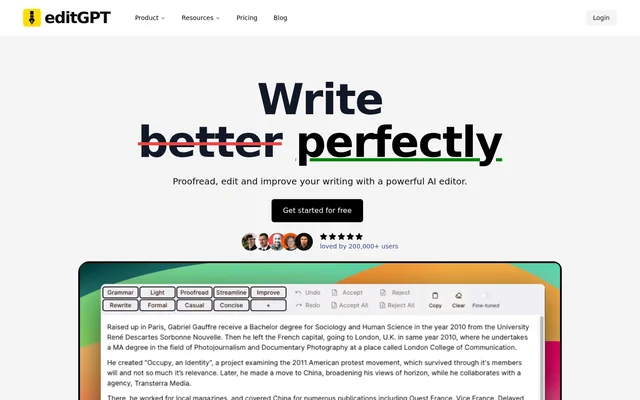
- editGPT offers Fix Grammar, Proofread, Natural, Improve, and Rewrite editing options.
- editGPT imports Word documents and exports .docx files with tracked changes.
- editGPT supports over 80 languages and automatic language detection.
- editGPT preserves rich text formatting, including bold and italics.
- editGPT supports custom editing prompts and tone and style adjustments.
- editGPT includes a team management dashboard on Unlimited Business.
How editGPT works
editGPT lets users choose how deeply their writing should be edited. For Word documents, the stated workflow is to import a document, edit with AI, and export it back to .docx while maintaining tracked changes. Users can select a supported language or let editGPT detect the language automatically.
editGPT also offers custom solutions for teams with requirements beyond the listed subscriptions. The website names custom model deployment, private API access, integration with existing systems, and tailored prompts as possible areas of work. These are presented as custom team services rather than documented self-service integrations.
Who editGPT is for
editGPT serves users who want more editing capabilities, power users who need high-volume editing, and organizations with enterprise needs. Word document support makes document revision a concrete use case, while language selection and automatic detection support users working in different languages. The business subscription adds shared access and team management.
- editGPT can proofread writing and correct grammar.
- editGPT can revise tone and style or rewrite text more extensively.
- editGPT can edit Word documents while preserving tracked changes.
- editGPT can support teams managing shared editing needs.
editGPT strengths and limitations
editGPT combines adjustable editing depth with Word tracked changes and formatting preservation. Multilingual support and saved custom prompts provide additional control over revision. editGPT also states that user data remains private and is never shared or used for training. Subscription limits differ, so document size, monthly volume, and team requirements affect plan suitability.
- editGPT Pro limits monthly editing volume to 500,000 words.
- editGPT Elite limits monthly editing volume to 3,000,000 words.
- editGPT Pro and Elite limit individual documents to 200,000 words.
- editGPT lists team management under Unlimited Business.
editGPT FAQ
What is editGPT?
editGPT is an AI writing editor for proofreading, grammar correction, and rewriting. editGPT offers selectable editing depth, multilingual support, custom editing prompts, and Word document import and export with tracked changes.
Is editGPT free?
editGPT offers free access to get started, alongside paid Pro, Elite, and Unlimited Business subscriptions. The website does not specify the free allowance. Paid plans provide different editing volumes, with team management included in Unlimited Business.
Can editGPT edit Word documents with tracked changes?
editGPT can import Microsoft Word documents, edit them with AI, and export them as .docx files while maintaining tracked changes. editGPT also preserves rich text formatting, including bold and italics.
What languages does editGPT support?
editGPT supports over 80 languages and allows users to choose a language or use automatic language detection. The supplied page describes multilingual editing but does not provide a complete list of supported languages.
Does editGPT use user data for AI training?
editGPT states that user data is never shared or used for training. editGPT describes data privacy and security as part of the service and lists data safety and privacy among its paid plan features.
Does editGPT offer custom integrations for teams?
editGPT offers custom solutions for teams, including custom model deployment, private API access, system integration, and tailored prompts. The website presents these capabilities as custom services rather than specifying standard integrations or a public self-service API.
From the community
No reviews yet
Be the first to review this tool. What you write helps the next person choose.