Create AI-generated Zoom backgrounds or download free images for office, travel, beach, and other meeting themes.
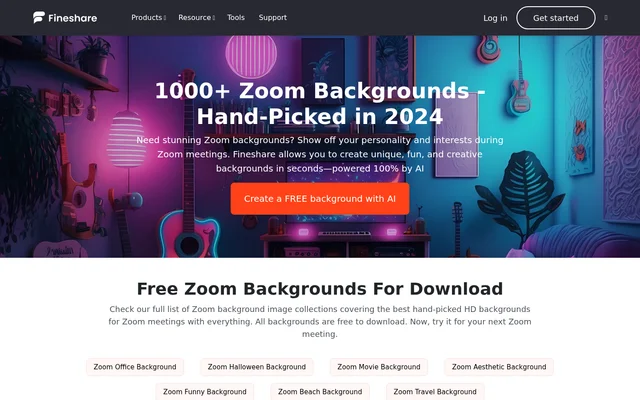
FineShare AI Zoom Background Generator is a tool for creating AI-powered meeting backgrounds and downloading themed Zoom background images. FineShare AI Zoom Background Generator serves Zoom users seeking personalized or professional-looking meeting settings, with free background creation and free downloads offered on the page.
FineShare AI Zoom Background Generator is an AI-powered background creation tool and a source of downloadable background images for Zoom meetings. FineShare AI Zoom Background Generator serves people who want meeting backgrounds that reflect their interests or present a more professional setting to colleagues and clients. The page offers free AI background creation alongside themed image collections.
FineShare AI Zoom Background Generator also addresses a practical reason for using virtual backgrounds: keeping unwanted details of a room out of view. The page describes situations involving children, limited cleaning time, and surroundings that users may prefer not to show during a meeting.
What FineShare AI Zoom Background Generator can do
FineShare AI Zoom Background Generator combines background creation with ready-made image collections and instructions for using those images in Zoom. The page describes AI-powered creation in seconds, while the downloadable collections let users choose a theme without creating a new background. Supporting guidance covers setup and common virtual background problems.
FineShare AI Zoom Background Generator offers AI-powered background creation.
FineShare AI Zoom Background Generator provides free background image downloads.
FineShare AI Zoom Background Generator lists office, Halloween, movie, aesthetic, funny, beach, and travel collections.
FineShare AI Zoom Background Generator explains desktop and mobile background uploads.
FineShare AI Zoom Background Generator provides format, lighting, and troubleshooting guidance.
How FineShare AI Zoom Background Generator works
FineShare AI Zoom Background Generator directs users to download a background image and then upload the image in Zoom. On desktop, the instructions point to Settings, then Background & Filters, followed by the plus icon. Users can upload the downloaded image or choose an available image or video background.
FineShare AI Zoom Background Generator gives a separate mobile workflow: download an image, launch Zoom, and start a meeting. From the More menu, users select Backgrounds & Effects and then the plus icon to upload a virtual background. The page offers an AI creation entry point but does not explain the generation interface.
Who FineShare AI Zoom Background Generator is for
FineShare AI Zoom Background Generator is for Zoom users who want to change the appearance of their meeting environment. The page specifically discusses showing personality and interests, as well as presenting a professional setting to colleagues or clients. The themed collections support both work-oriented backgrounds and more personal or seasonal choices.
Zoom users can select office backgrounds for work meetings.
Zoom users can choose beach or travel themes to reflect personal interests.
Zoom users can use virtual backgrounds to keep unwanted room details out of view.
FineShare AI Zoom Background Generator pricing and access
FineShare AI Zoom Background Generator offers a free AI background creation option, and the page states that all listed background images are free to download. The supplied page does not describe paid plans, account requirements, or generation allowances. Downloaded images are applied through Zoom’s background controls using the desktop or mobile instructions.
FineShare AI Zoom Background Generator strengths and limitations
FineShare AI Zoom Background Generator combines explicitly free downloads, multiple background themes, and practical Zoom setup instructions. The page also explains how lighting, clothing color, and the physical background affect results. These instructions help distinguish choosing a background image from preparing a camera setup that displays the virtual background cleanly.
Zoom virtual backgrounds require a device that meets Zoom’s minimum system requirements.
Desktop users may need to enable Zoom’s Virtual Background feature.
The page does not specify the AI generation workflow or usage limits.
FineShare AI Zoom Background Generator FAQ
What is FineShare AI Zoom Background Generator?
FineShare AI Zoom Background Generator is an AI-powered tool for creating Zoom meeting backgrounds and downloading themed background images. The page includes office, Halloween, movie, aesthetic, funny, beach, and travel collections, plus instructions for applying backgrounds in Zoom.
Is FineShare AI Zoom Background Generator free?
FineShare AI Zoom Background Generator offers free AI background creation, and the page states that all background images are free to download. The supplied page does not describe paid plans or specify limits for AI background generation.
How do you add FineShare AI Zoom Background Generator images to Zoom?
FineShare AI Zoom Background Generator images can be downloaded and uploaded through Zoom’s background settings. On desktop, open Settings and Background & Filters, then use the plus icon. On mobile, start a meeting, open More, select Backgrounds & Effects, and use the plus icon.
Who is FineShare AI Zoom Background Generator for?
FineShare AI Zoom Background Generator is for Zoom users who want to personalize meetings or present a professional background to colleagues and clients. The page also describes virtual backgrounds as a way to keep unwanted details of a room out of view.
Do FineShare AI Zoom Background Generator backgrounds require a green screen?
FineShare AI Zoom Background Generator includes guidance explaining that Zoom backgrounds can work without a green screen on Macs, PCs, and iOS devices that meet Zoom’s minimum system requirements. For desktop use without a green screen, the page advises enabling Virtual Background and unchecking the green-screen option.
From the community
No reviews yet
Be the first to review this tool. What you write helps the next person choose.
More tools like FineShare AI Zoom Background Generator