What is FlowCraft?
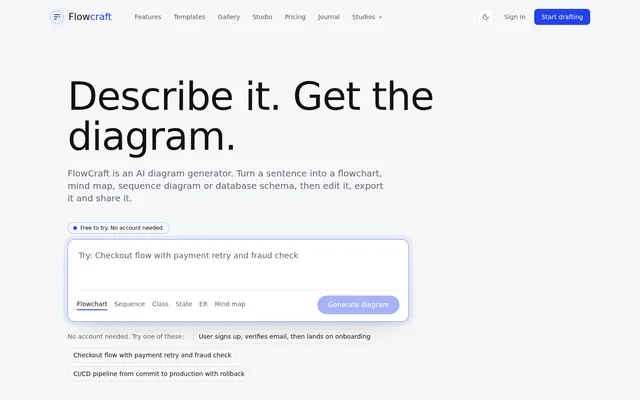
FlowCraft is an AI diagram generator that turns written descriptions of processes, systems and ideas into diagrams. FlowCraft is available on the web and supports both technical documentation and explanatory visuals. Engineers can describe system architecture, product teams can outline user journeys, and educators can organize lesson material. The starting point can be a single sentence rather than a manually assembled diagram.
FlowCraft offers an account-free generator for trying the service. FlowCraft also provides templates and a gallery for users who prefer an existing starting point. The website describes a workflow that moves from a written idea to a styled diagram, followed by refinement, export or sharing.
What FlowCraft can do
FlowCraft supports diagrams for decisions, relationships, interactions and changing states. The available formats cover software design, process documentation and visual explanations of ideas or data. FlowCraft can generate a draft from text, then accept further instructions or manual changes before the result is exported or shared.
- FlowCraft creates flowcharts for decisions, pipelines and approval paths.
- FlowCraft builds mind maps that branch from an initial idea.
- FlowCraft generates sequence diagrams showing interactions in order.
- FlowCraft turns descriptions of tables into entity relationship diagrams.
- FlowCraft creates state machines and class diagrams.
- FlowCraft also supports knowledge graphs, Sankey diagrams, charts, infographics and illustrations.
How FlowCraft works
FlowCraft starts with a typed sentence or a pasted document. Users choose a diagram type and color treatment suited to their document or presentation, then refine the generated result with a follow-up instruction or by adjusting the diagram manually. FlowCraft exports PNG, SVG and PDF files and provides public sharing links. A free account is required when users want to save, edit and export their diagrams.
Who FlowCraft is for
FlowCraft targets people who use diagrams to understand or communicate information. The website names engineers, product teams, educators, analysts, operations teams and founders as intended audiences. FlowCraft connects these audiences to specific work, including design reviews, feature planning, lesson preparation, numerical storytelling, process analysis and stakeholder communication.
- Engineers can document API sequences and database schemas for reviews.
- Product teams can explain features through user flows and journey maps.
- Educators can illustrate lessons with mind maps and process diagrams.
- Analysts can present numbers through charts and Sankey diagrams.
- Operations teams can map bottlenecks and handoffs.
- Founders can prepare visuals for pitch decks and updates.
FlowCraft pricing and plans
FlowCraft is free to try without an account. Hobby costs $7.99 per month and includes 20 AI-generated diagrams per month, complex diagram access, export, sharing and customer support. Pro costs $19 per month and adds unlimited AI-generated diagrams, unlimited complex diagrams and early access to new features. Teams costs $49 per month and adds team workspaces, collaboration tools and a shared diagram library. Annual billing saves 17 percent, and subscriptions can be canceled at any time.
FlowCraft strengths and limitations
FlowCraft combines several diagram types with text-based generation, follow-up refinement and manual editing. FlowCraft also supports multiple export formats and public links, allowing diagrams to be used in documents, presentations and shared explanations. The account-free trial provides an initial way to test generation, while saving, editing, export volume and team features have account or plan requirements.
- FlowCraft requires a free account for saving, editing and exporting.
- FlowCraft caps Hobby usage at 20 AI-generated diagrams per month.
- FlowCraft places team workspaces, collaboration tools and the shared diagram library in the Teams plan.
FlowCraft FAQ
What is FlowCraft?
FlowCraft is an AI diagram generator that turns plain-language descriptions into diagrams. FlowCraft supports flowcharts, mind maps, sequence diagrams, database schemas and other visual formats for explaining processes, systems and ideas.
Is FlowCraft free to try without an account?
FlowCraft is free to try through the website generator without signing up. FlowCraft requires a free account to save, edit and export diagrams, and also offers paid Hobby, Pro and Teams subscriptions.
Which diagram types can FlowCraft create?
FlowCraft can create flowcharts, mind maps, sequence diagrams, class diagrams, state machines and entity relationship diagrams. FlowCraft also supports knowledge graphs, Sankey diagrams, charts, infographics and illustrations.
Can you edit and export FlowCraft diagrams?
FlowCraft supports editing through follow-up instructions and manual adjustments. FlowCraft diagrams can be exported as PNG, SVG or PDF files, or shared through a public link; saving, editing and exporting require a free account.
How much does FlowCraft cost?
FlowCraft offers Hobby for $7.99 per month, Pro for $19 per month and Teams for $49 per month. Hobby includes 20 AI-generated diagrams monthly, Pro includes unlimited AI-generated diagrams, and Teams adds shared workspaces and collaboration tools. Annual billing saves 17 percent.
Who is FlowCraft for?
FlowCraft is for engineers, product teams, educators, analysts, operations teams and founders. FlowCraft supports use cases such as system design reviews, user journey mapping, lesson diagrams, charts, operational process mapping and visuals for pitch decks or stakeholder updates.
From the community
No reviews yet
Be the first to review this tool. What you write helps the next person choose.