What is Whimsical?
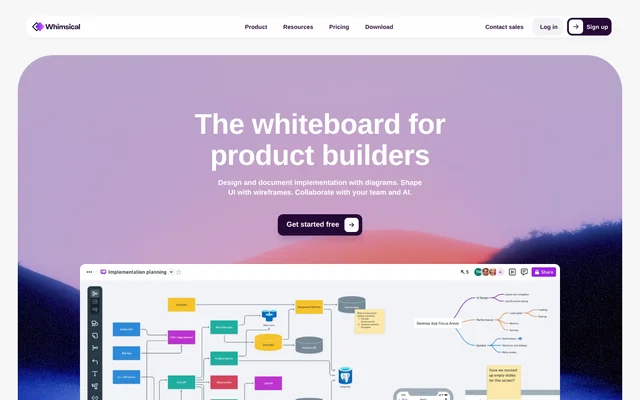
Whimsical is a collaborative whiteboard for product builders who need to design and document implementation, shape interfaces, and share ideas. Whimsical brings diagrams, wireframes, flowcharts, mind maps, and docs into a visual workspace. AI features support diagram generation, brainstorming, and information organization, while collaboration tools help teams develop shared understanding.
Whimsical supports work ranging from individual product exploration to planning across larger organizations. The product combines an infinite canvas with documentation and interface-design tools, allowing teams to capture ideas and refine solutions. Templates, comments, and shared editing support collaborative work around the diagrams and documents being created.
What Whimsical can do
Whimsical combines visual creation tools with AI assistance and collaboration features. Teams can explore interaction flows, organize ideas before refining a solution, and add context through uploaded images or embedded videos. Board version history also lets users inspect earlier work and restore a previous state.
- Whimsical generates diagrams with AI.
- Whimsical supports AI brainstorming and information organization.
- Whimsical creates wireframes with drag-and-drop components.
- Whimsical supports flowcharts, mind maps, and docs.
- Whimsical enables real-time editing and comments.
- Whimsical embeds videos from Loom and YouTube.
- Whimsical restores boards to earlier versions.
How Whimsical works
Whimsical provides an infinite canvas for capturing ideas, alongside templates that help users begin their work. Teams can build wireframes from drag-and-drop components, create diagrams, and use docs to align their work. Real-time multiplayer editing lets collaborators contribute together, while comments keep discussions attached to the work.
Whimsical supports collaboration outside an organization through share links and workspace guest invitations. Public share links can allow viewing, commenting, and editing. Slack and GitHub integrations are included across plans, as are third-party embeds and live Whimsical embeds for public and private content. A desktop app is also included.
Who Whimsical is for
Whimsical is aimed at product builders, with plans described for evaluation, individuals and small teams, and large teams or entire organizations. Product teams can use the visual tools to explore solutions before implementation. Shared docs and diagrams also support team alignment, while free guests allow participation from people outside the organization.
- Whimsical helps product builders document implementation with diagrams.
- Whimsical helps teams explore interface ideas with wireframes.
- Whimsical helps collaborators validate interaction flows.
- Whimsical helps teams expand and organize ideas with mind maps.
Whimsical strengths and limitations
Whimsical combines diagramming, wireframing, documentation, and AI assistance with shared editing and comments. Collaboration features extend to unlimited guests and viewers, and Slack and GitHub integrations are included across plans. Capacity, export presentation, history retention, and organizational controls differ by plan, so the Free plan does not provide the same scope as paid subscriptions.
- Whimsical limits monthly object and doc-block creation on Free.
- Whimsical includes watermarks on Free exports.
- Whimsical restricts private teams and advanced security controls to Business.
- Whimsical sells additional AI credits separately on every plan.
Whimsical FAQ
What is Whimsical?
Whimsical is a collaborative whiteboard for product builders that combines diagrams, wireframes, flowcharts, mind maps, and docs. Whimsical also provides AI features for generating diagrams, brainstorming ideas, and organizing information, alongside real-time editing and comments.
Is Whimsical free?
Whimsical offers a Free plan with unlimited boards, workspace members, and guests, plus 10 AI credits per member. Whimsical limits Free creation to 50 board objects and 50 doc blocks per month, includes watermarked exports, and provides 7-day version history.
What can Whimsical AI features do?
Whimsical provides AI features to generate diagrams, brainstorm ideas, and organize information. Whimsical includes 10 AI credits per member on the Free plan, and additional AI credits can be purchased separately on any plan.
Does Whimsical integrate with Slack and GitHub?
Whimsical includes Slack and GitHub integrations on Free, Pro, and Business plans. Whimsical also supports third-party embeds, live embeds of public and private content, image uploads, and embedded videos from Loom and YouTube.
Can Whimsical be shared with people outside an organization?
Whimsical allows files to be shared with anyone through a share link or through invitations to join a workspace as a guest. Whimsical offers free, unlimited guests on every plan, including Free, and public share links support viewing, commenting, and editing.
What does Whimsical Business include?
Whimsical Business includes the Pro features plus private teams, SAML single sign-on, SCIM, additional security controls, and unlimited version history. Whimsical Business also includes user offboarding file transfers, priority support, and a dedicated success manager.
From the community
No reviews yet
Be the first to review this tool. What you write helps the next person choose.