What is FlyFin?
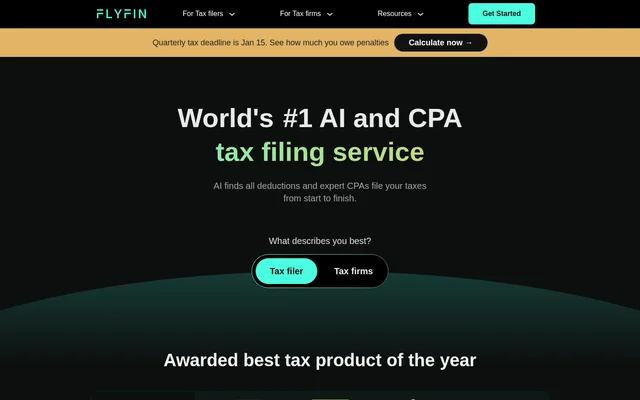
FlyFin is an AI-assisted tax preparation and filing service that pairs expense analysis with support from certified public accountants. FlyFin primarily addresses freelance and self-employment taxes, but the service also accepts other tax filers, including W-2 employees and business owners. The core offering combines deduction discovery, professional review, and preparation of federal and state returns rather than relying on automated filing alone.
FlyFin assigns a dedicated CPA to review deductions and suggest tax-saving strategies. The website also presents a separate path for CPA firms interested in automating client tax filings, although the supplied page does not explain that firm's workflow or commercial terms.
What FlyFin can do
FlyFin brings deduction tracking, financial monitoring, tax estimates, and professional preparation into the same service. Connected expense accounts provide the information used for automated deduction scanning, while users can review suggestions and ask a CPA about uncertain expenses. The website also describes a CPA-certified AI assistant that answers tax filing questions with unlimited use.
- FlyFin scans connected expenses for potential tax deductions.
- FlyFin lets users accept or reject suggested deductions.
- FlyFin automatically tracks monthly finances.
- FlyFin estimates quarterly taxes using income and deductions.
- FlyFin provides CPA questions and Zoom consultations.
- FlyFin prepares and files annual tax returns through expert CPAs.
- FlyFin exports an Excel tax summary for IRS form 1040.
How FlyFin works
FlyFin starts expense analysis when users connect their expense accounts with read access to account statements. FlyFin states that linking accounts does not cause a charge and that the app supports 2,000+ financial institutions. Users review identified deductions, accept or reject them, or ask a CPA for guidance. For quarterly estimates, users answer basic questions so the service can calculate payments.
FlyFin then uses a dedicated CPA to prepare federal and state returns for the user's review and electronic signature. The CPA electronically files the federal return after review. Users who prefer another accountant can export their tax summary in Excel format, though some expenses may need recategorization into IRS-compliant categories.
Who FlyFin is for
FlyFin primarily serves freelancers, gig workers, independent contractors, and sole proprietors who need help finding deductions and preparing taxes. FlyFin also lists employees, LLCs, corporations, partnerships, and trusts among supported tax situations. The website states that anyone can file taxes through FlyFin, while giving particular attention to self-employed workers and business owners managing deductible expenses and quarterly payments.
- Freelancers can use FlyFin to review home office, travel, meal, and mileage deductions.
- Self-employed workers can use FlyFin to estimate quarterly tax payments.
- Business owners can use FlyFin for CPA-prepared federal and state returns.
- Tax filers can use FlyFin to share an exported summary with another CPA.
FlyFin pricing and access
FlyFin charges a fee for filing taxes with its CPA team, and the website directs users to the latest version of the app for exact pricing. Connecting expense accounts does not automatically incur a charge. FlyFin also states that users can consult a CPA about preparing quarterly taxes for free. The supplied page does not list filing plan prices or a detailed subscription breakdown.
FlyFin strengths and limitations
FlyFin combines automated expense review with human tax preparation, giving users a way to question deductions before filing. FlyFin also includes audit insurance at no additional cost, with a CPA evaluating the situation, preparing responses, and communicating with the IRS. Export support provides an option for users who want to take a tax summary to an outside accountant instead of filing through FlyFin.
- FlyFin requires payment for CPA tax filing.
- FlyFin provides exact filing prices in the app rather than on this page.
- FlyFin exports may require expense recategorization before use by another accountant.
FlyFin FAQ
What is FlyFin?
FlyFin is an AI-assisted tax filing service that combines expense scanning and deduction tracking with CPA preparation of federal and state tax returns. FlyFin primarily serves freelancers and self-employed workers, while also supporting employees and business owners.
Is FlyFin free?
FlyFin charges a fee for CPA tax filing, with exact pricing available in the latest version of the app. FlyFin does not charge users simply for linking expense accounts and states that quarterly tax preparation consultations with a CPA are free.
What tax deductions does FlyFin find?
FlyFin scans connected expenses for potential freelance tax deductions, including home office expenses, business travel, meals, car expenses, and mileage. FlyFin lets users accept or reject suggestions, and a dedicated CPA reviews deductions and suggests tax-saving strategies.
Can FlyFin calculate quarterly taxes?
FlyFin calculates estimated quarterly tax payments using income and deductions after users answer basic questions. FlyFin also offers CPA consultation for quarterly tax preparation, allowing self-employed workers to discuss their estimated payments with a tax professional.
Can FlyFin export a tax summary for another CPA?
FlyFin can export a tax summary for IRS form 1040 in Excel format so users can share the information with their own CPA. FlyFin notes that some expenses may need to be recategorized into IRS-compliant categories.
Does FlyFin include audit support?
FlyFin includes full audit insurance at no additional cost. FlyFin states that, in an audit, a CPA evaluates the user's tax situation, prepares responses, and communicates with the IRS on the user's behalf.
From the community
No reviews yet
Be the first to review this tool. What you write helps the next person choose.