What is FocusDoro?
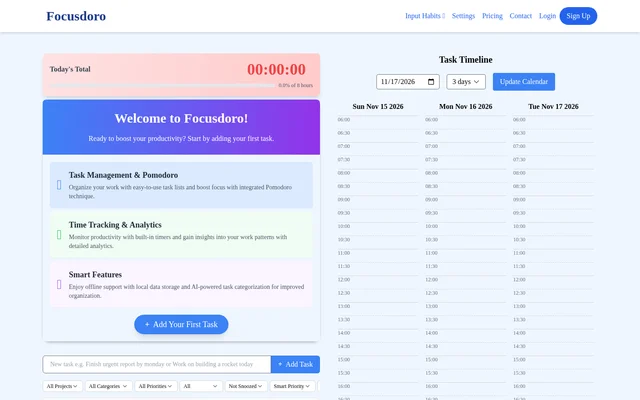
FocusDoro is a task manager that combines Pomodoro sessions with time tracking and productivity analytics. FocusDoro is for people who want to decide what to work on, set aside time to focus, and then review the time they recorded. The interface brings together a task list, a task timeline, and a view of productivity analytics.
What FocusDoro can do
FocusDoro puts task details and recorded time in the same workflow. The task list gives users a place to organize work by priority, project, or category, while the timers record time spent working. FocusDoro also provides AI-powered task categorization to help organize tasks and lists reminders as a way to keep track of deadlines.
- FocusDoro organizes work in task lists.
- FocusDoro supports timed sessions using the Pomodoro technique.
- FocusDoro records work time with built-in timers.
- FocusDoro shows task activity in a timeline.
- FocusDoro uses AI to categorize tasks.
- FocusDoro provides deadline reminders.
How FocusDoro works
FocusDoro starts with the task list, where the page shows fields for priority, estimated time, project, category, and time. These fields let users describe what they plan to work on before using the built-in timer. The Pomodoro timer supports timed focus sessions, and the analytics view lets users review their recorded work time afterward.
FocusDoro provides a task timeline with selectable day ranges and a separate calendar update control. The interface also displays today's total and a last-seven-days view, so users can look at tracked time for the current day or over a longer period.
Who FocusDoro is for
FocusDoro is for people who want to plan tasks and track time without treating those as separate activities. Someone juggling tasks across projects can use priorities and project labels to organize the list. Someone more interested in focus habits can use the timer during work and review the analytics afterward.
- Prioritize tasks before starting a focus session.
- Record time estimates for planned work.
- Review tracked time for today or across the last seven days.
- Group related tasks by project or category.
FocusDoro strengths and limitations
FocusDoro pairs task details with timers and analytics, allowing users to move from planning work to reviewing time in the same interface. Priority and estimated time describe the plan, while the timer records time spent working. FocusDoro also lists local data storage as the basis for offline support. The page does not specify which features are available offline.
Getting started with FocusDoro
FocusDoro opens with an option to add a task. The task list shows where to record details such as priority, estimated time, project, and category. Once a task is in the list, the built-in Pomodoro timer can be used for a focus session, and the productivity analytics can be used to review the time recorded.
FocusDoro FAQ
What is FocusDoro?
FocusDoro is a task manager with a built-in Pomodoro timer and productivity analytics. FocusDoro lets users organize and prioritize tasks, track time during work sessions, and review recorded time in the analytics view.
Does FocusDoro work offline?
FocusDoro supports offline use through local data storage. The FocusDoro page lists offline support alongside AI-powered task categorization but does not say whether AI categorization or other individual features work offline.
How does FocusDoro track work time?
FocusDoro tracks work time with built-in timers and displays results in its productivity analytics. The FocusDoro interface shows today's total and a view for the last seven days, so users can review current and recent tracked time.
Can FocusDoro categorize tasks with AI?
FocusDoro uses AI-powered task categorization to help organize work. The FocusDoro task list includes a category field alongside fields for project, priority, and estimated time.
Who is FocusDoro for?
FocusDoro is for people who want to organize tasks, run timed focus sessions, and review their work patterns. FocusDoro combines a prioritized task list with a Pomodoro timer and time analytics, so users can plan work and track the time they spend on it.
From the community
No reviews yet
Be the first to review this tool. What you write helps the next person choose.