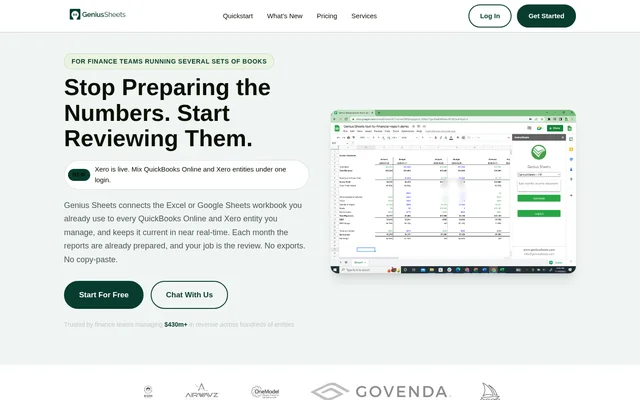
What is Genius Sheets?
Genius Sheets is financial reporting software that connects QuickBooks Online and Xero entities to Excel and Google Sheets. Genius Sheets serves finance professionals who manage several sets of books and need consolidated reports in their existing workbook layouts. The service keeps accounting data current in near real-time, shifting recurring work from preparing spreadsheets toward reviewing the numbers.
Genius Sheets supports reporting across operating companies, properties, funds, and clients. Finance teams can combine QuickBooks Online and Xero entities under one login rather than maintaining separate reporting workflows for each accounting system. Reports use transaction-level data, with direct connections rather than middleware or recurring exports.
What Genius Sheets can do
Genius Sheets combines live spreadsheet reporting with consolidation and financial review tools. Genius Sheets can populate management report packs in a team's own format, maintain comparisons, and expose the transactions behind reported figures. Daily book checks add exception monitoring, while Full alerts extend the range of financial conditions that teams can track.
- Genius Sheets connects QuickBooks Online and Xero directly to Excel and Google Sheets.
- Genius Sheets consolidates financial reporting with entity and property-level rollups.
- Genius Sheets supports prior-year and budget versus actual comparisons with variance.
- Genius Sheets lets reviewers drill from report figures to underlying transactions.
- Genius Sheets checks books daily and flags issues on an Alerts page.
- Genius Sheets offers an Adjusted EBITDA add-on with documented adjustments and covenant monitoring.
How Genius Sheets works
Genius Sheets starts with an account and connections to the user's QuickBooks Online or Xero entities. Users install the Excel or Google Sheets add-in, then link existing reports to live accounting data in their preferred layout. Enterprise customers can have the Genius Sheets team set up their reporting workbooks.
Genius Sheets keeps the linked workbook current so reviewers can check results, investigate unexpected figures, and distribute their reports. Basic alerts cover low cash, a bank account below zero, a month closed at a loss, and accounting connections needing attention. Full alerts add adjustable thresholds for financial changes such as budget variance, margin drops, expense spikes, and receivables growth.
Who Genius Sheets is for
Genius Sheets is aimed at finance teams managing multiple accounting entities, including family offices, holding companies, and firms serving clients. The source also identifies PE-backed groups and fractional CFO firms. Genius Sheets suits spreadsheet-based reporting workflows where reviewers need current group results alongside the ability to inspect individual companies and transactions.
- Finance teams can maintain consolidated management packs across operating companies.
- Family offices and holding companies can keep group reporting workbooks current.
- Property teams can review entity and property-level rollups.
- Accounting and fractional CFO firms can manage reporting across client books.
Genius Sheets pricing and plans
Genius Sheets offers Starter at $15/month for one user and one QuickBooks or Xero connection. Starter includes 20 monthly queries and 20 category filters. Business costs $75/month for one user and up to 5 connections, with unlimited monthly queries, unlimited category filters, and consolidated reporting. Additional users cost $10/month on either plan.
Genius Sheets prices Enterprise by entities and seats, with unlimited entities, custom report buildout, Full alerts, and priority support. Full alerts otherwise cost $5/month per connection. The Adjusted EBITDA add-on costs $25/month per connection with a $250 monthly minimum. A two-week free trial includes up to 2 connections without a credit card, and customers can cancel anytime.
Genius Sheets strengths and limitations
Genius Sheets supports existing spreadsheet layouts and mixed accounting systems, which can reduce repeated exports and manual report preparation. Transaction drill-down and daily alerts support financial review rather than only data delivery. Enterprise customers also have access to custom integrations and reporting assistance, while the free trial provides a way to test the workbook workflow.
- Genius Sheets limits Starter queries and category filters each month.
- Genius Sheets limits included connections on Starter and Business plans.
- Genius Sheets charges separately for Full alerts outside Enterprise.
- Genius Sheets describes its diligence workbook as a starting point, not a substitute for a quality of earnings review.
- Genius Sheets requires users to enter covenant definitions and check them against their credit agreement.
Genius Sheets FAQ
What is Genius Sheets?
Genius Sheets is financial reporting software that connects QuickBooks Online and Xero to Excel and Google Sheets. Genius Sheets keeps transaction-level data current in near real-time and supports consolidated reports, comparisons, and transaction drill-down for finance teams managing multiple entities.
Is Genius Sheets free?
Genius Sheets offers a two-week free trial with up to 2 connections and no credit card required. Genius Sheets has paid Starter and Business plans at $15/month and $75/month respectively, while Enterprise pricing depends on entities and seats.
Does Genius Sheets work with both QuickBooks Online and Xero?
Genius Sheets supports QuickBooks Online and Xero on every plan and allows teams to mix both accounting systems under one login. Genius Sheets delivers their data directly into Excel and Google Sheets without middleware or exports.
How do you set up Genius Sheets?
Genius Sheets setup involves creating an account, connecting QuickBooks Online or Xero from the dashboard, and installing the Excel or Google Sheets add-in. Users then link existing reports to live data. Enterprise plans include the option for the team to set up reports.
What financial alerts does Genius Sheets provide?
Genius Sheets includes Basic alerts for low cash, negative bank balances, a month closed at a loss, and connection issues. Full alerts add budget variance, cash runway, gross margin drops, expense spikes, unusually large expenses, and receivables growing faster than revenue, with adjustable thresholds.
How many entities can Genius Sheets connect?
Genius Sheets includes one QuickBooks or Xero connection on Starter and up to 5 connections on Business. Genius Sheets Enterprise plans support unlimited entities, allowing teams to connect operating companies, properties, funds, or clients under one login.
From the community
No reviews yet
Be the first to review this tool. What you write helps the next person choose.