What is Receipt AI?
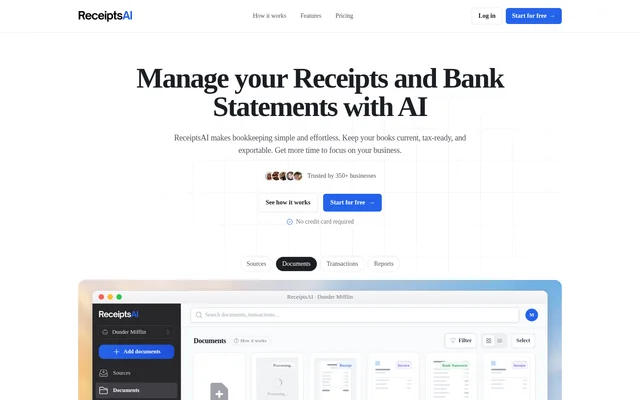
Receipt AI is an AI-powered receipt management application that turns submitted receipt images into categorized expense records. Receipt AI serves businesses, finance teams, and individuals who need to collect, track, and organize expense documents. The service emphasizes phone-based submission for business travelers and professionals working away from a desk.
Receipt AI combines document capture with accounting preparation rather than requiring users to enter receipt details manually. Receipt AI extracts purchase information, renames files, and uploads records to connected accounting software. Users without accounting software can also review receipts and organize expenses through custom categories.
What Receipt AI can do
Receipt AI processes receipts and other financial documents using AI-driven extraction and categorization. Receipt AI supports 9+ document types, including invoices, checks, bank statements, and purchase orders, and supports 39 languages. Supported receipt file formats include JPEG, PNG, PDF, TIFF, WEBP, HEIC, and HEIF.
- Receipt AI extracts dates, vendor names, tax amounts, totals, and line items.
- Receipt AI categorizes receipts or individual line items when enabled.
- Receipt AI applies account categories and tax codes.
- Receipt AI renames receipt files and uploads them to connected accounting software.
- Receipt AI flags duplicate receipts and prevents duplicate uploads to accounting software.
- Receipt AI stores memos submitted with receipts or added through Edit Receipt.
How Receipt AI works
Receipt AI accepts receipt photos by SMS or WhatsApp, forwarded receipts by email, and drag-and-drop uploads through the website. Email uploads can include receipts with or without attachments. Users can include a memo alongside a receipt photo in a message or place a memo in an email subject line.
Receipt AI reads the submitted receipt, applies categories and tax codes, and sends the record to QuickBooks Online or Xero when connected. Receipt AI matches the receipt to a transaction for review. Users complete reconciliation by clicking Match in QuickBooks or OK in Xero; users without accounting software review the receipt directly.
Who Receipt AI is for
Receipt AI is intended for businesses, finance teams, and individuals managing expense reporting. Receipt AI specifically addresses traveling teams, job-site workers, and other on-site professionals who need to submit receipts while moving between locations. Accountants and bookkeepers can use the same workflow to collect documentation and prepare expenses for reconciliation.
- Receipt AI lets business travelers submit receipts during work trips.
- Receipt AI helps on-site teams capture purchases while visiting job sites.
- Receipt AI helps accountants and bookkeepers categorize purchases and reconcile expenses.
- Receipt AI provides project expense information and visual insights for reviewing costs.
Receipt AI strengths and limitations
Receipt AI combines familiar submission channels with receipt extraction, expense categorization, and accounting connections. Receipt AI also supports use without accounting software and states that receipts and account information are encrypted. These capabilities cover both receipt submission and subsequent bookkeeping, although submission limits vary by channel and SMS availability depends on the sender's country.
- Receipt AI supports SMS uploads only for phone numbers from the US, Canada, and Australia.
- Receipt AI requires a single receipt photo per SMS or WhatsApp message.
- Receipt AI accepts up to three receipt photos per email submission.
Receipt AI FAQ
What is Receipt AI?
Receipt AI is an AI-powered receipt management application that extracts receipt details, categorizes expenses, and prepares records for reconciliation. Receipt AI accepts uploads through SMS, WhatsApp, email, and the website, and connects with QuickBooks Online and Xero.
Does Receipt AI work with QuickBooks Online and Xero?
Receipt AI integrates with QuickBooks Online and Xero to upload categorized receipts, apply account and tax codes, and match receipts to transactions. Receipt AI leaves a review step in the accounting software: click Match in QuickBooks or OK in Xero.
Can Receipt AI be used without accounting software?
Receipt AI can be used without accounting software to review receipts and organize expenses. Receipt AI supports custom categories and extracts receipt information, so a QuickBooks Online or Xero connection is not required to use the service.
Which countries support Receipt AI SMS uploads?
Receipt AI supports SMS uploads for phone numbers from the US, Canada, and Australia. Receipt AI also accepts receipts through WhatsApp, email, and website uploads, providing alternative submission channels beyond SMS.
Does Receipt AI detect duplicate receipts?
Receipt AI automatically detects duplicate receipts and flags repeated submissions. Receipt AI does not push flagged duplicates to connected accounting software, helping prevent duplicate entries when the same receipt is uploaded more than once.
From the community
No reviews yet
Be the first to review this tool. What you write helps the next person choose.