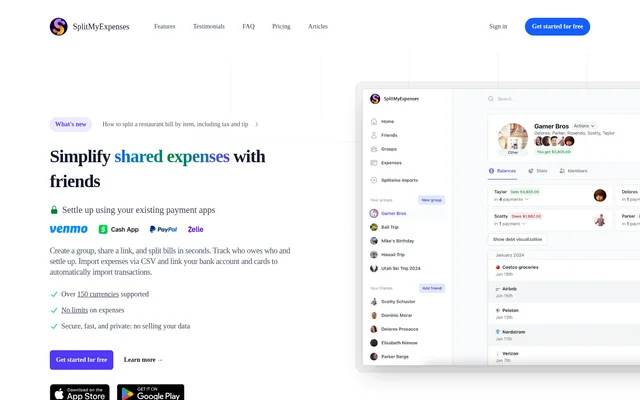
What is SplitMyExpenses?
SplitMyExpenses is a bill splitting and shared expense tracking app for friends, roommates, couples, and group trips. SplitMyExpenses records who paid, calculates balances, and helps groups settle shared costs through existing payment apps. Access is available through the web and mobile apps for iOS and Android.
SplitMyExpenses organizes bills into groups that users can share through invitation links. Different split methods accommodate equal contributions, agreed percentages, exact amounts, and individual purchases. The service also provides spending charts and debt views, so users can review category totals alongside the balances they need to settle.
What SplitMyExpenses can do
SplitMyExpenses combines expense entry, receipt itemization, imports, and settlement workflows. Users can add shared bills directly, upload expense files, or use Premium automation to bring in transactions from linked accounts. Group debt simplification reduces the number of payments needed to settle balances, while filters help users review spending.
- SplitMyExpenses divides bills equally, by amount, percentage, shares, adjustments, or itemization.
- SplitMyExpenses itemizes uploaded receipt photos with AI.
- SplitMyExpenses imports Splitwise data and CSV, Excel, or TXT files.
- SplitMyExpenses fetches expenses daily from linked bank accounts and credit cards.
- SplitMyExpenses displays spending charts and original or simplified debts.
- SplitMyExpenses opens supported payment apps at the charge or pay screen.
How SplitMyExpenses works
SplitMyExpenses starts with a group and a unique invitation link that friends can use to register and join. Users record shared expenses, specify who paid, and select a split method. Uploaded receipt photos can be itemized for per-item splitting, while imported expenses can still be edited for amount, description, date, and other details.
SplitMyExpenses supports settlement through Venmo, PayPal, CashApp, and Zelle. Payment app connections can also supply a friend's profile photo and name. Bank account and credit card connections support daily expense imports through the service's payment processor. Users can review balances and record payments to keep the group synchronized.
Who SplitMyExpenses is for
SplitMyExpenses serves people who regularly share household, dining, or travel costs. Roommates can keep rent, utilities, and groceries in a group, while couples can compare equal, percentage, and exact splits. Friends traveling together can organize trip costs across currencies and review balances before settling up.
- Roommates can track household bills and preserve expense history.
- Couples can apply agreed ratios to shared expenses.
- Restaurant groups can assign dishes, share discounts, and account for tax and tip.
- Group travelers can organize expenses across multiple currencies.
- Splitwise users can bring over groups, expenses, debts, and friends.
SplitMyExpenses pricing and plans
SplitMyExpenses offers a Free plan at $0/month and a Premium plan listed at $3.99/month. Free includes adding expenses, splitting bills, and settling up, with imports up to 1 month old and 10 total recurring expenses. The site states that core bill splitting and settlement will always remain free.
SplitMyExpenses Premium adds receipt scanning, imports from up to 10 years ago, up to 100 active recurring expenses, and daily imports from up to 50 cards and bank accounts. Premium also includes default group splits, conversion to 100+ currencies, and priority processing. The pricing page states that subscriptions can be canceled anytime.
SplitMyExpenses strengths and limitations
SplitMyExpenses combines unrestricted expense, friend, and group counts with several ways to divide bills. Editable imports support users moving existing records into the app, and payment app workflows connect balance tracking with settlement. The service states that user data is not sold and allows users to delete their accounts and data.
- SplitMyExpenses reserves AI receipt itemization and import automation for Premium.
- SplitMyExpenses limits Free imports to expenses up to 1 month old.
- SplitMyExpenses limits Free recurring expenses to 10 total.
SplitMyExpenses FAQ
What is SplitMyExpenses?
SplitMyExpenses is a bill splitting app for tracking shared expenses and settling balances with friends, roommates, couples, and travel groups. SplitMyExpenses supports multiple split methods, receipt itemization, expense imports, and access through web, iOS, and Android.
Is SplitMyExpenses free?
SplitMyExpenses offers free core bill splitting and settlement with no limits on expenses, friends, or groups. The Free plan costs $0/month, while Premium is listed at $3.99/month and adds receipt scanning, automated bank imports, and expanded recurring expense allowances.
Can SplitMyExpenses scan receipts with AI?
SplitMyExpenses can automatically itemize an uploaded receipt photo so users can split the bill by individual items, including multi-currency receipts. AI receipt scanning is included in Premium and is not available on the Free plan.
Which payment apps does SplitMyExpenses support?
SplitMyExpenses supports Venmo, PayPal, CashApp, and Zelle for settlement workflows. SplitMyExpenses can bring users directly to a supported app's charge or pay screen and can fetch a friend's profile photo and name from payment apps.
Can SplitMyExpenses import Splitwise data and spreadsheets?
SplitMyExpenses supports importing Splitwise groups, expenses, debts, and friends, as well as expense files in CSV, Excel, and TXT formats. Imported expenses remain editable, including their amounts, descriptions, and dates. Import history allowances depend on the selected plan.
Does SplitMyExpenses connect to bank accounts?
SplitMyExpenses supports daily expense imports from linked bank accounts and credit cards through its payment processor. Premium allows linking up to 50 cards and bank accounts, alongside other automation features such as default splits for new group expenses.
From the community
No reviews yet
Be the first to review this tool. What you write helps the next person choose.