What is GMass?
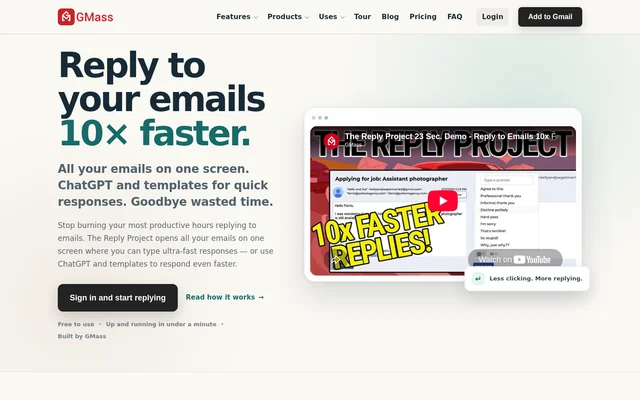
GMass is an email campaign tool that works inside Gmail and offers individual and team subscriptions. GMass combines mail merge personalization, contact and campaign management, email verification, and tracking links. The reply page also describes a single-screen approach to processing messages, allowing users to work through emails without repeatedly opening, closing, and navigating between separate threads.
GMass distinguishes its subscriptions by features and account setup rather than contact or campaign allowances. The pricing page lists unlimited contacts, unlimited campaigns, and unlimited emails across plans. However, GMass attaches a qualification to email sending: exceeding sending limits depends on individual account configuration.
What GMass can do
GMass provides Gmail-based campaign features alongside message handling. The listed capabilities cover personalized sending, email address checks, tracking links, follow-up sequences, and campaign testing. Feature availability varies by subscription: Standard includes the core sending features, while Premium and Professional add sequences, integrations, triggered emails, and inbox rotation.
- GMass displays emails on one screen for message processing.
- GMass personalizes campaigns with mail merge.
- GMass includes email address verification.
- GMass provides custom tracking links with SSL.
- GMass supports sequences and follow-ups on Premium and Professional.
- GMass offers API access with Zapier on Premium and Professional.
- GMass includes A/B testing, triggered emails, and MultiSend on Premium and Professional.
How GMass works
GMass works inside Gmail, and subscriptions are associated with a Google account. During checkout, subscribers enter the email address of the Google account they want to use. GMass allows a subscription to be transferred to a different Google account later. The pricing page provides Individual and Team options, monthly and annual billing selectors, and a PayPal payment option.
Who GMass is for
GMass serves individual senders and teams that want to manage email campaigns inside Gmail. GMass offers account choices for individual subscriptions and team setups, with campaign features that range from personalization to automated follow-ups. The single-screen message view also addresses users who want to process messages without moving repeatedly between email threads.
- GMass supports individual senders creating personalized Gmail campaigns.
- GMass supports teams choosing a shared subscription setup.
- GMass supports campaign users who need sequences and follow-ups.
- GMass supports senders who want A/B testing and triggered emails.
GMass pricing and plans
GMass offers paid Standard, Premium, and Professional individual plans, plus Team Premium subscriptions. Annual individual subscriptions are listed at $249 for Standard, $349 for Premium, and $599 for Professional. Monthly billing is also available. The supplied pricing is adjusted for the United States and listed in USD. GMass provides options to upgrade, downgrade, and access cancellation instructions.
GMass strengths and limitations
GMass combines Gmail-based sending with unlimited contacts and campaigns, email verification, and personalized mail merge across its listed plans. GMass also offers both individual and team billing options. The main limitations concern feature access and sending configuration: Standard omits several automation and integration features, and the advertised unlimited sending remains subject to the stated account-configuration qualification.
- GMass Standard excludes sequences, follow-ups, and API access.
- GMass Standard excludes A/B testing, triggered emails, and Inbox Rotation.
- GMass reserves high-priority support for Professional and Team Premium.
- GMass qualifies sending-limit increases by individual account configuration.
GMass FAQ
What is GMass?
GMass is an email campaign tool that works inside Gmail and supports mail merge personalization, email verification, and tracking links. GMass also describes a single-screen email view for working through messages without repeatedly navigating between individual threads.
Is GMass free?
GMass lists paid individual and team subscriptions with monthly or annual billing. Annual individual subscriptions are $249 for Standard, $349 for Premium, and $599 for Professional. Email address verification is included in the listed plans.
Does GMass have an API or Zapier integration?
GMass includes API access with Zapier on Premium and Professional individual plans and on Team Premium plans. GMass Standard does not include API access with Zapier, so this capability requires a higher subscription tier.
Does GMass support automated follow-ups?
GMass supports sequences and follow-ups on Premium and Professional individual plans and on Team Premium plans. GMass Standard excludes sequences and follow-ups. The higher plans also include triggered emails, A/B testing, and Inbox Rotation through MultiSend.
Does GMass offer unlimited email sending?
GMass advertises unlimited emails across all plans, but GMass states that exceeding sending limits depends on individual account configuration. The listed plans also include unlimited contacts and unlimited campaigns.
Can a GMass subscription be transferred to another Google account?
GMass allows a subscription to be transferred to a different Google account after signup. GMass asks subscribers to enter the email address of the Google account they want to subscribe during the checkout process.
From the community
No reviews yet
Be the first to review this tool. What you write helps the next person choose.