What is GPTExcel?
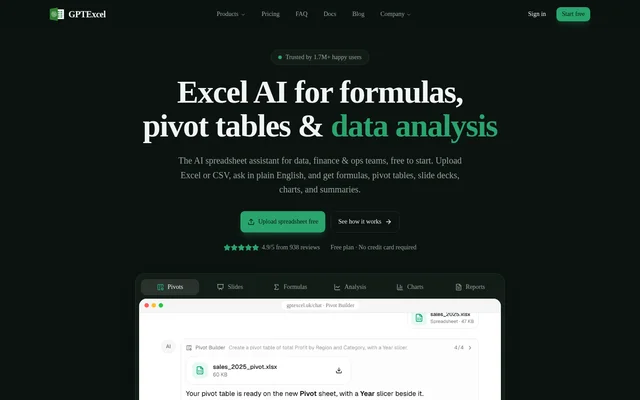
GPTExcel is an AI spreadsheet assistant for analyzing Excel and CSV files through plain-English questions. GPTExcel serves data, finance, and operations teams that need formulas, pivot tables, charts, summaries, or presentations from spreadsheet data. The browser-based application combines spreadsheet chat with dedicated builders and generators, and offers a Free plan alongside paid subscriptions.
What GPTExcel can do
GPTExcel combines conversational spreadsheet analysis with tools for building spreadsheet outputs and generating code. The stated capabilities cover both working with uploaded data and creating formulas or scripts for named spreadsheet applications. Presentation generation is also included, with downloadable slide decks rather than only written summaries.
- GPTExcel answers plain-English questions about uploaded Excel and CSV files.
- GPTExcel generates charts and summaries from spreadsheet data.
- GPTExcel builds pivot tables, slicers, and pivot charts.
- GPTExcel creates slide decks downloadable as PowerPoint or PDF.
- GPTExcel generates formulas for Excel, Google Sheets, LibreOffice Calc, and Airtable.
- GPTExcel generates VBA, Apps Script, LibreOffice Basic, Airtable, and Python scripts.
- GPTExcel provides SQL, regex, and table template generators.
- GPTExcel supports shareable chats.
How GPTExcel works
GPTExcel runs in a web browser. Users upload Excel or CSV files and ask questions in plain English to request analysis or spreadsheet outputs. The website links directly to spreadsheet chat, formula generation, pivot table building, and slide deck creation. Users can start free without a credit card and sign in to upgrade to a paid plan.
GPTExcel applies file and usage allowances according to the selected plan. Free supports files up to 5 MB and 10 files per chat; Pro supports 50 MB and 20 files per chat; Pro Plus supports 100 MB and 30 files per chat. Available models also vary by plan.
Who GPTExcel is for
GPTExcel is positioned for data, finance, and operations teams. The website's worked guides illustrate sales reporting, budget review, and HR analysis, showing how spreadsheet questions can lead to charts, explanations, and leadership summaries. Other guides address formula selection and slow workbooks, providing examples for people working directly with spreadsheet calculations.
- GPTExcel guides demonstrate investigating revenue growth alongside declining margins.
- GPTExcel guides demonstrate finding budget overspend and drafting a future budget.
- GPTExcel guides demonstrate analyzing headcount, turnover, and pay by level.
- GPTExcel turns spreadsheet data into presentation decks.
GPTExcel pricing and plans
GPTExcel offers Free at $0 forever, Pro at $9 per month, and Pro Plus at $18 per month. Annual billing advertises savings of 30%. Free includes 50 credits a month and the Fast model. Pro includes approximately 3,000 monthly credits and Fast and Standard models; Pro Plus includes approximately 10,000 monthly credits and adds the Expert model.
GPTExcel includes spreadsheet chat, charts, summaries, Pivot Builder, Slide Deck Builder, generators, and email support across the listed plans. Free includes 5 free tool runs daily, then charges 1 credit each. Paid tool runs use the same allowance as messages. Credits refresh weekly on paid plans and monthly on Free, and weekly credits do not roll over.
GPTExcel strengths and limitations
GPTExcel combines spreadsheet analysis, formula and script generation, pivot tools, and presentation creation in a browser-based workflow. The Free plan includes the named builders and generators rather than reserving those capabilities entirely for paid users. The main stated constraints concern usage allowances, model access, and upload limits, so plan selection depends on file sizes and usage needs.
- GPTExcel limits file size and files per chat according to the plan.
- GPTExcel reserves the Expert model for Pro Plus.
- GPTExcel does not roll weekly paid credits over.
- GPTExcel paces heavy usage bursts over 5-hour windows.
GPTExcel FAQ
What is GPTExcel?
GPTExcel is a browser-based AI spreadsheet assistant for data, finance, and operations teams. GPTExcel accepts Excel and CSV uploads and uses plain-English questions to generate formulas, pivot tables, charts, summaries, and slide decks.
Is GPTExcel free?
GPTExcel offers a Free plan at $0 forever with no credit card required. The Free plan includes 50 credits a month, the Fast model, and 5 free tool runs daily before additional runs cost 1 credit each.
How much does GPTExcel cost?
GPTExcel offers Pro at $9 per month and Pro Plus at $18 per month, alongside a Free plan. Pro includes approximately 3,000 monthly credits, while Pro Plus includes approximately 10,000. The pricing page advertises 30% savings with annual billing.
Which spreadsheet applications does GPTExcel support for formula generation?
GPTExcel generates formulas for Excel, Google Sheets, LibreOffice Calc, and Airtable. GPTExcel also provides script generation for VBA, Apps Script, LibreOffice Basic, Airtable, and Python, plus SQL, regex, and table template generators.
Can GPTExcel create pivot tables and PowerPoint presentations?
GPTExcel includes a Pivot Builder agent for pivot tables, slicers, and pivot charts, plus a Slide Deck Builder agent for presentations from spreadsheet data. Generated presentations can be downloaded as PowerPoint or PDF, and both builders appear in every listed plan.
What are GPTExcel's file upload limits?
GPTExcel allows files up to 5 MB and 10 files per chat on Free. Pro increases those limits to 50 MB and 20 files per chat, while Pro Plus allows 100 MB and 30 files per chat.
From the community
No reviews yet
Be the first to review this tool. What you write helps the next person choose.