What is HTML Anything?
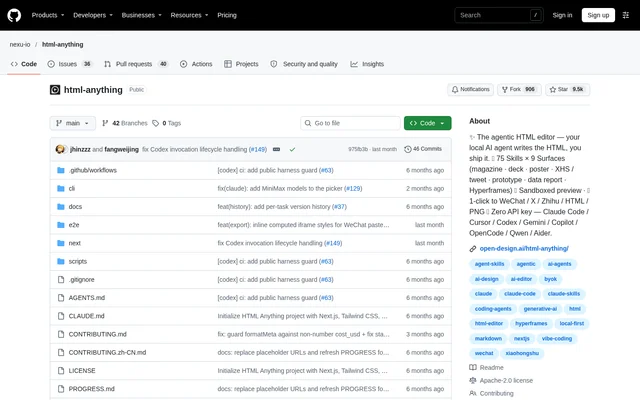
HTML Anything is an open-source HTML editor that connects existing local coding agents to a visual content workflow. HTML Anything turns drafts, notes and structured data into standalone HTML for writers, designers and teams producing documents, presentations and other reader-facing materials. The project comes from the team behind Open Design and is distributed through a public GitHub repository.
HTML Anything treats Markdown as an input rather than the final presentation format. The editor combines an input pane, a template and design-system picker, and a live preview. The resulting deliverables include magazine articles, résumés, posters, social cards, web prototypes, data reports and video storyboard frames.
What HTML Anything can do
HTML Anything uses 75 composable skill templates to guide content layout and presentation. Templates are searchable and filterable by mode and scenario, including design, marketing, engineering, product and personal work. Each skill includes an example HTML file that can be opened directly from the repository without authentication or setup.
- HTML Anything accepts Markdown, CSV, TSV, JSON, SQL and plain text.
- HTML Anything streams generated HTML into a live preview.
- HTML Anything creates decks with slide navigation, presenter notes and PDF export.
- HTML Anything exports formatted content for WeChat and Zhihu.
- HTML Anything downloads standalone HTML and high-DPI PNG files.
- HTML Anything generates Hyperframes-compatible frames for external video rendering.
How HTML Anything works
HTML Anything runs locally after users clone the repository, install dependencies with pnpm and start the development app. The browser interface detects installed coding-agent CLIs on startup. Users select an agent and template, paste their content, and press the documented keyboard shortcut to generate HTML using an already authenticated agent session.
HTML Anything updates the preview as the agent produces output, allowing users to interrupt generation and revise the prompt. Tabular inputs are parsed in the browser without uploading them. The preview uses a sandboxed iframe that separates generated content from host cookies and local storage. The web layer can run on Vercel, but the coding agent remains on the user's laptop.
Who HTML Anything is for
HTML Anything supports content and document work across design, marketing, engineering and product scenarios. Writers can turn drafts into editorial layouts, while teams can use office templates for specifications, runbooks, finance reports and meeting notes. The template catalog also covers personal materials such as résumés and visual formats for social publishing.
- HTML Anything helps writers format long essays, reports and one-pagers.
- HTML Anything helps marketers prepare posters and social cards.
- HTML Anything helps product teams create specifications and prototypes.
- HTML Anything helps engineers format runbooks and technical documents.
- HTML Anything helps presenters create keynote decks.
HTML Anything pricing and access
HTML Anything is an open-source project distributed under the Apache-2.0 license. The documented access path is to clone the repository and run the application locally. HTML Anything does not require a separate API key because generation reuses a coding-agent session that the user has already authenticated, with the user's existing subscription providing the agent access.
HTML Anything strengths and limitations
HTML Anything combines reusable design templates, live generation previews and publishing exports in a local-first workflow. Existing agent authentication avoids a separate API-key setup, and the repository includes examples for inspecting template output before generating content. Practical constraints include the development-oriented installation process, dependence on a local coding agent and external rendering for finished video files.
- HTML Anything requires repository cloning and pnpm dependency installation for the documented local setup.
- HTML Anything requires an installed and authenticated coding-agent CLI for generation.
- HTML Anything keeps the agent on the laptop even when the web layer runs on Vercel.
- HTML Anything hands video frames to Hyperframes or Remotion for MP4 rendering.
HTML Anything FAQ
What is HTML Anything?
HTML Anything is an open-source, local-first AI HTML editor that uses coding-agent CLIs to convert notes, documents and data into designed HTML. Supported deliverables include articles, decks, résumés, posters, social cards, web prototypes, data reports and video storyboard frames.
Is HTML Anything free?
HTML Anything is available as an open-source project under the Apache-2.0 license. HTML Anything requires no separate API key, but AI generation uses an already authenticated coding-agent session and the user's existing subscription.
Which coding agents does HTML Anything support?
HTML Anything lists support for Claude Code, Cursor Agent, Codex, Gemini CLI, GitHub Copilot CLI, OpenCode, Qwen Coder, Aider and IBM Bob. HTML Anything detects installed CLIs on the user's PATH and provides a top-bar agent picker.
What formats can HTML Anything import and export?
HTML Anything accepts Markdown, CSV, TSV, JSON, SQL and plain text, with browser-side parsing for tabular data. HTML Anything exports standalone HTML and PNG files, formats content for WeChat and Zhihu, and creates images for social publishing. Deck mode also supports PDF export.
How do you run HTML Anything locally?
HTML Anything runs locally by cloning the GitHub repository, installing dependencies with pnpm and starting the development app. HTML Anything then opens in a browser, detects authenticated coding-agent CLIs, and lets users select a template and paste content for generation.
Can HTML Anything create videos?
HTML Anything generates Hyperframes-compatible storyboard frames, including duration and transition markers. HTML Anything does not describe a built-in finished-video rendering workflow; generated frames are handed to Hyperframes or Remotion to render an MP4.
From the community
No reviews yet
Be the first to review this tool. What you write helps the next person choose.