What is open-slide?
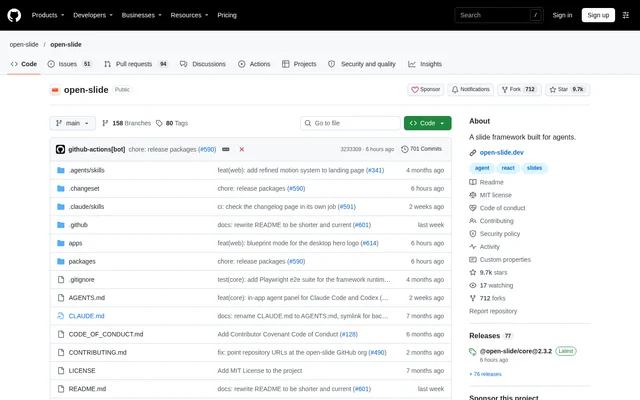
open-slide is an open-source presentation framework built for coding agents. Users describe a deck, and a coding agent writes the slides as React components. open-slide supplies the presentation infrastructure, including the canvas, scaling, navigation, hot reload, editing, and present mode. The framework is designed around an agent-assisted development workflow rather than slide creation alone.
open-slide renders every page on a fixed 1920 × 1080 canvas. The repository includes the runtime, a Vite plugin, a CLI, and a project template. Developers can work with the source while using browser-based controls to review slides, make visual changes, and guide an agent through revisions.
What open-slide can do
open-slide combines deck generation, visual editing, and presentation delivery in a React workflow. The browser agent panel can draft a deck page by page while the canvas follows along. Direct editing tools and source-backed comments provide additional ways to adjust a presentation without relying only on written prompts.
- open-slide connects Claude Code or Codex CLI to a browser agent panel.
- open-slide supports dragging, resizing, alignment guides, and inline text editing.
- open-slide saves visual notes as @slide-comment markers in the source.
- open-slide includes themes, transitions, step-by-step reveals, and shared-element morphs.
- open-slide provides brand logo search through svgl and access to Google Fonts.
- open-slide offers fullscreen playback and a presenter view with notes and a timer.
- open-slide exports decks to static HTML, PDF, and PPTX.
How open-slide works
open-slide projects start with npx @open-slide/cli init my-deck, followed by cd my-deck and npm run dev. In the browser, pressing A on a slide opens the agent panel. The panel connects to an existing Claude Code or Codex CLI login, and the SDK installs into the workspace when the panel is first opened.
open-slide sends the current slide, page, and selected element with each agent message, giving editing requests visual context. Users can press C to comment on an element or a selected region, then apply comments from the comment bar. Terminal users can use the bundled /create-slide, /apply-comments, and /create-theme skills with coding agents including Claude Code, Codex, and Cursor.
Who open-slide is for
open-slide suits developers and presentation creators who want coding agents to build and revise React-based decks. The combination of source files, visual controls, and agent instructions supports workflows that move between code and the browser. Presentation delivery is also covered through keyboard navigation, fullscreen playback, speaker notes, and a next-slide preview.
- Developers can generate React decks from written descriptions.
- Presentation creators can request changes to selected slide elements.
- Reviewers can leave notes for an agent to apply in a pass.
- Presenters can use speaker notes and preview the next slide.
- Deck authors can export files or publish a static presentation site.
open-slide pricing and access
open-slide is available as an open-source project under the MIT license. The repository provides the framework source and a CLI-based initialization path. The browser agent panel uses an existing agent login without API key configuration. The repository also provides a support option for users who want to contribute to development.
open-slide strengths and limitations
open-slide brings agent-driven generation, contextual revisions, and direct visual editing into the same presentation workflow. Export formats and static deployment options provide several ways to distribute completed decks. The main constraints follow from the framework's technical setup, reliance on a connected coding agent for generated changes, and fixed slide canvas.
- open-slide requires CLI-based project initialization and a development workflow.
- open-slide relies on a coding agent for agent-driven deck creation and revisions.
- open-slide uses a fixed 1920 × 1080 canvas for every page.
open-slide FAQ
What is open-slide?
open-slide is an open-source React slide framework built for coding agents. Users describe a deck, and an agent writes the presentation as React components. open-slide handles canvas rendering, scaling, navigation, hot reload, editing, and presentation mode.
Is open-slide free?
open-slide is available as an open-source project under the MIT license. The repository provides the source code and CLI initialization instructions. The browser agent panel connects to an existing Claude Code or Codex CLI login.
Which coding agents work with open-slide?
open-slide connects Claude Code or Codex CLI through its browser agent panel. open-slide also includes terminal skills for creating slides, applying comments, and creating themes that work with coding agents including Claude Code, Codex, and Cursor.
Can open-slide export PowerPoint and PDF files?
open-slide exports presentations to PPTX, PDF, and static HTML. open-slide also produces a static build that can deploy to Vercel, Cloudflare Pages, Netlify, or any static host, supporting both file-based sharing and hosted presentations.
How do you edit slides in open-slide?
open-slide supports visual editing through dragging, resizing, alignment guides, and inline text editing. open-slide also sends slide and selection context with agent messages and saves comments as source markers, allowing an agent to apply requested changes.
Does open-slide require API keys?
open-slide does not require API key configuration for its browser agent panel. open-slide uses an existing Claude Code or Codex CLI login, and the SDK installs into the workspace when the agent panel is first opened.
From the community
No reviews yet
Be the first to review this tool. What you write helps the next person choose.