What is InRoom AI?
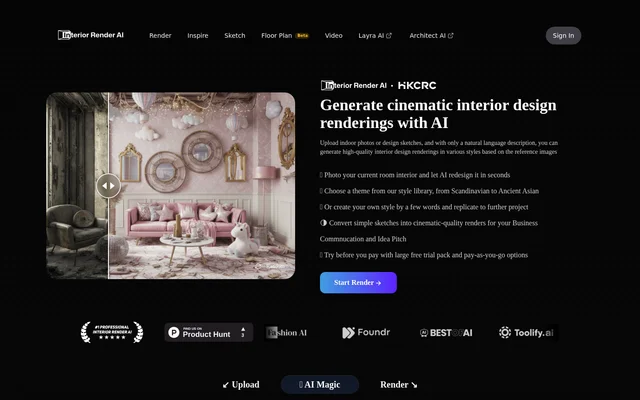
InRoom AI is an AI interior design tool for generating room visualizations from photographs and design sketches. InRoom AI helps homeowners explore renovation ideas, designers communicate concepts, and real estate professionals prepare staged images. The website describes a workflow based on uploading an image and choosing a style or writing a natural-language description.
InRoom AI supports residential spaces such as living rooms, bedrooms, kitchens, and bathrooms, as well as commercial interiors. The resulting images are intended for visual exploration, idea pitches, and client presentations. InRoom AI generates these renderings without requiring users to work in 3D modeling or design software.
What InRoom AI can do
InRoom AI combines image-based room redesign with preset and custom styling. Users can start from a photograph of an existing space or a hand-drawn concept, then explore different visual directions. The website also describes virtual staging for empty or furnished rooms, with furniture and decor generated in the selected style.
- InRoom AI generates redesigned interiors from uploaded room photos.
- InRoom AI converts design sketches into interior renderings.
- InRoom AI offers Scandinavian, Japanese, and Mediterranean style presets.
- InRoom AI creates custom styles from natural-language descriptions.
- InRoom AI lets users reuse and share custom styles.
- InRoom AI adds furniture and decor for virtual staging.
How InRoom AI works
InRoom AI starts on the Render page, where users upload a room photo or sketch. Users can optionally select a preset or describe the desired appearance in text before clicking Render. The website states that results are generated in seconds and that photo-based room redesigns preserve the original layout and proportions.
InRoom AI provides a style library alongside custom style controls, allowing users to compare established themes with their own written concepts. For staging, the input can show either an empty room or a furnished space. The same image-and-style workflow supports concept visualization without a separate 3D software workflow.
Who InRoom AI is for
InRoom AI serves homeowners considering room changes and professionals who need visual material for design discussions. The website describes use by interior designers, real estate stagers, architects, students, hospitality designers, property developers, and renovation contractors. These audiences use room images and sketches to communicate possible interiors before committing to physical changes.
- Homeowners can compare styles for a planned renovation.
- Interior designers can prepare visual concepts for client meetings.
- Real estate professionals can generate staged room images for listings.
- Design students can turn hand sketches into presentation images.
- Hospitality designers can explore hotel and restaurant concepts.
InRoom AI strengths and limitations
InRoom AI supports both photographs and sketches, providing input options for existing rooms and early design concepts. Preset styles and written prompts offer different ways to specify a visual direction. The website also states that uploaded and generated content is not used for AI training, shared with third parties, or publicly displayed as case studies.
InRoom AI provides trial access rather than presenting ongoing use as entirely free, so continued use beyond the trial requires credit purchases. The described workflow is focused on generating interior images from supplied photos or sketches. InRoom AI is presented for room visualization, concept communication, and staging rather than as a requirement to learn conventional modeling software.
InRoom AI FAQ
What is InRoom AI?
InRoom AI is an AI interior design tool that turns room photos and sketches into rendered interior concepts. InRoom AI uses style presets or natural-language descriptions to help homeowners, designers, and real estate professionals visualize redesigned or staged spaces.
Is InRoom AI free?
InRoom AI offers a free trial, followed by paid, pay-as-you-go credit packs. InRoom AI does not require a subscription or contract, and the website states that purchases do not involve automatic billing.
How do you redesign a room with InRoom AI?
InRoom AI redesigns a room after a user uploads a photo on the Render page, optionally selects a style or enters a description, and clicks Render. InRoom AI generates an interior visualization while retaining the room layout and proportions, according to the website.
Can InRoom AI turn sketches into interior renders?
InRoom AI accepts hand-drawn sketches as well as room photographs and generates interior design visualizations from those inputs. InRoom AI supports optional style presets and text prompts for concept exploration, design presentations, and idea pitches without 3D modeling software.
Does InRoom AI support virtual staging?
InRoom AI supports virtual staging from photos of empty or furnished rooms by generating furniture and decor in a chosen style. InRoom AI is described as a tool for real estate professionals and homeowners preparing staged images for property listings.
Does InRoom AI use uploaded images for AI training?
InRoom AI states that uploaded and generated content is not used for AI training. InRoom AI also states that this content is not shared with third parties or publicly displayed as a case study.
From the community
No reviews yet
Be the first to review this tool. What you write helps the next person choose.