What is Jam?
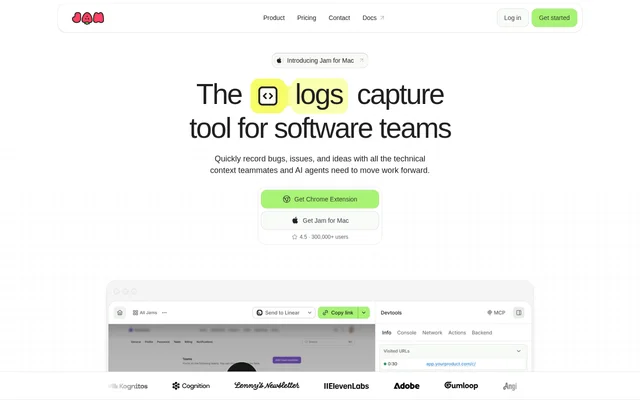
Jam is a bug reporting and screen capture tool for software teams that need to share issues, feedback, and ideas with technical context. Jam brings a recording together with available diagnostic information, giving teammates and AI agents a starting point for investigation rather than relying on a written explanation alone.
Jam supports internal reporting and customer-submitted issues. Engineers can receive recordings with available logs and device information, while customers can demonstrate problems through a Recording Link or within a Fin conversation. Jam also provides capture options through a browser extension and apps for Mac and iOS.
What Jam can do
Jam combines visual capture, AI-generated reporting suggestions, and technical context in a shareable report. Jam also connects reports to team workflows, allowing issues to move into triage or AI tooling. The available capabilities cover capturing an issue, describing the reproduction process, and handing the report to someone who can investigate.
- Jam records screens and captures screenshots through the Chrome extension.
- Jam AI suggests a title, summary, and reproduction steps.
- Jam attaches available logs, network requests, user events, and device details.
- Jam routes reports to Linear, Jira, Slack, or AI tooling.
- Jam triggers triage, notifications, or handoffs when a report is created.
- Jam hides matched elements during Recording Link sessions with auto-blur.
How Jam works
Jam starts with capturing a bug, feedback, or an idea as it happens. Through the Chrome extension, users can record their screen or take a screenshot. Jam keeps available technical context with the capture, while Jam AI suggests reporting text. The resulting report can then be routed to teammates, connected tools, or AI tooling.
Jam also accepts customer recordings through links or Fin conversations without requiring customers to install Jam. Connecting a product domain enables customer recordings to include console logs, network requests, and user interactions from any browser. Recording Link sessions can use auto-blur so that only the blurred version of matched elements is captured.
Who Jam is for
Jam serves software teams that need to communicate problems between customers, support staff, engineers, and AI agents. Jam supports reporting issues before they become support tickets and collecting evidence when customers encounter a problem. The same capture workflow also supports product feedback and ideas that need to reach teammates with context.
- Jam helps team members report bugs with visual evidence and available technical details.
- Jam lets customers demonstrate issues through installation-free Recording Links.
- Jam gives engineers recordings and context for investigating reported problems.
- Jam passes issue context into AI tooling for coding-agent investigation.
Jam strengths and limitations
Jam brings screen captures and available diagnostic context into the same report, rather than separating the visible issue from its supporting information. Jam also supports customer submissions without downloads and connects reports to named team tools. These capabilities support handoffs from customer reporting to engineering investigation without requiring the customer to write a detailed technical explanation.
- Jam requires a connected product domain for browser context in customer recordings.
- Jam attaches available technical context rather than promising every diagnostic detail.
- Jam auto-blur covers matched elements during Recording Link sessions.
Getting started with Jam
Jam offers a Chrome extension and apps for Mac and iOS as capture entry points. Teams collecting customer issues can instead send a Recording Link or use Jam within Fin. For customer recordings with browser context, the stated setup step is connecting the product domain; reports can then enter existing triage and notification workflows.
Jam FAQ
What is Jam?
Jam is a bug reporting and screen capture tool for software teams. Jam combines recordings or screenshots with available technical context, while AI suggests titles, summaries, and reproduction steps to help engineers and AI agents begin investigating reported issues.
Which platforms does Jam support?
Jam offers a Chrome extension and apps for Mac and iOS. Jam supports screen recording and screenshots through the Chrome extension, recording and sharing issues from iOS devices, and recording and sharing issues from anywhere on a Mac.
Does Jam integrate with Jira, Linear, and Slack?
Jam supports routing reports to Linear, Jira, and Slack for team triage. Jam also sends reports into AI tooling and supports automations that trigger triage, notifications, or handoffs when a report is created.
Can customers use Jam without installing software?
Jam lets customers record and submit issues through Recording Links without downloading or installing Jam. Jam also lets customers submit recordings within Fin conversations, giving engineering a recording with available context for investigation.
What technical context does Jam capture?
Jam attaches available logs, network requests, user events, and device details to recordings. Jam also supports console logs, network requests, and user interactions from customer recordings across browsers when a team connects its product domain.
How does Jam protect sensitive information in recordings?
Jam provides auto-blur for matched elements during Recording Link sessions. Jam captures only the blurred version of those elements, so the stated protection applies to matched content within that recording workflow.
From the community
No reviews yet
Be the first to review this tool. What you write helps the next person choose.