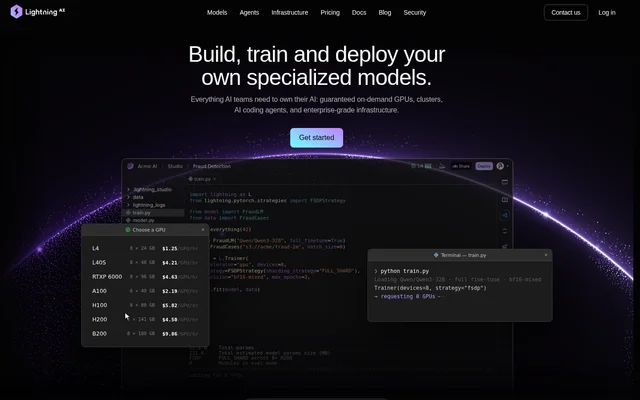
What is Lightning AI?
Lightning AI is an AI development and infrastructure service for teams building their own specialized models. Lightning AI combines on-demand GPUs, clusters, coding tools and enterprise infrastructure across the model development lifecycle. The service comes from the creators of PyTorch Lightning and addresses work ranging from dataset preparation to training, evaluation and inference.
Lightning AI serves individual developers and researchers as well as research labs and security-focused organizations. The offering combines development environments with scalable compute and organizational controls. Researchers can code and experiment, while teams can manage budgets, access permissions and deployment environments within the same service.
What Lightning AI can do
Lightning AI supports the steps involved in creating and operating specialized AI models. The website describes workflows for collecting and cleaning data, refining models interactively, running experiments in parallel and comparing training runs. Lightning AI also provides infrastructure for training from scratch, specializing pretrained models, evaluating results and running inference.
- Lightning AI helps collect, clean and organize model training datasets.
- Lightning AI supports interactive model coding and debugging with GPUs and SSH.
- Lightning AI runs parallel experiments and compares training runs.
- Lightning AI supports pretraining, fine-tuning and multi-node training.
- Lightning AI supports accuracy, safety and reliability evaluation before inference.
- Lightning AI provides no-code and full-control model endpoints.
How Lightning AI works
Lightning AI organizes development around Studios with browser coding, notebooks, terminal access and SSH connections. Developers can also connect local IDEs, including VSCode and PyCharm. The pricing page describes ready-to-code environments without CUDA setup, reusable configurations and the ability to switch a Studio between CPU and GPU compute.
Lightning AI connects development environments to data and compute resources. Supported storage connections include S3, GCS and R2 buckets, while cluster reservations cover A100, H100, H200 and B200 hardware on baremetal, SLURM or Kubernetes. Enterprise options include using an existing AWS or GCP account, private VPC deployment and customer-provided images.
Who Lightning AI is for
Lightning AI identifies students and hobbyists, developers and researchers, research labs and teams, and security-first organizations as audiences for its plans. The use cases span individual experimentation, shared model development and enterprise infrastructure management. The website also presents customer examples involving cancer research, edge AI, market simulations and client machine-learning pipelines.
- Lightning AI supports students and hobbyists exploring model development.
- Lightning AI supports researchers preparing data and comparing model experiments.
- Lightning AI supports research teams running multi-node training.
- Lightning AI supports organizations managing AI workloads with security and spending controls.
Lightning AI pricing and plans
Lightning AI offers Free, Pro, Teams and Enterprise plans alongside pay-as-you-go compute. The free entry offer includes up to 50 free GPU hours, with no credit card required. Compute is billed by the second, and the listed H200 rate starts at $4.50 per hour. Enterprise pricing is custom.
Lightning AI places resource and session limits on the Free plan. Free Studios require restarts every 4 hours, and A100, H100 and H200 sessions have a 4-hour limit. Pro and higher plans remove those session restrictions. Paid tiers increase available resources, while Enterprise adds options such as priority GPU access and using AWS or GCP credits.
Lightning AI strengths and limitations
Lightning AI combines model development workflows, GPU infrastructure and collaboration tools rather than addressing training alone. Browser access, local IDE connections and SSH accommodate different development workflows. Budget controls, autosleep and real-time cost tracking support compute management, while private-cloud and access-control options address organizational requirements. These capabilities vary by plan, so access depends on the selected tier.
- Lightning AI Free Studios require periodic restarts.
- Lightning AI applies plan-specific limits to seats, storage and concurrent GPUs.
- Lightning AI places SAML/SSO and role-based access controls in Enterprise.
Lightning AI FAQ
What is Lightning AI?
Lightning AI is an AI development and infrastructure service for building, training and deploying specialized models. Lightning AI combines on-demand GPUs, development Studios, dataset preparation, training workflows, model evaluation and inference tools for developers, researchers and enterprise AI teams.
Is Lightning AI free?
Lightning AI offers a Free plan with up to 50 free GPU hours and no credit card requirement. Additional compute is available through pay-as-you-go billing. Lightning AI also offers Pro, Teams and custom Enterprise plans, while Free Studios require a restart every 4 hours.
Can Lightning AI connect to local IDEs and cloud storage?
Lightning AI supports local IDE connections, including VSCode and PyCharm, alongside browser coding, notebooks and SSH access. Lightning AI also lists connections to S3, GCS and R2 buckets, allowing development environments to work with cloud storage.
Can Lightning AI train and deploy AI models?
Lightning AI supports pretraining, fine-tuning, multi-node training, evaluation and inference. Lightning AI provides workflows for preparing datasets, comparing training runs and specializing pretrained models, plus options to deploy no-code model endpoints or full-control model endpoints.
Does Lightning AI support private-cloud deployment?
Lightning AI offers private-cloud and VPC support, bring-your-own-cloud options and support for Kubernetes and Slurm environments. Lightning AI Enterprise includes options to use AWS or GCP credits, customer VPCs and images, alongside role-based access controls and SAML/SSO.
What are the limits of the Lightning AI Free plan?
Lightning AI Free includes up to 2 seats, up to 2 concurrent GPUs and 50 GB of persistent storage. Free Studios require restarts every 4 hours, and A100, H100 and H200 sessions have a 4-hour limit. Additional CPU and GPU credits are pay-as-you-go.
From the community
No reviews yet
Be the first to review this tool. What you write helps the next person choose.