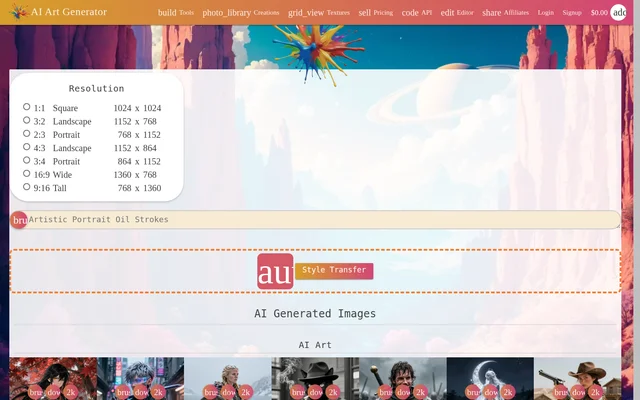
What is MagicStock?
MagicStock is an online AI image generator for creating artwork, photos, illustrations, and designs from text descriptions. Presented on the TensorPix website, MagicStock also supports editing existing pictures and using uploaded images as creative inputs. MagicStock runs directly in a browser, requires no software downloads, and offers image generation in 4K.
MagicStock addresses visual tasks such as producing backgrounds, logos, marketing materials, realistic AI photos, and paintings. The source describes both generating new images and modifying existing pictures, so the available workflow extends beyond text-to-image creation. Free access includes weekly credits, while the linked TensorPix pricing page provides paid options.
What MagicStock can do
MagicStock combines image generation, prompt-based editing, image blending, and style transfer. Users can begin with a written description or supply existing images to shape the result. The page specifically describes background changes, lighting adjustments, and compositions built from multiple images, alongside options for selecting the AI model and output resolution.
- MagicStock generates artwork, photos, and designs from text prompts in 4K.
- MagicStock modifies existing pictures using text instructions.
- MagicStock changes image backgrounds and adjusts lighting.
- MagicStock blends up to 10 images into compositions, collages, or new scenes.
- MagicStock copies styles from paintings, drawings, and logos.
- MagicStock lets users choose an AI model and image resolution.
How MagicStock works
MagicStock follows a prompt, settings, and generation workflow. Users describe the image they want to create, optionally upload images, and then choose an AI model, image resolution, and other settings. Selecting generate starts image creation. MagicStock operates in the browser, so the stated workflow does not require downloading an application.
Who MagicStock is for
MagicStock is relevant to content creators and people making visual assets for creative or marketing work. The page names logos, backgrounds, marketing visuals, realistic photos, and paintings as examples. MagicStock also supports people who want to change an existing picture through written instructions rather than create a new image from a text description.
- MagicStock creates marketing visuals from written ideas.
- MagicStock produces backgrounds and logo concepts.
- MagicStock generates realistic AI photos and illustrated artwork.
- MagicStock combines uploaded photos into collages or new scenes.
MagicStock pricing and plans
MagicStock offers free access with weekly credits obtained by logging in. The linked TensorPix pricing page lists a free plan, subscription plans, and pay-as-you-go access. Standard costs $5.5 per month billed annually, Premium costs $12.42 per month billed annually, and Elite costs $30.25 per month billed annually. Paid subscriptions include credits and access to premium generative AI models.
MagicStock strengths and limitations
MagicStock brings text-to-image creation, prompt editing, image blending, and style transfer into a browser-based workflow. Free weekly credits provide access without a subscription, while uploaded references support composition and style tasks. The linked pricing page places limits on free access, including basic model availability and a retention period for generated media.
- MagicStock free access requires logging in to receive weekly credits.
- MagicStock premium generative AI models are available through paid plans.
- MagicStock images on the TensorPix free plan are deleted 30 days after creation.
MagicStock FAQ
What is MagicStock?
MagicStock is a browser-based AI image generator presented on the TensorPix website. MagicStock creates artwork, photos, illustrations, and designs from text descriptions, and also supports prompt-based image editing, image blending, and style transfer.
Is MagicStock free?
MagicStock offers free access with weekly credits obtained by logging in. The linked TensorPix pricing page also lists subscriptions and pay-as-you-go access, with basic generative AI models on the free plan and premium models on paid plans.
Can MagicStock edit existing images?
MagicStock edits existing images using text prompts to change backgrounds, adjust lighting, or reimagine pictures. MagicStock also supports style transfer from reference images, including paintings, drawings, and logos.
How many images can MagicStock combine?
MagicStock can combine up to 10 images into a single creation. MagicStock uses image blending to produce compositions, collages, or new scenes, and the page describes maintaining consistent visual identity across multiple outputs.
Does MagicStock require a download?
MagicStock runs directly in a browser and does not require a download. MagicStock users enter a prompt or upload images, select an AI model and resolution, and then generate images online.
Who is MagicStock for?
MagicStock serves content creators and people producing artwork, photos, logos, backgrounds, and marketing visuals. MagicStock supports both creating images from written descriptions and modifying existing pictures with text instructions.
From the community
No reviews yet
Be the first to review this tool. What you write helps the next person choose.