What is Mayday?
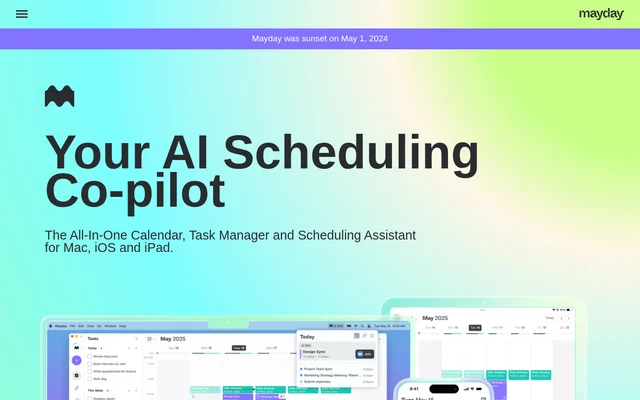
Mayday was an AI scheduling assistant that combined a calendar and task manager for individuals and teams. Mayday helped users organize meetings, reserve time for tasks and manage availability within native apps for Apple devices. The website states that Mayday was sunset on May 1, 2024, so its feature descriptions should be read in that discontinued-product context.
Mayday described its scheduling approach as a combination of user preferences, scheduling patterns and productivity practices. Rather than treating a calendar only as a record of appointments, Mayday used those inputs to suggest times for events and tasks. Team scheduling also aimed to reduce the need to interpret coworkers’ schedules manually.
What Mayday can do
Mayday brought meeting coordination, task scheduling and calendar organization into the same application. Mayday described tools for choosing suitable times, adjusting plans when priorities changed and controlling how availability appeared to others. Additional calendar features addressed preparation time, event visibility and quick access to upcoming meetings.
- Mayday scheduled tasks from inputs such as duration and time frame.
- Mayday suggested meeting times using coworkers’ schedules.
- Mayday supported automatic rescheduling and one-click rescheduling.
- Mayday offered scheduling links with limits and preferred meeting times.
- Mayday used Time Windows to define availability for different event types.
- Mayday categorized events with Smart Tags and applied related automations.
- Mayday created private mirrored placeholder events across multiple calendars.
- Mayday added buffer placeholders before and after events.
How Mayday worked across calendars and devices
Mayday used task duration and a desired time frame as inputs for finding time to complete work. When creating an event, Mayday suggested an appropriate meeting time rather than requiring users to decipher colleagues’ calendars. Scheduling links provided another route for arranging meetings while setting limits and directing guests toward preferred times.
Mayday listed Google Calendar and Microsoft 365 under its calendar connections. Native apps built with SwiftUI were available for macOS, iOS and iPadOS. Mayday also described a menu bar view with meeting shortcuts and widgets for checking upcoming events, viewing a month at a glance and joining meetings directly.
Who Mayday was for
Mayday addressed people balancing individual work with meetings, as well as teams coordinating shared availability. Mayday explicitly emphasized working with others, while its task management features supported reserving time for personal work. Calendar organization tools also served users who needed visibility into events without treating every event as an active commitment.
- Mayday helped teammates find meeting times without manually comparing schedules.
- Mayday helped individuals allocate time to tasks as priorities changed.
- Mayday let meeting hosts share availability while limiting bookable time.
- Mayday used FYI Events to visually minimize informational events.
Mayday strengths, limitations and availability
Mayday combined several related workflows: scheduling meetings, planning tasks, adjusting appointments and organizing calendar visibility. Mayday also offered controls for different kinds of availability, preparation buffers and mirrored calendar events. These capabilities supported managing both the timing of work and how commitments appeared across calendars, rather than addressing meeting booking alone.
Mayday’s sunset notice is the central limitation for prospective users. Although the page retains feature descriptions and access links, Mayday states that the product was sunset on May 1, 2024. Several other capabilities were explicitly labeled as coming soon, which distinguishes them from the native Apple apps and calendar connections described as available.
- Mayday was sunset on May 1, 2024.
- Mayday marked Android and Windows apps as coming soon.
- Mayday marked Apple iCloud support and Chat Assistant as coming soon.
Who Mayday is for
Individuals and teams managing meetings and tasks on Apple devices
- Finding meeting times across coworkers’ schedules
- Scheduling tasks within a specified time frame
- Rescheduling work when priorities change
- Sharing availability through scheduling links
- Reflecting availability across multiple calendars
Mayday FAQ
What is Mayday?
Mayday was an AI calendar, task manager and scheduling assistant for Mac, iOS and iPad. Mayday combined meeting coordination, task scheduling and calendar organization, using scheduling preferences and patterns to suggest suitable times for events and work.
Is Mayday still available?
Mayday was sunset on May 1, 2024, according to the notice on its website. Mayday’s page still describes its scheduling features and native apps, but the sunset notice establishes that the product was discontinued.
How did Mayday schedule tasks?
Mayday scheduled tasks using inputs such as duration and time frame, then selected a suitable time for the work. Mayday also described automatic and one-click rescheduling to accommodate changing priorities and changes to a user’s calendar.
Which calendars and devices did Mayday support?
Mayday listed Google Calendar and Microsoft 365 connections, with native SwiftUI apps for macOS, iOS and iPadOS. Mayday marked Apple iCloud support, Android apps and Windows apps as coming soon rather than available.
How did Mayday help teams schedule meetings?
Mayday suggested meeting times without requiring users to manually interpret coworkers’ schedules. Mayday also offered scheduling links that let users set limits and guide guests toward preferred times while helping preserve balanced availability.
From the community
No reviews yet
Be the first to review this tool. What you write helps the next person choose.