What is Moments?
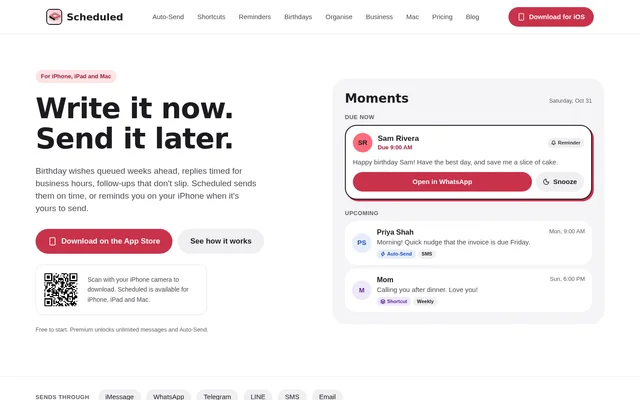
Moments is the message scheduling view in Scheduled, an app for iPhone, iPad and Mac. People can write messages when they think of them and choose when they should go out. Moments shows which messages are due or coming up and whether each one is set as a reminder, an Auto-Send message or a Shortcut.
What Moments can do
Moments brings manual reminders and automatic delivery into the same schedule. Reminders leave the final send action with the sender, while Auto-Send handles SMS and email without a tap at the scheduled time. Premium also covers repeating messages, groups, templates and sequences for messages that need to go out more than once or to multiple people.
- Reminders open prepared messages in iMessage, WhatsApp, Telegram or LINE.
- Auto-Send delivers SMS or email at the scheduled time.
- Scheduled Shortcuts can send through WhatsApp, iMessage or Telegram on iPhone.
- Birthday import pulls birthdays from contacts for advance planning.
- The Mac menu bar shows what is coming up next.
How Moments works
Moments uses a workflow on iPhone that starts with choosing a person from contacts or selecting a group. The sender writes the message, previews how it will look and picks a time. A reminder sends a notification, and tapping it opens the prepared message for manual sending. A Shortcut runs the Scheduled shortcut on iPhone at the set time. Scheduled also lets people plan on Mac and stay in sync with iPhone through the same account.
Who Moments is for
Moments is for people who want to plan both personal and work messages. Someone preparing birthday wishes can import birthdays and write messages ahead of time. Someone who writes a reply outside business hours can choose a later time. For client-facing teams, the Business plan offers a business sending number and brings client replies into the app.
- Prepare birthday wishes and set them to repeat yearly.
- Queue replies for business hours.
- Schedule an SMS reminder before an invoice is due.
- Keep client replies in the app with the Business plan.
Moments pricing and plans
Moments is available through Scheduled's free, Premium and Business plans. Free includes up to 3 active reminders, birthday import and calendar suggestions. Premium adds unlimited scheduled messages, Shortcuts, Auto-Send SMS and email, and tools for repeating messages, groups, templates and sequences. Business includes Premium features and adds a business sending number, a business name as sender ID and client replies in the app.
Moments uses plans billed through Apple ID, and the App Store shows the exact price in the buyer's currency before purchase. Premium is offered monthly, every 3 months or yearly. Auto-Send SMS draws one credit per recipient from packs purchased in the app. Email and Shortcut messages do not use credits.
Strengths and limitations of Moments
Moments makes the delivery method visible before a message is due, so the sender can tell whether a manual step remains. That distinction matters when planning across apps: a WhatsApp reminder opens the message for the sender to finish, while a supported Shortcut can send without opening the messaging app. On Mac, the menu bar shows upcoming messages, and the schedule stays in sync with iPhone.
- Free accounts are limited to 3 active reminders.
- Reminders do not send messages automatically.
- Auto-Send and Shortcuts are paid features.
- Auto-Send is limited to SMS and email, and SMS uses credits per recipient.
Moments FAQ
What is Moments?
Moments is the message scheduling view in Scheduled for iPhone, iPad and Mac. Moments shows when messages are due and whether they will prompt the sender to send manually, go out automatically over SMS or email, or run through an iPhone Shortcut.
Is Moments free?
Moments is available on Scheduled's free plan, which includes up to 3 active reminders, birthday import and calendar suggestions. Premium adds unlimited scheduled messages, Shortcuts and Auto-Send. The App Store shows the exact subscription price in the buyer's currency before purchase.
Can Moments send WhatsApp messages automatically?
Moments can send WhatsApp messages through the Scheduled Shortcut on iPhone with Premium or Business. A WhatsApp reminder instead opens the prepared message and leaves the final send action to the sender. The separate Auto-Send option is for SMS and email.
Does Moments use credits for scheduled messages?
Moments uses one credit per recipient for Auto-Send SMS, while email and Shortcut messages do not use credits. SMS credits can be purchased in the app and are returned to the balance if an Auto-Send SMS is deleted before it goes out.
Can Moments schedule recurring birthday messages?
Moments supports importing birthdays from contacts and preparing wishes in advance. Birthday import is included in the free plan, while repeating messages are a Premium feature. Scheduled can line up birthdays for the year and set a wish to repeat yearly.
From the community
No reviews yet
Be the first to review this tool. What you write helps the next person choose.