What is Music Demixer?
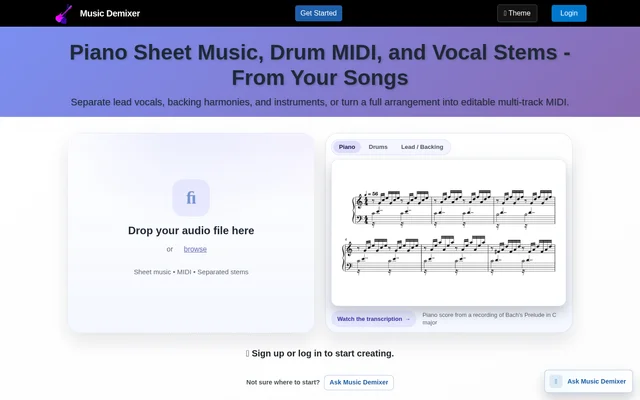
Music Demixer is a browser-based music tool that separates recordings into vocal and instrument parts and transcribes audio into editable music files. Music Demixer supports musicians working from full songs, solo performances, or already isolated tracks. Outputs include stem audio, MIDI, guitar tab drafts, PDF score drafts, and editable MusicXML.
Music Demixer combines separation and transcription within task-specific workflows. A user can isolate an instrument before converting the part into notation or MIDI, or skip separation when the uploaded recording already contains only the desired instrument. Vocal workflows also cover karaoke backing tracks, synced lyrics, and vocal melody transcription.
What Music Demixer can do
Music Demixer offers separate tasks for stem extraction, sheet music, MIDI, guitar tab, drums, and vocals. Output options depend on the selected task rather than every job producing every file type. The results screen supports listening and score previews, while the stem mixer allows users to select parts and download a custom mix.
- Music Demixer separates songs into vocals, drums, bass, piano, guitar, and Other stems.
- Music Demixer creates single-instrument and multi-track MIDI files.
- Music Demixer exports PDF score drafts and editable MusicXML.
- Music Demixer produces editable guitar tab drafts with selectable tuning.
- Music Demixer isolates drum kit pieces and creates editable drum MIDI.
- Music Demixer separates lead and backing vocals and offers duet separation in beta.
- Music Demixer creates karaoke backing tracks, synced lyrics, and vocal sheet music.
- Music Demixer previews MIDI with instrument sounds and displays following scores.
How Music Demixer works
Music Demixer starts with account sign-up or login and an audio upload. Supported input formats include MP3, WAV, FLAC, M4A/AAC, OGG, and AIFF. Users select a task, choose an instrument or multi-track output where applicable, and decide whether the source needs separation before transcription. Solo recordings can bypass the separation step.
Music Demixer provides task-specific controls such as guitar tuning, drum kit detail, project tempo, and time signature. Users keep the browser tab open during processing, then preview the available audio or notation. Paid jobs provide downloadable outputs, including stem audio in MP3, Opus, or WAV and score files for the selected transcription task.
Who Music Demixer is for
Music Demixer serves musicians who want to practice individual parts, edit transcribed performances, or work with separated audio in a DAW. Guitar recordings, drum performances, vocal recordings, and full arrangements each have dedicated workflows. Editable outputs support arranging and notation work, while audio stems support listening, practice, and remixing.
- Guitarists can create editable tab drafts to learn riffs and solos.
- Drummers can isolate drums, separate kit pieces, or create drum MIDI.
- Singers can create karaoke backing tracks and synced lyrics.
- Musicians can turn full arrangements into separate editable MIDI tracks.
- Piano players can obtain left- and right-hand transcription with sustain pedal events.
Music Demixer pricing and plans
Music Demixer offers a Free Preview with 1 job and a 30-second browser preview, without requiring a payment card. Full-length downloads require a paid option. The 5-Job Pack costs $5.99 USD, includes full downloads, and unlocks the saved Free Preview result. Pack credits never expire, and additional packs can be purchased.
Music Demixer Pro costs $9.99 USD per month and includes unlimited jobs, full downloads, and access to saved job history. Pro results are saved automatically and remain saved until deleted. Every access option includes all Music Demixer tools, but revisiting and downloading past results through job history is a Pro feature.
Music Demixer strengths and limitations
Music Demixer brings audio separation, editable transcription, and browser previews into a shared workflow. Support for both full mixes and isolated recordings allows different starting points, while MIDI, MusicXML, guitar tab, and audio exports serve different editing needs. The source also identifies outputs as drafts in several workflows and warns that AI-generated lyrics, notes, and timing may require editing.
- Music Demixer restricts full-length downloads to paid packs or Pro.
- Music Demixer requires the processing tab to remain open.
- Music Demixer labels duet separation and Click Track as beta features.
- Music Demixer may return stems without a click track when no drum beat is detected.
- Music Demixer requires Pro renewal to open, download, or delete saved Pro results.
Music Demixer FAQ
What is Music Demixer?
Music Demixer is a browser-based music separation and transcription tool. Music Demixer separates instrument and vocal stems, converts audio into editable MIDI and sheet music, creates guitar tab drafts, and produces karaoke backing tracks with synced lyrics.
Is Music Demixer free?
Music Demixer offers a Free Preview with 1 job and a 30-second browser preview, with no card required. Full-length downloads require a 5-Job Pack for $5.99 USD or Pro for $9.99 USD per month. Pro includes unlimited jobs and saved job history.
What files can Music Demixer create?
Music Demixer creates outputs according to the selected task, including MP3, Opus, or WAV stems, editable MIDI, PDF score drafts, MusicXML, and editable .gp5 guitar tabs. Full-mix guitar tab jobs also include Guitar and Backing track audio.
Can Music Demixer separate lead and backing vocals?
Music Demixer separates the main vocal from harmonies, doubles, and choir vocals through its Lead & Backing Vocals workflow. Music Demixer also offers combined vocals and instrumental separation, duet vocal separation in beta, vocal melody transcription, and karaoke tools.
What audio formats does Music Demixer support?
Music Demixer accepts MP3, WAV, FLAC, M4A/AAC, OGG, AIFF, and other common audio formats. Music Demixer supports full songs as well as isolated instrument or vocal recordings, with an option to skip separation for an already isolated track.
Does Music Demixer transcription need editing?
Music Demixer warns that AI-generated lyrics, notes, and timing may need editing. Music Demixer describes several notation outputs as drafts and provides editable MIDI, MusicXML, and guitar tab files so users can work further on the generated transcription.
From the community
No reviews yet
Be the first to review this tool. What you write helps the next person choose.