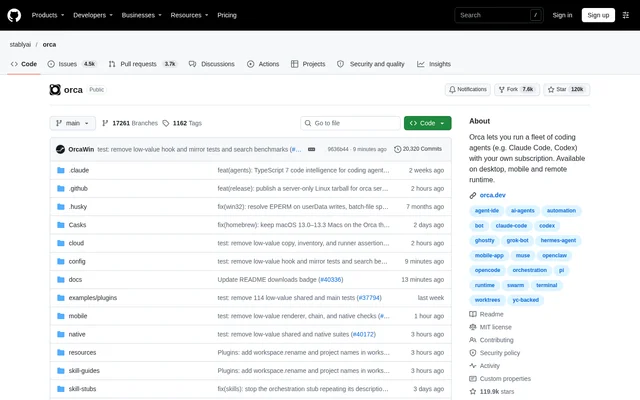
What is orca?
orca is an open-source application for orchestrating coding agents across isolated development workspaces. Developers can run Claude Code, Codex, and other terminal-based agents in parallel while keeping their work separate through Git worktrees. The application brings chat, terminals, diffs, and a browser into a shared interface.
orca is published in the stablyai/orca GitHub repository under the MIT License. Desktop builds support macOS, Windows, and Linux, while companion mobile apps support iOS and Android. The repository also links to documentation, contribution instructions, community support, and privacy and telemetry information.
What orca can do
orca combines agent coordination with tools for reviewing and managing development work. A lead agent can split a larger task, start workers in separate workspaces, and return their results. Developers can inspect changes, provide targeted feedback, and arrange agents, terminals, browsers, and diffs in split panes.
- orca runs coding agents in parallel, each in an isolated worktree.
- orca switches conversations between chat and raw CLI interaction without losing context.
- orca sends feedback on exact changed lines back to an agent.
- orca drafts commit messages and pull requests from diffs.
- orca brings GitHub and Linear tasks into a shared view.
- orca copies an inspected browser element's HTML, styles, and selector into an agent workflow.
- orca schedules prompts for dependency updates, triage, and flaky-test sweeps.
- orca provides CLI commands for worktrees, workers, browser control, and desktop app control.
How orca works
orca supports coding agents through chat or their raw command-line interfaces. The repository states that any agent running in a terminal can run in orca. Developers can create isolated worktrees for separate tasks, review the resulting diffs, and send failing checks or pull request review comments back to an agent.
orca can pair with a Remote Orca Server, work on an SSH host, or assign a cloud VM to a worktree. These remote options allow agents to continue running when a laptop sleeps. The companion mobile app pairs with the desktop app for notifications, chat replies, and monitoring work across machines.
Who orca is for
orca is designed for developers using coding agents across repositories and machines. The documented workflows cover parallel implementation, review of generated code, task management, and recurring maintenance. Developers working away from their desks can use the mobile app to respond when an agent needs input and keep existing work moving.
- Developers can separate simultaneous coding tasks into independent worktrees.
- Developers can delegate larger tasks to a lead agent and worker agents.
- Reviewers can annotate changed lines and return focused feedback.
- Developers can start workspaces from GitHub and Linear tasks.
- Developers can monitor ongoing agent work from a paired phone.
orca pricing and access
orca is free and open source under the MIT License. The repository states that coding agents run with the user's own subscription. Desktop builds are available through download links, Homebrew for macOS, and AUR packages for Arch Linux. Mobile access is available through the iOS App Store and an Android APK.
orca strengths and limitations
orca combines broad terminal-agent compatibility with isolated worktrees, integrated review tools, and local or remote execution. Desktop and mobile access support continuing development work across devices. The source also identifies setup dependencies: mobile access requires desktop pairing, remote execution needs a configured remote environment, and coding agents use the user's own subscription.
- orca requires desktop pairing for companion mobile monitoring and control.
- orca requires a remote server, SSH host, or cloud VM setup for remote execution.
- orca uses the user's own coding agent subscription rather than including one.
orca FAQ
What is orca?
orca is a free, open-source coding agent orchestrator for running Claude Code, Codex, and other terminal agents in parallel. orca combines isolated worktrees, chat, terminals, diffs, and a browser for developers managing agent-driven coding work.
Is orca free?
orca is free and open source under the MIT License. orca runs coding agents with the user's own subscription, so the application's free licensing does not mean an agent subscription is included.
Which coding agents does orca support?
orca supports any coding agent that runs in a terminal. The repository lists Claude Code, Codex, Cursor, GitHub Copilot, OpenCode, Cline, and other agents, with options to use chat or the raw CLI.
Which operating systems does orca support?
orca provides desktop builds for macOS, Windows, and Linux, plus companion mobile apps for iOS and Android. orca mobile apps pair with the desktop app to monitor agents, receive notifications, and send chat replies.
Can orca keep agents running when a laptop sleeps?
orca can keep agents running when a laptop sleeps through remote execution. orca supports pairing with a Remote Orca Server, working on an SSH host, or giving a worktree its own cloud VM.
Does orca integrate with GitHub and Linear?
orca provides native access to GitHub and Linear tasks and can start a workspace for each task. orca also drafts commit messages and pull requests from diffs and sends failing checks or review comments back to an agent.
From the community
No reviews yet
Be the first to review this tool. What you write helps the next person choose.