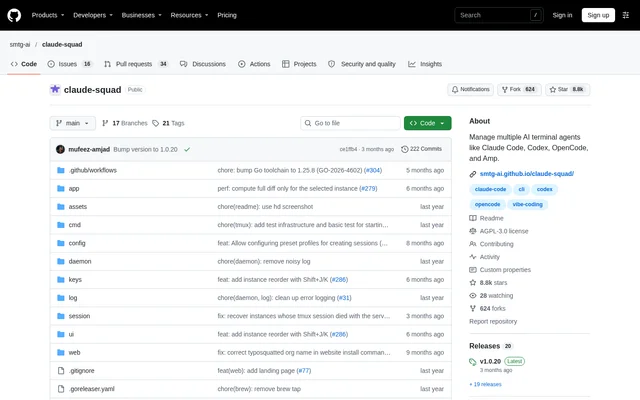
What is Claude Squad?
Claude Squad is an open-source terminal application for managing multiple AI coding agents across separate workspaces. Claude Squad serves developers who want to work on several coding tasks simultaneously without combining every agent's changes in the same working directory. Supported assistants named in the repository include Claude Code, Codex, Gemini and Aider.
Claude Squad brings agent sessions and task controls into a terminal interface. Developers can move between sessions, attach to an agent to provide another prompt, and inspect changes before applying them. The repository also names OpenCode and Amp among the AI terminal agents Claude Squad manages.
What Claude Squad can do
Claude Squad combines concurrent agent execution with controls for inspecting and managing the resulting code changes. Each task receives an isolated Git workspace, while the terminal interface provides access to sessions, previews and diffs. Background execution and configurable agent commands support workflows that involve different assistants or several tasks.
- Claude Squad runs multiple agent sessions in one terminal window.
- Claude Squad isolates task codebases with Git worktrees.
- Claude Squad shows previews and diffs for reviewing changes.
- Claude Squad commits and pushes branches to GitHub.
- Claude Squad pauses and resumes sessions.
- Claude Squad provides named profiles for different agent commands.
- Claude Squad offers experimental automatic prompt acceptance for Claude Code and Aider.
How Claude Squad works
Claude Squad uses tmux to create separate terminal sessions and Git worktrees to give each session its own branch. After installation, developers launch Claude Squad with cs. The default agent command is claude, while the program flag allows a different assistant command, including codex, aider or gemini.
Claude Squad stores configuration in ~/.claude-squad/config.json, and cs debug reports the configuration path. Named profiles pair display names with agent launch commands. When multiple profiles exist, the session creation interface offers a profile picker. The documented Codex setup also requires setting the OPENAI_API_KEY environment variable before launching the assistant.
Who Claude Squad is for
Claude Squad is for developers using terminal-based AI assistants to work on concurrent coding tasks. Separate branches and workspaces support keeping agent changes apart, while session controls let developers return to a task with further instructions. The preview and diff views support reviewing generated changes before committing or applying work.
- Developers can assign separate coding tasks to different agent sessions.
- Developers can compare changes in the diff view before proceeding.
- Developers can select named profiles when using different assistant commands.
- Developers can leave tasks running in the background.
Claude Squad access and installation
Claude Squad is distributed through a public repository under the AGPL-3.0 license. The repository documents Homebrew installation and a manual shell installation script rather than product subscription plans. Both installation paths make Claude Squad available as cs, and the manual installer also supports choosing a custom binary name.
Claude Squad strengths and limitations
Claude Squad combines isolated coding workspaces, agent selection and change review in a terminal workflow. Git worktrees separate task branches, and named profiles make different assistant commands available during session creation. Setup still depends on terminal tools and the selected assistant, and automatic acceptance has a narrower documented scope than general session management.
- Claude Squad requires tmux and gh.
- Claude Squad marks automatic prompt acceptance as experimental.
- Claude Squad documents automatic prompt acceptance for Claude Code and Aider.
- Claude Squad recommends updating the underlying agent when session creation times out.
Claude Squad FAQ
What is Claude Squad?
Claude Squad is an open-source terminal application that manages multiple AI coding agents in separate workspaces. Claude Squad supports concurrent tasks, session navigation and change review, using tmux sessions and Git worktrees to separate agent activity.
Is Claude Squad free?
Claude Squad is available as an open-source project under the AGPL-3.0 license. The repository provides Homebrew and manual installation instructions but does not list Claude Squad subscription plans or pricing for the underlying AI assistants.
Which AI coding agents does Claude Squad support?
Claude Squad names Claude Code, Codex, Gemini and Aider in its usage documentation, while the repository description also lists OpenCode and Amp. Claude Squad accepts an agent launch command through its program flag or named configuration profiles.
How does Claude Squad keep coding tasks separate?
Claude Squad uses tmux for isolated terminal sessions and Git worktrees for separate codebases and branches. Claude Squad gives each task its own workspace and provides preview and diff views so developers can inspect changes before applying them.
How do you install Claude Squad?
Claude Squad can be installed through Homebrew or the repository's shell installation script. Claude Squad requires tmux and gh, launches with cs, and uses claude as the default agent command. The manual installer supports a custom binary name.
Can Claude Squad automatically accept agent prompts?
Claude Squad includes an experimental autoyes flag that automatically accepts prompts for Claude Code and Aider instances. Claude Squad also supports completing tasks in the background, while session controls allow developers to attach again and provide further instructions.
From the community
No reviews yet
Be the first to review this tool. What you write helps the next person choose.