What is PDFPal.ai?
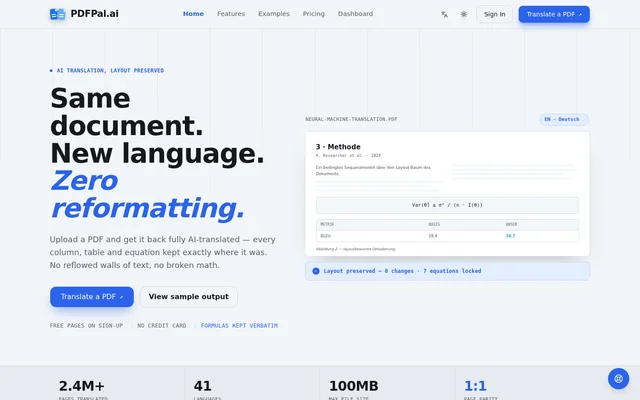
PDFPal.ai is an AI PDF translator that fits translated text back into the original page layout. PDFPal.ai keeps headings, columns, figures, and page numbers in place and leaves mathematical formulas unchanged. The focus on page structure makes the tool useful for researchers and other readers who need to follow equations, captions, or footnotes in the context of the original document.
What PDFPal.ai can do
PDFPal.ai translates into 41 target languages and accepts PDF uploads up to 100 MB. The available output formats are a translated PDF and a side-by-side bilingual PDF. A per-document CSV glossary can guide terminology, and the translation engine can be selected separately for each file.
- PDFPal.ai preserves reading order across columns.
- PDFPal.ai keeps table cells, captions, and figure anchors in position.
- PDFPal.ai leaves formulas and inline math unchanged.
- PDFPal.ai maintains footnotes and page numbering.
- PDFPal.ai supports batch submissions on paid plans.
How PDFPal.ai works
PDFPal.ai starts with a PDF uploaded by drag and drop or selected from a file picker. PDFPal.ai separates text from visual layout and detects columns, tables, and formulas before translation. The selected model translates text blocks using the supplied glossary, if any, while formulas are masked as placeholders. PDFPal.ai then returns the text to its original positions and resizes paragraphs to fit.
Who PDFPal.ai is for
PDFPal.ai is aimed at researchers and readers who need translated papers, contracts, or other documents to retain their original structure. For mathematical papers, PDFPal.ai preserves notation without asking the translation model to rewrite it. For comparative law research, keeping footnotes and page numbers in place helps readers refer back to the original.
- Read academic papers with equations and multi-column layouts.
- Review translated case law with footnotes and pagination intact.
- Translate reports and fact sheets that contain tables and figures.
- Compare source and translated text in a side-by-side PDF.
PDFPal.ai pricing and plans
PDFPal.ai gives new accounts 20 free pages without a credit card. The Starter plan costs $9 per month for 500 pages, Pro costs $29 per month for 2,000 pages, and Max costs $99 per month for 10,000 pages at the standard engine rate. Standard engines use one credit per page, while premium engines use two. Paid plans include watermark-free output and batch translation, and failed jobs trigger automatic credit refunds.
PDFPal.ai strengths and limitations
PDFPal.ai preserves equations and reading order rather than returning only extracted text. PDFPal.ai says it stores documents privately, provides short-lived signed download links, and does not use files to train models. Files are retained until the user deletes them or closes the account, and text being translated is sent to the selected engine provider, which may involve a model-routing service.
- PDFPal.ai has no built-in OCR for image-only scans.
- PDFPal.ai watermarks free-plan output.
- PDFPal.ai limits the free plan to one file at a time.
- PDFPal.ai reserves premium engines for paid plans.
Getting started with PDFPal.ai
PDFPal.ai offers free pages on sign-up for testing a document. The upload must contain a text layer, so image-only scans need separate OCR first. After uploading, users can choose a target language and an available engine, add a CSV glossary if needed, and review the estimated credit cost in the engine picker. Finished jobs can be downloaded as a translated or side-by-side bilingual PDF.
PDFPal.ai FAQ
What is PDFPal.ai?
PDFPal.ai is an AI PDF translator that preserves the original page layout while translating text. PDFPal.ai keeps columns, tables, figures, footnotes, and page numbers in place, leaves equations unchanged, and offers translated or side-by-side bilingual PDF output.
Is PDFPal.ai free?
PDFPal.ai gives new accounts 20 free pages without requiring a credit card. The free plan watermarks output and handles one file at a time. Paid plans start at $9 per month and include watermark-free output, batch submissions, and access to premium engines.
Can PDFPal.ai translate scanned PDFs?
PDFPal.ai can process scanned PDFs only after a text layer has been added, because PDFPal.ai does not include built-in OCR. Image-only scans need a separate OCR tool before upload. If an image-only file is submitted without a text layer, the job fails and credits are refunded.
Does PDFPal.ai preserve equations and tables?
PDFPal.ai keeps equations unchanged and preserves table cell positions in the translated PDF. Formulas are masked as placeholders during translation, while translated text is fitted back into the original layout. PDFPal.ai also keeps captions, figure anchors, and multi-column reading order.
Can PDFPal.ai create a bilingual PDF?
PDFPal.ai can export a side-by-side bilingual PDF as an alternative to a translated PDF. Bilingual output is available on both free and paid plans, so readers can compare the original document with the translation. Free-plan output carries a watermark.
Does PDFPal.ai use uploaded documents to train AI models?
PDFPal.ai says it does not use uploaded documents to train models. PDFPal.ai sends the text being translated to the selected engine provider, which may involve a model-routing service. Files are stored privately until they are deleted or the account is closed.
From the community
No reviews yet
Be the first to review this tool. What you write helps the next person choose.