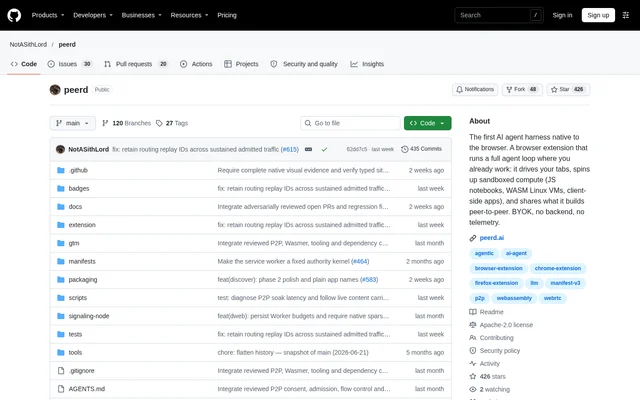
What is peerd?
peerd is an open-source AI agent runtime delivered as a browser extension for Chromium and Firefox. peerd works with existing tabs, signed-in sessions, web applications, and local browser compute rather than requiring a hosted browser. The project builds on browser primitives including Workers, origins, sandboxing, WASM/WASI, WebRTC, and WebExtensions.
peerd supports a choice of hosted model providers and local models accessed through localhost, alongside preliminary support for local WebGPU models. No peerd account or tool-server connection is required. Current builds send no product telemetry to peerd, while model calls and other network operations follow separate scoped policies.
What peerd can do
peerd combines browser interaction, sandboxed computation, and persistent agent context inside the extension. The main agent delegates page and compute work to separate keyless actors with tools scoped to their environment. Preview builds additionally provide browser-to-browser discovery and communication, while store packages exclude the distributed dweb capabilities.
- peerd reads page content and drives browser tabs and web applications.
- peerd builds reusable site clients for subsequent tasks.
- peerd executes scripts, JavaScript Notebooks, and compiled WASI tools.
- peerd runs browser Apps and Chromium-only Linux WebVMs.
- peerd retains sessions, memory, skills, goals, and browser-native repository history.
- peerd preview builds enable agent-to-agent communication over WebRTC.
How peerd works
peerd starts from the browser toolbar with creation and unlocking of a local vault, followed by profile onboarding. Users then open Settings, add a provider key or choose a supported local provider, select a model, and start a chat. Passphrase unlock is always available; passkey unlock depends on browser and device support for WebAuthn PRF.
peerd can be loaded from source in Chrome by enabling Developer mode and selecting the extension directory through Load unpacked. Firefox requires a Firefox-specific package rather than the checked-in Chrome manifest. GitHub Releases provides current artifacts, and packaging determines which features are included for each browser and release channel.
Who peerd is for
peerd suits users who want browser-based agent work to happen in their existing web environment, as well as developers examining or extending a browser-native agent runtime. The source extension uses vanilla JavaScript with ES modules and runs directly when loaded unpacked, without a development bundler, transpiler, or watcher.
- peerd supports tasks involving existing tabs and signed-in web applications.
- peerd provides isolated browser compute for agent-written scripts and applications.
- peerd supports workflows that retain context through sessions, memory, and skills.
- peerd preview builds support experiments with browser-to-browser agent communication.
peerd licensing and access
peerd is distributed as an open-source project under the Apache License 2.0, with source installation instructions and release artifacts available through GitHub. The repository does not list subscription plans or model-provider prices. Model access is configured separately through a supported hosted provider or local option, rather than through a required peerd account.
peerd distinguishes its project license from the licenses of bundled components. Vendored components retain their own licenses, and CheerpX is a proprietary runtime supplied by Leaning Technologies rather than software covered by peerd's Apache license. The shipped extension has no npm runtime dependencies; third-party runtime code is vendored separately.
peerd strengths and limitations
peerd combines access to existing browser sessions with browser isolation, narrow tool exposure, explicit egress controls, and extension-managed credentials and audit. These boundaries do not mean every feature is available in every browser or that all stored data is encrypted. The repository documents browser-specific capability gaps and security boundaries.
- peerd WebVMs remain Chromium-only.
- peerd Firefox preview builds omit dweb until Firefox has a mesh host.
- peerd Apps block ambient network access and require confirmation for external HTTP and HTTPS links.
- peerd temporary Firefox add-ons require reloading after browser restarts.
- peerd vault encryption covers vault secrets and protected security records, not all local extension state.
peerd FAQ
What is peerd?
peerd is an open-source browser AI agent runtime for Chromium and Firefox. peerd can read and drive tabs, work with signed-in web applications, execute code in browser-isolated environments, and retain agent context inside the extension.
How can you get peerd?
peerd is available through its GitHub source repository and release artifacts under the Apache License 2.0. peerd supports source installation in Chrome and Firefox-specific packages for Firefox. The repository does not list subscription pricing, and vendored components retain separate licenses.
Does peerd support local AI models?
peerd supports local models through localhost and includes preliminary support for local WebGPU models. peerd also supports hosted model providers through bring-your-own-key adapters. Users configure a provider in Settings, select a model, and start a chat.
Does peerd work in Firefox?
peerd supports Firefox through Firefox-specific packages, with differences from Chromium builds. peerd uses dedicated workers and visible Notebooks for Firefox compute, while WebVMs remain Chromium-only. Firefox preview builds omit dweb, and temporary add-ons must be loaded again after Firefox restarts.
Does peerd require an account or collect telemetry?
peerd requires no peerd account, hosted browser, or tool-server connection, and current builds send no product telemetry to peerd. peerd still performs network operations such as model calls and web reads through operation-specific scoped paths and policies.
Can peerd connect agents across browsers?
peerd preview builds support signed identity, browser-to-browser discovery, dwapps, and agent-to-agent communication over WebRTC. peerd store packages omit those dweb capabilities entirely, and Firefox preview builds omit dweb until Firefox has a mesh host.
From the community
No reviews yet
Be the first to review this tool. What you write helps the next person choose.