What is WebBrain?
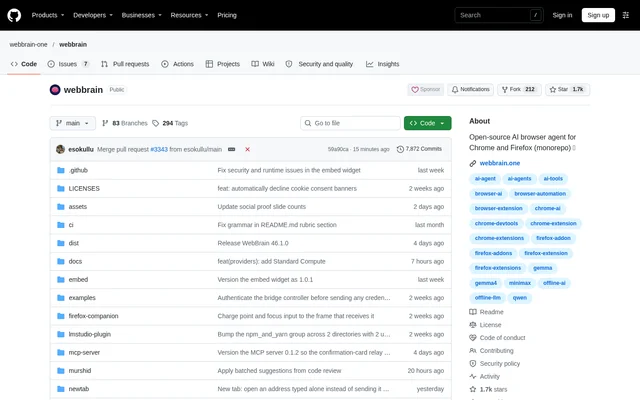
WebBrain is an open-source AI browser agent that runs in a side panel beside browser tabs. WebBrain combines page questions, browser automation, and multi-step workflows in a browser extension. The project serves people working with web content and developers who need page inspection tools, with installation options for Chrome, Firefox, and Edge.
WebBrain lets users choose the model behind the agent rather than requiring a single provider. The available paths include a managed default, local model servers, and cloud APIs. The repository distributes WebBrain under GPL-3.0-or-later and includes documentation covering architecture, providers, permissions, privacy, and prompt-injection defenses.
What WebBrain can do
WebBrain combines page reading with actions that operate directly in the browser. Page information comes from the accessibility tree, while an optional vision mode uses screenshots with an image-capable model. WebBrain also supports planning before execution, reusable workflows, and recurring page checks for tasks that extend beyond a single question.
- WebBrain reads text, links, forms, tables, PDFs, and interactive elements.
- WebBrain clicks, types, scrolls, navigates, uploads, downloads, and verifies forms.
- WebBrain can show structured plans for approval before Act or Dev tools run.
- WebBrain saves successful runs as workflows that users can rerun, export, and share.
- WebBrain schedules tasks and watches pages for specified conditions.
- WebBrain provides page source, styles, console, network information, and reversible edits in Dev mode.
How WebBrain works
WebBrain opens from the extension icon, after which users enter a question or task in the side panel. WebBrain selects Ask mode unless the message requests browser action. Users can explicitly choose Ask, Act, or Dev with slash commands. Ask is read-only, Act allows browser interaction, and Dev adds diagnostic access and reversible page changes.
WebBrain separates permission modes from provider tool tiers. Compact, Mid, and Full determine how many tools the selected model sees, while modes determine what actions the user allows. WebBrain requests per-site permission before consequential actions and can compact conversation context as the available model window fills.
Who WebBrain is for
WebBrain suits browser users who want help understanding pages or completing repeated web tasks. Developers can use Dev mode for page inspection and diagnostics. Users working with local models can connect an OpenAI-compatible server, while users who prefer a simpler start can use the managed default without local model setup.
- WebBrain summarizes the current page and answers questions about its contents.
- WebBrain finds links about a requested topic, such as pricing.
- WebBrain fills search fields and navigates websites.
- WebBrain turns demonstrated actions into reusable workflows.
- WebBrain monitors a page and acts when a specified condition appears.
WebBrain pricing and access
WebBrain is available as an open-source project under GPL-3.0-or-later, with installation through browser extension stores or the source repository. The repository does not list subscription prices or paid plans. The managed default needs no API key or local setup, and local model connections also need no API key.
WebBrain supports local providers including llama.cpp, Ollama, LM Studio, and LocalAI, alongside cloud APIs such as OpenAI, Anthropic Claude, and Google Gemini. WebBrain Companion is a separate desktop app for local models and supported account subscriptions, with downloads for Windows, macOS, and Linux. The source does not specify provider usage charges.
WebBrain strengths and limitations
WebBrain offers model choice, browser automation, and reusable workflows within a side-panel interface. Read-only and action modes provide distinct permission boundaries, while per-tab conversations keep browsing contexts separate. Local user memory is optional, and the research-sharing switch for local or bring-your-own providers remains off by default.
- WebBrain vision mode requires an image-capable model.
- WebBrain local model context must accommodate fixed instructions, tool schemas, page content, conversation history, and requested output.
- WebBrain does not expose every tool in every provider tier.
- WebBrain temporary Firefox add-ons disappear after a browser restart, and permanent source installation requires signing.
WebBrain FAQ
What is WebBrain?
WebBrain is an open-source AI browser extension that places an agent beside browser tabs. WebBrain answers questions about pages, performs actions such as clicking and typing, and runs multi-step workflows using a managed default, local models, or cloud APIs.
Is WebBrain free?
WebBrain is distributed as an open-source project under GPL-3.0-or-later. The repository does not list subscription pricing or paid plans. WebBrain provides a default model without an API key or local setup, but the source does not state cloud provider usage charges.
Which browsers does WebBrain support?
WebBrain provides installation links for the Chrome Web Store, Firefox Add-ons, and Edge Add-ons. WebBrain also documents loading the extension from source in Chrome and Firefox, including the requirement to sign Firefox add-ons for permanent source installation.
Can WebBrain use local AI models?
WebBrain connects to OpenAI-compatible local servers, including llama.cpp, Ollama, vLLM, LM Studio, and LocalAI. WebBrain also offers a separate Companion desktop app for local models on Windows, macOS, and Linux. Local models need sufficient context capacity for instructions, tools, page content, and conversation history.
What can WebBrain automate?
WebBrain can click, type, scroll, navigate, upload, download, and fill forms in Act mode. WebBrain also supports saved workflows, scheduled tasks, and page watches that act when a condition is met, with per-site permission prompts before consequential actions.
What is the difference between WebBrain Ask, Act, and Dev modes?
WebBrain Ask mode reads pages, answers questions, and fetches URLs without browser actions. WebBrain Act mode adds clicking, typing, navigation, uploads, downloads, and form filling. WebBrain Dev mode adds page source, styles, console, network information, and reversible page edits.
From the community
No reviews yet
Be the first to review this tool. What you write helps the next person choose.