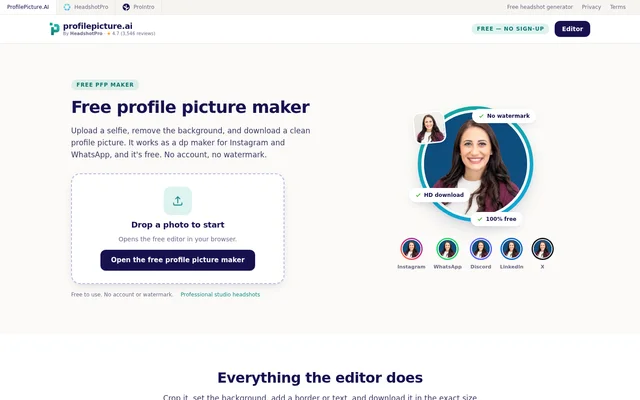
What is ProfilePicture.AI?
ProfilePicture.AI is a free profile picture maker that edits an existing selfie into a profile image for social accounts, professional profiles, or a CV. ProfilePicture.AI runs in a browser and combines background removal, cropping, styling, and image export. The editor is designed for people who already have a photo and want to change its presentation rather than generate a new portrait.
ProfilePicture.AI explicitly separates this free editor from studio-style AI headshot generation. The page links to HeadshotPro for professionally reshot AI portraits and identifies that service as a paid product. The free editor instead works with the detail already present in the uploaded image, making the original photo's sharpness and lighting relevant to the finished result.
What ProfilePicture.AI can do
ProfilePicture.AI provides editing controls for the background, subject position, surrounding frame, and final file. A live round preview helps users check whether hair and shoulders fit within a circular profile display. Export presets cover social accounts and professional uses, alongside a 1024×1024 HD square download in PNG or JPEG format without a watermark.
- ProfilePicture.AI removes photo backgrounds inside the browser.
- ProfilePicture.AI adds solid colors, gradients, or patterns behind the subject.
- ProfilePicture.AI adjusts circle crops with zoom and drag controls.
- ProfilePicture.AI adds solid rings or gradient frames with adjustable thickness.
- ProfilePicture.AI applies photo filters and straight or curved text.
- ProfilePicture.AI exports images using platform-specific size presets.
How ProfilePicture.AI works
ProfilePicture.AI starts with a photo dropped into the browser editor or selected from a phone camera roll. JPG and PNG uploads are supported. Users remove the background, choose a replacement color or gradient, and adjust the crop or border before downloading. The same upload, edit, and download workflow is available in mobile browsers and on desktop.
ProfilePicture.AI processes background removal in the browser, so the image is not uploaded to servers for the cut-out step. The page also states that editor photos are not used to train models. These statements describe local background processing and photo training practices; the background-removal claim is specifically tied to that editing step.
Who ProfilePicture.AI is for
ProfilePicture.AI serves people preparing profile images for Instagram, WhatsApp, Discord, TikTok, YouTube, Twitter/X, and LinkedIn. ProfilePicture.AI also supports CV photos with plain backgrounds. Social profile users can check a round crop and add a border, while people updating professional profiles can choose a plain background, including the LinkedIn-blue option mentioned on the page.
- ProfilePicture.AI creates round display pictures for Instagram and WhatsApp.
- ProfilePicture.AI prepares avatars for Discord, TikTok, and YouTube.
- ProfilePicture.AI styles LinkedIn profile pictures with a professional crop.
- ProfilePicture.AI prepares plain-background photos for a CV or resume.
ProfilePicture.AI pricing and access
ProfilePicture.AI offers the editor and HD downloads free of charge, with no sign-up, credit card, watermark, or paywall. Users can open the browser editor directly and work with their existing photo. The page presents HeadshotPro as a separate paid option for studio-style AI headshots, not as a requirement for downloading from the free editor.
ProfilePicture.AI strengths and limitations
ProfilePicture.AI combines account-free access, watermark-free downloads, browser-based background removal, and export presets for several profile destinations. The editor supports both mobile and desktop use, with controls for practical changes such as framing a face or replacing a distracting background. The main boundary is the source image: the editor changes an existing photo rather than inventing missing detail or reshooting the portrait.
- ProfilePicture.AI requires an existing photo to edit.
- ProfilePicture.AI cannot invent detail that is absent from the uploaded file.
- ProfilePicture.AI does not generate studio-style AI portraits in this free editor.
ProfilePicture.AI FAQ
What is ProfilePicture.AI?
ProfilePicture.AI is a browser-based profile picture editor for existing photos. ProfilePicture.AI removes backgrounds, adjusts circle crops, and adds borders, filters, or text before exporting images for social profiles, LinkedIn, or CV use.
Is ProfilePicture.AI free?
ProfilePicture.AI is free to use, including HD profile picture downloads, with no account, credit card, watermark, or paywall. The page separately links to HeadshotPro, a paid product for studio-style AI headshots.
Is ProfilePicture.AI an AI profile picture generator?
ProfilePicture.AI is an editor for a photo the user already has, not a studio-style AI portrait generator. The page directs users who want a reshot AI portrait to the separate paid HeadshotPro product.
Does ProfilePicture.AI upload photos for background removal?
ProfilePicture.AI runs background removal in the browser, without uploading the image to servers for that step. The page also states that editor photos are not used to train models.
Does ProfilePicture.AI work on phones?
ProfilePicture.AI works in a mobile browser as well as on desktop. Users can select a photo from their phone camera roll, edit the background and crop, and download the finished profile picture without creating an account.
What file formats does ProfilePicture.AI support?
ProfilePicture.AI accepts JPG and PNG photo uploads and exports finished images as HD PNG or JPEG files. ProfilePicture.AI also provides platform-specific export presets and a 1024×1024 HD square option without a watermark.
From the community
No reviews yet
Be the first to review this tool. What you write helps the next person choose.