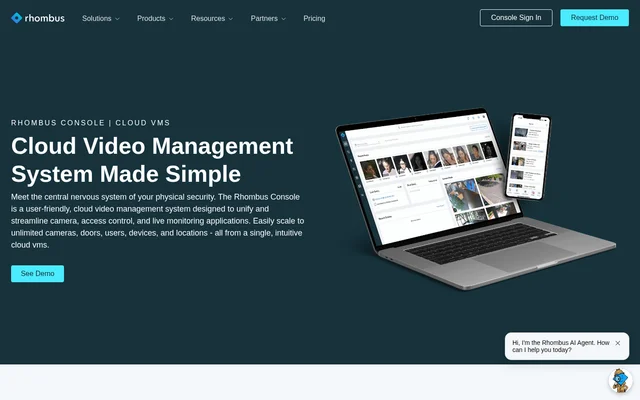
What is Rhombus?
Rhombus is a cloud video management system for organizations that want to manage cameras, doors, sensors, and live monitoring in the same console. Facilities and security teams can review footage, monitor door events, and manage users across locations without switching between separate camera and access control dashboards.
What Rhombus can do
Rhombus supports live monitoring and footage review from the same console. Teams can watch multiple feeds on a video wall during live monitoring or use Smart Search to find recorded footage afterward. Rhombus MIND can answer questions, take actions, and create reports using physical security data.
- Rhombus displays multiple live camera feeds on video walls.
- Rhombus lets operators manage door events alongside live video.
- Rhombus lets users share video from the console.
- Rhombus sends alerts through the mobile app, text, or email.
- Rhombus can trigger audio and visual deterrence workflows based on AI threat detection.
How Rhombus works
Rhombus provides remote access through a desktop or mobile app, while Rhombus cameras store video locally. Operators can stream camera footage, manage door events, and configure alerts for specific users and schedules. The console uses granular permissions to control user access.
Rhombus also offers the N100 Relay for third-party camera streams. The number of streams a unit can handle depends on camera resolution, bitrate, motion, and enabled AI features. To enable AI features for a third-party camera connected through the N100 Relay, Rhombus requires a Professional or Enterprise license for that camera.
Who Rhombus is for
Rhombus is designed for organizations that manage physical security at their facilities. The product page includes examples from an office manager who uses the dashboard to receive alerts and view footage, and an information systems executive whose organization uses controlled facility access and reviews footage. The pricing page also lists school districts, cities, and Fortune 500 companies as users.
- Monitor camera feeds and door events across locations.
- Review and share incident footage with other users.
- Manage permissions for staff who need access to the console.
- Route alerts to designated users on a schedule.
Rhombus pricing and plans
Rhombus offers a free trial, but its cameras require both a one-time hardware purchase and an ongoing license. The pricing page lists the R120 Mini Dome at $399 and its Professional license at $149, for a total of $548. Rhombus products are available through authorized resellers, and organizations can request a custom quote.
Rhombus lists Professional and Enterprise license options on its pricing page. For Rhombus cameras, the Professional license does not include AI features or cloud archiving. The pricing page directs buyers to the license comparison for details on what each option covers. Shipping and international fees may apply to listed camera prices.
Rhombus strengths and limitations
Rhombus brings live video, door events, and user permissions into a shared console, with remote access for staff away from the facility. The company states that the system uses end-to-end encryption and a Zero Trust architecture. Rhombus cameras include a 10-year warranty, and the license covers ongoing service and firmware updates.
- Rhombus cameras cannot operate without an ongoing license.
- The Professional license for Rhombus cameras excludes AI features and cloud archiving.
- The N100 Relay supports up to 10 camera streams per unit.
Rhombus FAQ
What is Rhombus?
Rhombus is a cloud video management system that combines security cameras, access control, sensors, and live monitoring. Security and facilities teams can use the Rhombus Console to monitor camera feeds and door events, review and share footage, and manage users across locations.
Is Rhombus free?
Rhombus offers a free trial, but its cameras require a one-time hardware purchase and an ongoing license to operate. The pricing page lists the R120 Mini Dome at $399 and its Professional license at $149, for a total of $548.
What does Rhombus MIND do?
Rhombus MIND is an AI assistant built into Rhombus that can answer questions, take actions, and create reports from physical security data. The console brings together cameras, access control, and sensors, giving users a single place to work with that data.
Does Rhombus work with third-party cameras?
Rhombus supports third-party camera streams through the N100 Relay, which handles up to 10 streams per unit depending on resolution, bitrate, motion, and enabled AI features. Turning on AI features for a third-party camera connected through the relay requires a Professional or Enterprise license per camera.
Where does Rhombus store camera footage?
Rhombus cameras store video locally on the cameras. Teams can still access footage remotely through the desktop or mobile app. The pricing page lists storage durations by camera model and notes that they are based on default settings.
From the community
No reviews yet
Be the first to review this tool. What you write helps the next person choose.