What is riter app?
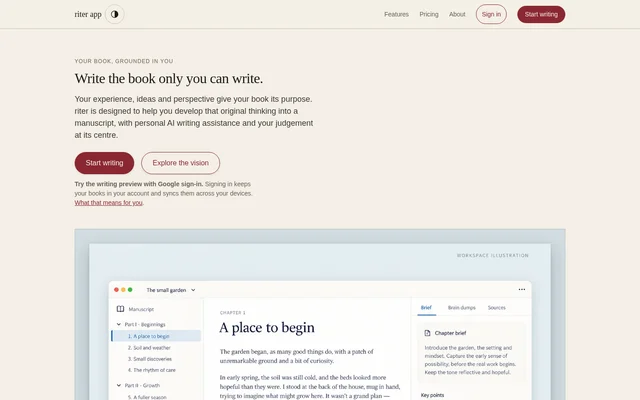
riter app is a book-writing workspace with personal AI writing assistance, designed for authors turning their own experience and ideas into a manuscript. The available product is a writing preview with chapters, notes and wording review. The author remains responsible for the book’s thinking and revision decisions rather than handing authorship to the software.
riter app distinguishes the current preview from a broader author experience still described as its product vision. That vision includes interviews, spoken thoughts, research, story or argument development, and book design. Those descriptions should not be read as a list of capabilities already included in the free editor.
What riter app can do
riter app provides tools for organising a book and reviewing its wording while keeping notes close to the draft. The preview highlights wording patterns and explains them so authors can decide what to revise. Character checks operate separately from the wording review, and the editor saves review decisions with the author’s account.
- riter app organises writing into books and chapters.
- riter app keeps passage notes beside the draft.
- riter app highlights wording with explanations for author review.
- riter app saves review decisions in the signed-in account.
- riter app checks characters and identifies problems that block export.
- riter app downloads individual chapters or whole books as Markdown.
How riter app works
riter app offers its writing preview through Google sign-in, with no payment card required. Signing in keeps books and review decisions in the account and syncs them across devices. Authors work chapter by chapter, keep notes beside their text, review highlighted wording, and choose whether to make changes before downloading their writing.
riter app converts pasted punctuation and accented letters to plain characters. Authors who want to retain the original pasted text must undo that conversion before their next edit. When a chapter or manuscript is ready to leave the workspace, the preview offers Markdown downloads and shows character problems that need resolving before export.
Who riter app is for
riter app is intended for authors who want to develop a book grounded in their own knowledge, experience and perspective. The current preview suits chapter-based drafting, passage-level notes and wording review. The wider vision discusses both following characters through a story and developing frameworks in a technical book, but that broader assistance is not included in the preview.
- Authors can organise a developing manuscript into chapters.
- Authors can keep passage-specific notes alongside their writing.
- Authors can review wording without delegating revision decisions.
- Authors can export a manuscript to continue working elsewhere.
riter app pricing and plans
riter app is currently free to use, with no billing, card form or subscription to cancel. The stated future price is $12 a month or $120 a year, with the same product rather than a higher feature tier. Payment is not active, and users will not be charged without being asked first.
riter app includes Markdown downloads in the free writing preview, and the source states that taking work elsewhere will not become a paid feature. Word and PDF exports are described within the broader author experience, not the current preview. Google sign-in is the stated route to accessing the free workspace.
riter app strengths and limitations
riter app combines chapter organisation, nearby notes, saved wording-review decisions and manuscript downloads in a free workspace. The product also states clear boundaries for its feedback: wording highlights support author judgement rather than proving originality or correctness. Authors can use the preview for drafting and review without treating its feedback as evidence of authorship or factual accuracy.
- riter app does not establish authorship, detect plagiarism or verify facts.
- riter app has no personalised voice comparison in the editor.
- riter app leaves voice, accuracy and continuity measurements unavailable.
- riter app currently exports Markdown rather than Word or PDF.
- riter app does not include the complete assistance described in its product vision.
riter app FAQ
What is riter app?
riter app is a web-based book-writing workspace for authors developing their own ideas into manuscripts. The current writing preview includes book and chapter organisation, passage notes, wording highlights with explanations, saved review decisions and Markdown downloads.
Is riter app free?
riter app is currently free to use, with no card, billing or subscription to cancel. Planned pricing is $12 a month or $120 a year, but payment is not active and users will not be charged without being asked first.
Can riter app export a book to Word or PDF?
riter app currently exports individual chapters or whole manuscripts as Markdown. Word and PDF exports are described as part of the broader product vision, not the available writing preview. Character problems that prevent export are shown for the author to resolve.
Does riter app check plagiarism or verify facts?
riter app does not detect plagiarism, establish authorship or verify facts. The preview highlights wording patterns for author review and checks characters separately. Voice, accuracy and continuity measurements remain unavailable, and the editor does not compare drafts with the author’s own writing.
How do authors access riter app?
riter app provides access to its free writing preview through Google sign-in, with no payment card needed. Signing in keeps books and review decisions in the author’s account and syncs them across devices.
Does riter app write a book for the author?
riter app does not write the book for the author. The preview supports chapter organisation, passage notes and wording review while leaving revision decisions to the author. Broader assistance with interviews, research and chapter development is described as the product vision.
From the community
No reviews yet
Be the first to review this tool. What you write helps the next person choose.