What is mdedit.ai?
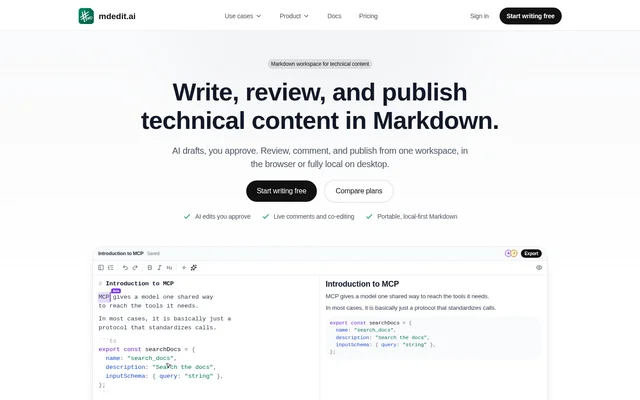
mdedit.ai is an offline-first Markdown workspace for writing, reviewing, and publishing technical content. mdedit.ai serves technical writers, developers, content teams, and students working on documentation, READMEs, guides, and notes. Drafting, AI assistance, review comments, technical visuals, and publishing share the same Markdown source rather than requiring a separate document for each stage.
mdedit.ai was created by Vivek Maskara, who describes a fragmented technical publishing workflow as the reason for building the workspace. mdedit.ai provides a browser editor and desktop app, with mobile access and companion tools for browsers, code editors, the command line, and AI agents.
What mdedit.ai can do
mdedit.ai combines long-document editing tools with contextual AI and human review. Source and rendered output appear side by side, while headings and a generated table of contents help users navigate longer documents. AI requests can use the open document as context, and proposed changes remain visible for approval before they alter the Markdown.
- mdedit.ai catches Markdown formatting issues with linting and autofix.
- mdedit.ai supports AI Ask, Edit, Create, and advanced Agent modes.
- mdedit.ai renders Mermaid, Graphviz, and Markmap diagrams live.
- mdedit.ai generates photos, diagrams, charts, and animations.
- mdedit.ai supports comments, suggestions, assignments, replies, and resolution.
- mdedit.ai imports Markdown, HTML, and Jupyter Notebook files.
- mdedit.ai exports portable formats including Markdown, PDF, DocX, ODT, and EPUB.
How mdedit.ai works
mdedit.ai can be opened in a no-sign-up web editor or used through the desktop app for local Markdown files and folders. The web editor saves drafts locally and syncs after reconnection. Desktop workspaces respond to external file changes, while automatic history allows users to compare or restore captured versions.
mdedit.ai supports OpenAI, Anthropic, Grok, and Gemini models through the AI access options described on the page. The desktop app also supports local models through Ollama or an OpenAI-compatible server. Publishing destinations include GitHub, WordPress, Ghost, DEV, Hashnode, X Articles, Gists, S3, and webhooks.
Who mdedit.ai is for
mdedit.ai targets people who create and review technical documents, including individual writers and teams coordinating writers, subject-matter experts, and publishers. mdedit.ai also describes student workflows for notes, group review, papers, and resumes. Shared editing and review threads support collaborative work, while local files and portable exports support individual document ownership.
- mdedit.ai helps technical writers take long documents through review and publishing.
- mdedit.ai helps developers write READMEs, architecture guides, and developer education.
- mdedit.ai helps content teams coordinate co-editing and assigned review threads.
- mdedit.ai helps students take notes, review group work, and export papers or resumes.
mdedit.ai pricing and plans
mdedit.ai offers Free, Standard, and Premium plans. Free costs $0 forever and includes core editing, 20 AI trial credits, 25 lifetime cloud-synced documents, and 3 version snapshots per document. Standard is listed at $6.99 per month and adds unlimited cloud-synced documents, bring-your-own-key AI, real-time collaboration, and 50 version snapshots per document.
mdedit.ai Premium is listed at $17.99 per month and includes Standard features, built-in AI without an API key, advanced AI models, and unlimited version snapshots retained for 1 year. A free account requires no credit card. Paid subscriptions require a card, and billing begins immediately.
mdedit.ai strengths and limitations
mdedit.ai combines portable Markdown, reviewable AI suggestions, offline drafting, and publishing destinations in the same workspace. Local desktop files and local model support provide alternatives to cloud-based document and AI workflows. However, access to collaboration, built-in AI, and more extensive history depends on the selected plan, and mobile availability differs by operating system.
- mdedit.ai limits free cloud sync to 25 lifetime documents.
- mdedit.ai limits free version history to 3 snapshots per document.
- mdedit.ai lists bring-your-own-key AI under Standard and built-in AI under Premium.
- mdedit.ai lists the iOS app as coming soon.
mdedit.ai FAQ
What is mdedit.ai?
mdedit.ai is an AI-powered, offline-first Markdown editor for technical content. mdedit.ai combines document editing, reviewable AI suggestions, real-time collaboration, technical visuals, version history, and publishing for technical writers, developers, content teams, and students.
Is mdedit.ai free?
mdedit.ai offers a free plan with core Markdown editing, 20 AI trial credits, 25 lifetime cloud-synced documents, and 3 version snapshots per document. mdedit.ai also offers paid Standard and Premium plans, and a free account does not require a credit card.
Does mdedit.ai work offline?
mdedit.ai works offline by saving web editor drafts locally and syncing when the connection returns. mdedit.ai also provides desktop local Markdown workspaces that open files and folders and respond to external file changes.
Which AI models does mdedit.ai support?
mdedit.ai supports OpenAI, Anthropic, Grok, and Gemini models through included credits, a user's own key, or built-in AI. mdedit.ai also supports fully local desktop models through Ollama or an OpenAI-compatible server.
Can teams collaborate in mdedit.ai?
mdedit.ai supports real-time co-editing and review with read or write access for collaborators. mdedit.ai includes comments, suggestions, highlights, assignments, replies, and resolution, with real-time collaboration and shared editing listed in the Standard plan.
Where can mdedit.ai publish documents?
mdedit.ai publishes to GitHub, WordPress, Ghost, DEV, Hashnode, X Articles, Gists, S3, and webhooks. mdedit.ai also exports documents to portable formats including PDF, DocX, EPUB, Markdown, and HTML.
From the community
No reviews yet
Be the first to review this tool. What you write helps the next person choose.