What is Superflows?
Superflows is an AI assistant builder for product teams at SaaS companies. Superflows adds a chat interface that helps users retrieve information, understand product data and perform tasks within existing software. The assistant connects to the product’s APIs and documentation rather than serving only as a documentation chatbot.
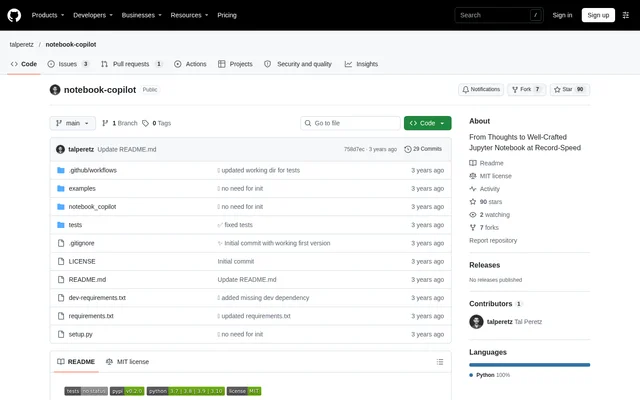
Superflows presents analytics, actions and product guidance as its main areas of functionality. The website also lists open-source repositories for the Superflows API and developer dashboard, plus a separate repository containing chat user interface components. These repositories are available through GitHub, where users can follow releases and suggest features.
What Superflows can do
Superflows combines data retrieval, calculations and task execution in an embedded assistant. Superflows calls product APIs to obtain information and writes code to process analytics requests. For operations that change something in the product, Superflows prepares the action and asks the user to confirm before completing it.
- Superflows retrieves product data through configured API endpoints.
- Superflows writes code to calculate analytics results and provide insights.
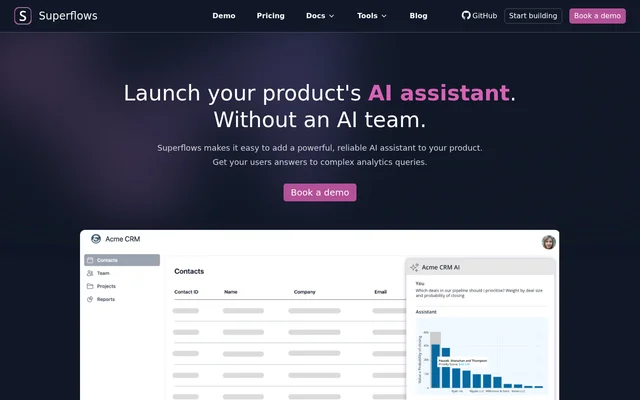
- Superflows provides plots in response to users’ data needs.
- Superflows prepares actions and requests confirmation before execution.
- Superflows references product documentation to provide guidance.
- Superflows collects interaction data and feedback about answer usefulness.
How Superflows works
Superflows setup begins with connecting a product’s API and documentation. Teams upload an OpenAPI specification and docs, define the endpoints the assistant can access and configure authentication. Superflows provides a playground for testing the assistant before integration, along with controls for approving the answers and answer formats the assistant can provide.
Superflows is added to a product’s frontend using a code snippet. After integration, teams can review user questions and collect feedback to identify answers that need improvement. Superflows also offers a workshop-led route: the team evaluates requirements, builds a tailored proof of concept in 2 weeks and supports evaluation before going live.
Who Superflows is for
Superflows is built for SaaS product teams that want users to interact with their software through chat. Superflows illustrates this with a CRM copilot: users can ask which deals to prioritize, request suggested next steps and create reminder tasks. The same example includes analyzing which outreach strategy generated the most leads.
- Superflows helps SaaS users ask analytics questions about their data.
- Superflows supports CRM deal prioritization by deal size and closing probability.
- Superflows lets CRM users request follow-up tasks through chat.
- Superflows provides product guidance using connected documentation.
Superflows pricing and plans
Superflows offers a free Testing plan with 50 queries in the testing playground, a single seat and community support. The plan lets teams set accessible API endpoints and connect their API in the playground. Scale costs $999 monthly and includes 10,000 Chat-to-API queries, 200,000 Chat-to-Docs queries and unlimited playground testing.
Superflows Scale also includes multi-tenant APIs, unlimited seats, custom setup and priority email support. Enterprise has custom pricing and lists 10,000+ Chat-to-API queries, 200,000+ Chat-to-Docs queries, access audit logs and priority feature requests. Superflows defines a Chat-to-API query as a user message that triggers a query to the connected API.
Superflows strengths and limitations
Superflows combines analytics, documentation guidance and confirmed actions in the same product assistant. Superflows gives teams control over accessible endpoints and approved answer formats, while the testing playground supports evaluation before release. The configuration workflow still requires API and authentication setup, and the free plan is specifically presented as a testing option.
- Superflows limits the free Testing plan to 50 playground queries.
- Superflows includes only a single seat on the free Testing plan.
- Superflows requires teams to define API access and configure authentication.
- Superflows lists query allowances for its paid plans.
Superflows FAQ
What is Superflows?
Superflows is an AI assistant builder for SaaS products. Superflows connects to product APIs and documentation so users can ask analytics questions, receive product guidance and complete tasks through chat, with confirmation requested before actions are completed.
Is Superflows free?
Superflows offers a free Testing plan with 50 playground queries, a single seat and community support. Superflows also offers Scale at $999 monthly and an Enterprise plan with custom pricing, with additional query allowances and features listed for paid plans.
How do you integrate Superflows into a product?
Superflows integration involves uploading an OpenAPI specification and documentation, defining accessible endpoints, configuring authentication and testing in the playground. Superflows is then added to the product’s frontend through a code snippet, with controls for approved answers and assistant behavior.
Can Superflows take actions for users?
Superflows can take actions on behalf of users through a product’s APIs. Superflows prepares the requested action and asks for confirmation before completing it. The website’s CRM example includes creating tasks to remind users about suggested next steps for deals.
Does Superflows have open-source code?
Superflows lists open-source repositories on GitHub for its API and developer dashboard and for chat user interface components. Superflows identifies these repositories as @Superflows-AI/superflows and @Superflows-AI/chat-ui, and invites users to follow releases and suggest features.
From the community
No reviews yet
Be the first to review this tool. What you write helps the next person choose.