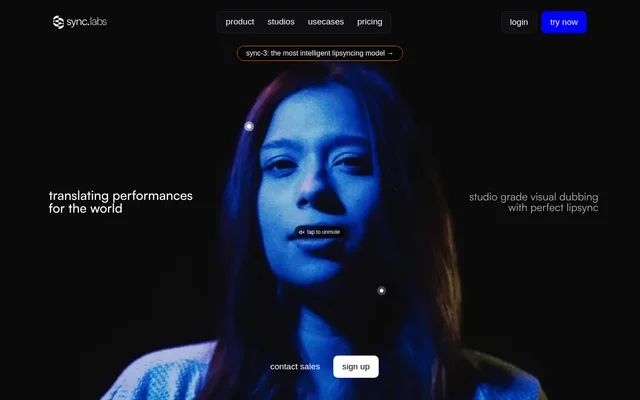
What is Sync?
Sync is an AI video lip-sync and visual dubbing tool for filmmakers, creators and production workflows. Sync combines lip-sync generation with facial reanimation to adapt filmed performances to different speech and languages. Access is available through a web studio and API, allowing both direct editing and integration into existing workflows.
Sync describes support for footage involving multiple faces, objects blocking a face, low lighting, rapid dialogue and fast camera movements. Sync also lists multiple camera angles and 4K ProRes among supported production scenarios. The focus is adapting an actor’s performance while preserving facial details and movement across languages.
What Sync can do
Sync combines video generation, speech tools and editing controls within its studio and developer offerings. Sync can use cloned voices, generated speech or audio from an existing clip to create synchronized video. The available tools range from a simple upload workflow to a full editing timeline and programmatic generation.
- Sync generates video lip-sync and facial reanimation.
- Sync dubs audio into 29 languages.
- Sync generates speech from text through partner integrations.
- Sync prepares generations from written editing instructions.
- Sync cuts, trims and splits video and dialogue with frame-accurate controls.
- Sync verifies whether uploaded videos were modified using its technology.
How Sync works
Sync offers Lite, Assistant and Advanced working modes. In Lite, users upload a video, provide a voice through cloning, generation or existing clip audio, and receive a lip-synced result without using a timeline. Assistant accepts descriptions of changes and sets up the generation, while Advanced provides an editing timeline for precise video and dialogue adjustments.
Sync also provides a RESTful API and SDKs for integration into applications and production pipelines. API access is included in Hobbyist, while Scale adds batch API processing. Sync lists studio tools and plugins as workflow options, and projects requiring direct involvement can work with the Sync team.
Who Sync is for
Sync serves filmmakers and creators working with recorded performances, as well as developers and teams building video applications or production workflows. Sync positions Hobbyist for side projects, Creator for videos intended for global audiences, Growth for teams building applications and workflows, and Scale for high-volume use with additional support.
- Filmmakers can use Sync to adapt recorded performances for different languages.
- Creators can use Sync to synchronize clips with cloned or generated voices.
- Developers can use Sync to add lip-sync generation through the API.
- Production teams can use Sync to edit dialogue and video on a shared workflow.
Sync pricing and plans
Sync advertises a free trial and paid plans with subscription fees plus metered usage. Hobbyist costs $5/month, Creator costs $19/month, Growth costs $49/month and Scale costs $249/month. Subscription payments are not credit bundles: generation usage is charged separately. Enterprise access is available through sales, and higher tiers provide usage discounts.
Sync bills lip-sync generation per frame, so usage costs depend on the selected model and frame count. Audio dubbing is billed separately per second, rounded up. Plans allow unlimited video generation but restrict video duration and simultaneous processing. Hobbyist supports videos up to 1 minute, while Scale supports videos up to 30 minutes.
Sync strengths and limitations
Sync provides different levels of control, from upload-based generation to prompt-guided changes and frame-accurate editing. Sync also supports developer integration and production footage with varied shooting conditions. These options cover both individual editing tasks and application workflows, but costs and available capabilities depend on subscription level and generated usage.
- Sync adds usage charges to subscription fees rather than including a credit bundle.
- Sync restricts video length, concurrency and voice-cloning allowances by plan.
- Sync includes watermark removal from Creator upward.
- Sync reserves batch API processing for Scale.
- Sync charges audio dubbing separately from lip-sync generation.
Sync FAQ
What is Sync?
Sync is an AI video lip-sync and visual dubbing tool for filmmakers, creators and developers. Sync synchronizes facial performances with speech, provides facial reanimation, and offers access through a web studio and API.
Is Sync free?
Sync advertises a free trial alongside paid subscriptions with separate usage charges. Sync lists Hobbyist at $5/month, Creator at $19/month, Growth at $49/month and Scale at $249/month. Subscription fees are not credit bundles, and generated usage is billed separately.
Does Sync have an API?
Sync provides a RESTful API and SDKs for integrating generation into applications and workflows. Sync includes API access in Hobbyist and offers batch API processing on Scale, alongside web studio tools for direct video work.
How do you create a lip-synced video with Sync?
Sync lets users upload a video and supply speech through voice cloning, generated audio or audio from the original clip. Sync offers a timeline-free Lite workflow, an Assistant that prepares generations from written instructions, and an Advanced editor with frame-accurate controls.
How many languages does Sync support for dubbing?
Sync supports audio dubbing into 29 languages. Sync also provides visual lip-sync and facial reanimation for translated performances. Audio dubbing is billed per second, rounded up, and lip-sync generation is charged separately.
From the community
No reviews yet
Be the first to review this tool. What you write helps the next person choose.