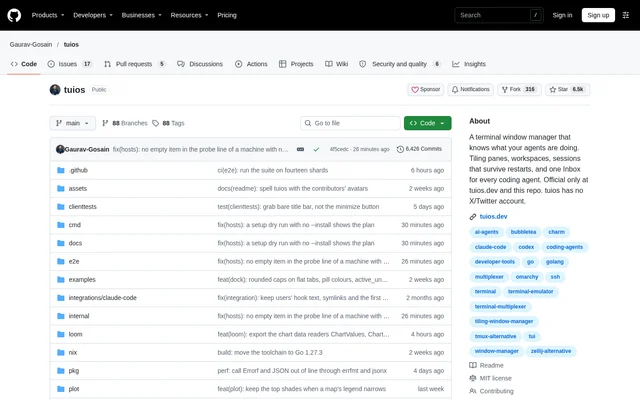
What is tuios?
tuios is an open-source terminal multiplexer and window manager for developers who manage terminal sessions and coding agents. Built with Go and the Charm stack, tuios runs inside an existing terminal rather than replacing the terminal application. tuios combines pane organization, workspaces and a vim-inspired modal interface with agent-state reporting and a shared Inbox.
tuios uses a daemon to keep sessions alive and reach sessions on other machines. The interface includes a session rail showing terminals, files, git state and agents. Developers can use tuios for conventional terminal organization while also monitoring whether coding agents are working, waiting for input, finished or reporting an error.
What tuios can do
tuios brings terminal layout controls and agent coordination into the same interface. Beyond creating and arranging panes, tuios exposes agent requests, messages and status through shared views. Supported agent integrations include Claude Code, Codex, Gemini CLI and opencode, while the Program Status Protocol lets other programs report activity alongside agents.
- tuios creates, resizes, drags and organizes terminal panes.
- tuios offers BSP, master-stack and scrolling layouts.
- tuios collects approvals, questions, mail, errors and finished turns in the Inbox.
- tuios starts agent fleets with each agent in a separate git worktree.
- tuios lets agents send messages and ask each other questions.
- tuios exposes daemon controls through an MCP server.
- tuios opens tmux-driven tool workflows as tuios panes.
How tuios works
tuios runs inside a terminal with true color support and provides separate Window Management and Terminal modes. A fuzzy-searchable command palette exposes actions, while the settings page changes options within the application. Running tuios integration install connects supported agent harnesses to state reporting, and the Inbox lets users answer prompts without navigating to the originating pane.
tuios connects to named remote machines over SSH. Developers can attach to remote sessions, place a remote process in a local session or create global sessions containing panes from multiple machines. Agent requests from remote machines appear in the same Inbox. The MCP server defaults to read-only access restricted to the agent's own session unless configured otherwise.
Who tuios is for
tuios serves developers who work in terminals, use coding agents or distribute development work across machines. The combination of panes, session controls and agent reporting suits workflows where several shells or agents need attention. tuios also supports tools built around tmux through a shim, allowing those tools to open their panes within tuios.
- tuios helps developers organize shells into separate workspaces.
- tuios helps agent users review questions, approvals and completed turns.
- tuios supports parallel coding-agent work in separate git worktrees.
- tuios supports development sessions and agent tasks on remote machines.
tuios licensing and installation options
tuios is available as an open-source project under the MIT license. Distribution options include Homebrew, Arch Linux AUR, Nix, a quick installation script, Go installation and Docker. The repository also provides pre-built release binaries for Linux, macOS, Windows, FreeBSD and OpenBSD. Installation and reference documentation are available on tuios.dev and in the repository.
tuios offers a guided tour at tuios.dev/learn that runs the real application compiled to WebAssembly, with a practice shell in each pane. Installed users can run tuios tutor for the same tour in their terminal. Script and release-binary installations can use tuios update, while package-manager installations should use their package manager.
tuios strengths and limitations
tuios combines local terminal organization, remote sessions and coding-agent communication without requiring separate views for every agent request. The shared Inbox and session rail make agent activity visible across sessions and machines. Installation choices and the browser tour provide different ways to evaluate the application, but terminal capabilities and build requirements still affect setup.
- tuios requires a terminal with true color support.
- tuios recommends kitty graphics and sixel support for graphics.
- tuios source builds require Go 1.26.8 or newer.
- tuios needs additional ConPTY files to pass sixel images through the built-in Windows console host.
tuios FAQ
What is tuios?
tuios is an open-source terminal multiplexer and window manager built with Go. tuios runs inside an existing terminal and combines tiled panes, workspaces, daemon-backed sessions and coding-agent coordination through state indicators and a shared Inbox.
Is tuios open source?
tuios is an open-source project distributed under the MIT license. tuios is available from its GitHub repository through package managers, installation scripts, release binaries, Go installation and Docker, with documentation hosted at tuios.dev.
Which coding agents does tuios support?
tuios provides state-reporting integrations for harnesses including Claude Code, Codex, Gemini CLI and opencode. tuios integration install wires supported harnesses into reporting, and tuios also detects agent CLIs through their processes and screen contents.
Does tuios have an MCP server?
tuios includes an MCP server started with tuios mcp. tuios exposes its control surface as MCP tools, with read-only access and restriction to the agent's own session by default unless broader access is explicitly configured.
Can tuios manage remote sessions?
tuios can reach named machines over SSH, attach to remote sessions and run remote processes in panes. tuios also supports global sessions spanning machines, and requests from agents on other machines appear in the local Inbox.
Can you try tuios without installing it?
tuios provides a browser-based guided tour at tuios.dev/learn using the real application compiled to WebAssembly. tuios supplies a practice shell in every pane, while installed users can access the same tour with tuios tutor.
From the community
No reviews yet
Be the first to review this tool. What you write helps the next person choose.