What is ZCode?
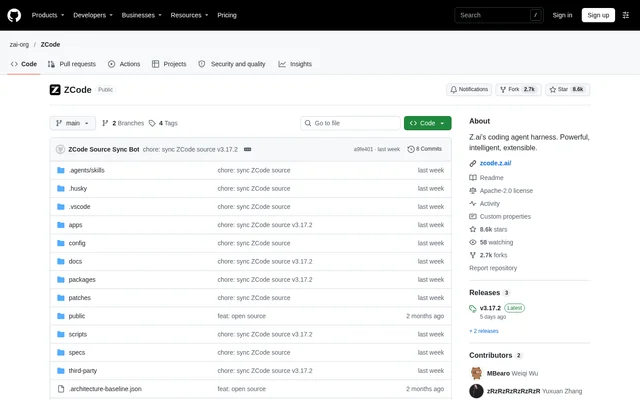
ZCode is an open-source AI coding workbench from Z.ai that gives developers desktop, browser and terminal ways to work with a coding agent. ZCode's repository contains the clients, backend services, shared interface components, Agent CLI and runtime source code. The project is published under the Apache-2.0 license.
ZCode separates its desktop application, Web client, server and agent runtime into documented repository components. The desktop application uses Electron, while the server provides HTTP and WebSocket services and remote connections. This structure gives developers source-level access to the interfaces and supporting services rather than only a packaged client.
What ZCode can do
ZCode provides several interfaces around its coding-agent runtime, with options for local workspaces and remote projects. The repository documents desktop development, browser-based operation, terminal interaction and plugin development. Configuration covers workspace locations, provider files, application data and distribution downloads, allowing developers to adapt the documented setup to their development environment.
- ZCode provides desktop, browser and terminal interfaces.
- ZCode opens a terminal user interface with the zcode command.
- ZCode launches its browser interface with zcode --web.
- ZCode supports remote project connections through SSH and WSL.
- ZCode documents UI plugin development with an Excalidraw canvas collaboration example.
- ZCode supports configurable workspace paths and local provider configuration files.
How ZCode works
ZCode source development starts with Git, Node.js and pnpm, followed by pnpm bootstrap from the repository root. The bootstrap command installs workspace dependencies, prepares local desktop runtime resources and runs the bootstrap build. Agent CLI and runtime sources are included directly in the repository, so a separate Git submodule initialization is unnecessary.
ZCode's command-line distribution bundles the terminal interface, Web interface and Agent behind one launcher. Running zcode without arguments opens the terminal interface; zcode --web starts the browser interface. Both modes run locally without Electron. Web mode uses the current directory as its default workspace, opens a browser and can accept workspace, port and host settings.
Who ZCode is for
ZCode serves developers who want to use a coding agent through a desktop application, browser or terminal, as well as developers extending the workbench itself. The source documentation covers UI plugins, Agent CLI development, backend changes and desktop packaging. Remote-project instructions also address developers working through SSH or WSL connections.
- ZCode supports local coding-agent workflows through a terminal interface.
- ZCode supports browser-based access to a local project workspace.
- ZCode supports remote project workflows through SSH and WSL.
- ZCode provides source entry points for developing the terminal interface or Agent.
- ZCode provides documentation for building and debugging UI plugins.
ZCode licensing and access
ZCode is available as an open-source project in its public repository under the Apache-2.0 license. The repository provides commands for building desktop applications and assembling a command-line distribution. Desktop packaging supports macOS, Windows and Linux targets, while command-line packaging collects the terminal interface, backend, Web client and runtime dependencies into a distribution.
ZCode strengths and limitations
ZCode combines multiple interfaces with source access to the clients, services and agent runtime. The documented launcher keeps terminal and browser operation under the same command, and remote workflows cover SSH and WSL. ZCode also documents development configuration, plugin work and packaging, making the repository relevant to developers modifying or distributing their own builds.
- ZCode source setup requires Git, Node.js and pnpm.
- ZCode's command-line distribution still requires Node.js to run.
- ZCode remote development requires preparation of additional remote resources.
- ZCode local macOS builds are unsigned and may need quarantine removal before opening.
- ZCode desktop packaging and signing require tools and configuration for the target platform.
ZCode FAQ
What is ZCode?
ZCode is an open-source AI coding workbench from Z.ai with desktop, browser and terminal interfaces. ZCode's repository includes client applications, backend services, shared UI components, the Agent CLI and runtime source code under the Apache-2.0 license.
Is ZCode open source?
ZCode is published as an open-source project under the Apache-2.0 license. ZCode's public repository includes source code and instructions for local development, desktop packaging and command-line distribution builds; the supplied product documentation does not state subscription prices.
Can ZCode run in a browser or terminal?
ZCode supports both browser and terminal operation through its command-line distribution. ZCode opens the terminal interface with zcode and starts the browser interface with zcode --web. Both modes run locally without Electron, although the distribution still requires Node.js.
Does ZCode support SSH and WSL?
ZCode supports remote project workflows through SSH and WSL. ZCode's development instructions require preparing remote resources before starting the desktop application, then selecting local download and upload when connecting. Development resources are uploaded to the remote environment through SFTP.
What does ZCode require to build from source?
ZCode requires Git, Node.js and pnpm for source setup. ZCode documents pnpm bootstrap as the initialization command, followed by separate desktop, Web and CLI development commands. Desktop packaging and signing also require the appropriate tools and configuration for the target operating system.
Can developers extend ZCode?
ZCode provides documentation for UI plugin development, including installation, updates, page APIs and host debugging. ZCode also links to CLI guidance covering model configuration, non-interactive calls, tools, extensions, batch evaluation and trace recording.
From the community
No reviews yet
Be the first to review this tool. What you write helps the next person choose.