What is VanceAI Image Upscaler?
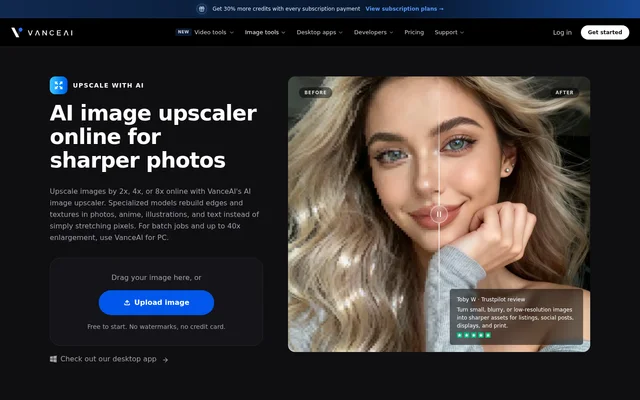
VanceAI Image Upscaler is an AI image enlargement tool for turning small, blurry, or low-resolution images into larger assets for listings, social posts, displays, and print. VanceAI Image Upscaler supports photographs, anime, illustrations, and text, with online access and a Windows desktop option. The tool serves photographers, artists, designers, and sellers who need larger images for specific publishing or printing tasks.
VanceAI Image Upscaler uses models that rebuild edges, textures, and skin tones rather than relying only on conventional pixel stretching. The website describes general and specialized models for different image types. Online enlargement reaches 8x, while the desktop option supports enlargement up to 40x and batch jobs.
What VanceAI Image Upscaler can do
VanceAI Image Upscaler combines enlargement controls with models tailored to the source image. Users can choose a general model for everyday photographs or specialized options for portraits, product images, anime, text, and low-light scenes. The stated capabilities cover both visual content and scanned records, with different output needs across digital publishing and print.
- VanceAI Image Upscaler enlarges images by 2x, 4x, or 8x online.
- VanceAI Image Upscaler rebuilds edges and textures during enlargement.
- VanceAI Image Upscaler upscales product images and AI artwork to 4K.
- VanceAI Image Upscaler sharpens characters and lines in scanned documents.
- VanceAI Image Upscaler provides model and parameter controls for photographic work.
- VanceAI Image Upscaler supports batch jobs and enlargement up to 40x through the desktop option.
How VanceAI Image Upscaler works
VanceAI Image Upscaler follows an upload, select, and download workflow online. Users upload or drag an image into the page, choose an enlargement scale, select a model suited to the image type, and download the processed result. Online processing consumes credits according to the chosen scale. Uploaded images are encrypted in transit and permanently deleted within 24 hours of processing.
VanceAI Image Upscaler also offers a Windows desktop route for local processing. The desktop option keeps files on the user's computer, supports batch processing, and uses no credits for local jobs. Paid desktop plans include unlimited local processing, accept images of any size, and include future updates and new features without upgrade fees.
Who VanceAI Image Upscaler is for
VanceAI Image Upscaler addresses image preparation tasks for commercial photography, online selling, visual design, and social media. The page also describes artwork enlargement and document readability use cases. Photographers can use model and parameter controls for tighter crops and large prints, while sellers can enlarge product or vehicle details for closer inspection.
- Online sellers can enlarge product photos for marketplace and storefront listings.
- Vehicle sellers can prepare clearer views of paint, badges, dashboards, and interiors.
- Artists can enlarge AI art, illustrations, and pixel art for editing, sharing, or print.
- Designers can prepare images for posters, banners, wallpapers, and displays.
- Document users can improve the readability of contracts, invoices, and archival scans.
VanceAI Image Upscaler pricing and plans
VanceAI Image Upscaler provides 10 free credits, with no credit card required to start. Online enlargement costs 1 credit at 2x, 2 credits at 4x, or 3 credits at 8x. The pricing page lists monthly, annual, and pay-as-you-go web options, and states that unused credits roll over. Paid web jobs skip the free-tier queue and continue processing in the background.
VanceAI Image Upscaler desktop access is offered through monthly, annual, and lifetime licences. Listed desktop prices are $39.90 for 1 month, $99.90 for 1 year, and $129.90 for lifetime access. Each desktop plan licenses 1 PC and includes unlimited local processing. Enterprise options include custom pricing, custom integration, automated batch processing, and direct engineering support.
VanceAI Image Upscaler strengths and limitations
VanceAI Image Upscaler offers a choice between browser-based processing and local Windows processing, alongside models for several image types. The free credits allow an initial trial, while the desktop option supports batch work without local credit charges. The main constraints concern online credit consumption, the online enlargement ceiling, and Windows availability for the desktop software.
- Online enlargement is limited to 8x; enlargement up to 40x requires the desktop option.
- Online jobs consume credits, with higher enlargement scales using more credits.
- Batch processing is directed to the desktop option.
- The desktop software runs on Windows rather than offering a stated macOS or Linux version.
VanceAI Image Upscaler FAQ
What is VanceAI Image Upscaler?
VanceAI Image Upscaler is an AI tool that enlarges photos, illustrations, anime, and scanned documents by rebuilding edges and textures. VanceAI Image Upscaler supports enlargement up to 8x online and up to 40x through the Windows desktop option.
Is VanceAI Image Upscaler free?
VanceAI Image Upscaler offers 10 free credits without requiring a credit card. Online enlargement uses 1 credit at 2x, 2 credits at 4x, or 3 credits at 8x. Paid web plans and paid Windows desktop licences are also available.
How do you upscale an image with VanceAI Image Upscaler?
VanceAI Image Upscaler lets users upload an image, choose 2x, 4x, or 8x enlargement, and download the result. Users can select a model for the image type, including everyday photos, portraits, products, anime, text, and low-light scenes.
Can VanceAI Image Upscaler process images in batches?
VanceAI Image Upscaler supports batch processing through the Windows desktop option. The desktop option also provides enlargement up to 40x and local processing without credit usage. Paid desktop licences include unlimited local processing and accept images of any size.
How does VanceAI Image Upscaler handle uploaded images?
VanceAI Image Upscaler encrypts uploaded images in transit and permanently deletes them within 24 hours of processing. The Windows desktop option processes files locally, keeping images on the user's computer rather than uploading them for online processing.
Who is VanceAI Image Upscaler for?
VanceAI Image Upscaler is for photographers, artists, online sellers, designers, and social media creators preparing larger images. Stated uses include product listings, car listings, posters, large prints, AI artwork, scanned documents, wallpapers, and social posts.
From the community
No reviews yet
Be the first to review this tool. What you write helps the next person choose.