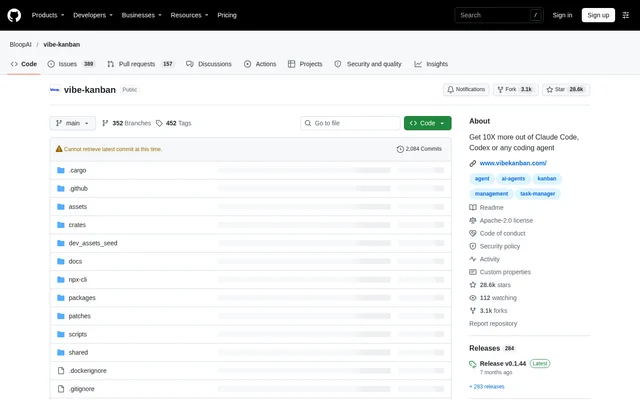
What is vibe-kanban?
vibe-kanban is an open-source project for planning software work and reviewing coding agent output. Software engineers can organise issues privately or with a team, then move into workspaces where agents execute the work. The repository presents planning and review as central parts of a workflow in which engineers supervise coding agents rather than only write code directly.
vibe-kanban brings kanban issues, agent workspaces, code diffs, application previews, and pull requests into a connected workflow. The source is published under the Apache-2.0 license. The README also prominently states that vibe-kanban is sunsetting and links to an announcement, although the supplied text does not explain the timing or consequences.
What vibe-kanban can do
vibe-kanban connects task organisation with agent execution and review. A workspace gives a coding agent a branch, terminal, and development server, while review tools let engineers inspect changes and return feedback without leaving the interface. Application previews and pull request creation extend the workflow beyond assigning an agent a task.
- vibe-kanban creates, prioritises, and assigns issues on a kanban board.
- vibe-kanban runs coding agents in workspaces with branches, terminals, and development servers.
- vibe-kanban displays diffs and sends inline comments directly to agents.
- vibe-kanban previews applications in a browser with devtools, inspect mode, and device emulation.
- vibe-kanban supports Claude Code, Codex, Gemini CLI, GitHub Copilot, Amp, Cursor, OpenCode, Droid, CCR, and Qwen Code.
- vibe-kanban creates pull requests with AI-generated descriptions and supports merging.
How vibe-kanban works
vibe-kanban starts from the terminal with npx vibe-kanban after the user authenticates with a supported coding agent. The documented workflow begins with planning kanban issues and creating workspaces when work is ready to start. Engineers then review agent changes, send feedback, preview the application, and open pull requests for review on GitHub.
vibe-kanban also documents self-hosting and remote deployment. Remote editor integration can generate links that open a local VSCode editor connected to a server over SSH. That setup requires SSH access, passwordless SSH keys, and the VSCode Remote-SSH extension. Reverse proxy or custom domain deployments must configure VK_ALLOWED_ORIGINS so browser API requests are accepted.
Who vibe-kanban is for
vibe-kanban is intended for software engineers who spend time planning and reviewing coding agent work. The kanban workflow supports private planning as well as team issue assignment. The combination of execution workspaces, inline feedback, and browser previews serves developers who need to check both code changes and application behaviour before moving work toward a pull request.
- Individual developers can plan coding work privately on kanban boards.
- Software teams can prioritise and assign issues before agent execution.
- Reviewers can inspect agent-generated diffs and return inline feedback.
- Developers can inspect application previews with device emulation.
- Remote developers can connect their local VSCode editor to server-hosted projects.
vibe-kanban pricing and access
vibe-kanban is available as an open-source project under the Apache-2.0 license, with installation through npx and instructions for building from source. The supplied repository text does not list product subscription plans or prices. A separate self-hosting guide covers hosting a Vibe Kanban Cloud instance; the included GitHub pricing text does not establish pricing for vibe-kanban.
vibe-kanban strengths and limitations
vibe-kanban combines several concrete stages of agent-assisted development: issue planning, workspace execution, diff review, application inspection, and pull request creation. Support for multiple coding agents and documented self-hosting options are practical strengths. Adoption decisions should also account for the explicit sunsetting notice and the configuration requirements for agent authentication, reverse proxies, and remote editor access.
- vibe-kanban is sunsetting according to the README.
- vibe-kanban requires users to authenticate with a supported coding agent before launch.
- vibe-kanban requires allowed-origin configuration behind a reverse proxy or custom domain.
- vibe-kanban remote VSCode integration requires SSH access, passwordless keys, and the Remote-SSH extension.
vibe-kanban FAQ
What is vibe-kanban?
vibe-kanban is an open-source kanban and coding agent workspace project for software engineers. Developers can plan issues, run agents in workspaces, review diffs, send inline feedback, preview applications, and create pull requests with AI-generated descriptions.
Is vibe-kanban free or paid?
vibe-kanban is available as an open-source project under the Apache-2.0 license. The supplied repository text lists no product subscription prices or paid tiers and provides an npx launch command, source build instructions, and self-hosting guidance.
Which coding agents does vibe-kanban support?
vibe-kanban lists Claude Code, Codex, Gemini CLI, GitHub Copilot, Amp, Cursor, OpenCode, Droid, CCR, and Qwen Code among its supported coding agents. Users must authenticate with their chosen coding agent before launching vibe-kanban.
How do you install vibe-kanban?
vibe-kanban can be launched by running npx vibe-kanban in a terminal after authenticating with a supported coding agent. The repository also includes development prerequisites, instructions for running the backend and web app, and a macOS source build procedure.
Can you self-host vibe-kanban?
vibe-kanban provides a guide for hosting a Vibe Kanban Cloud instance and documents reverse proxy, custom domain, and remote deployment configuration. Reverse proxy and custom domain setups require VK_ALLOWED_ORIGINS; remote VSCode access requires SSH configuration and the Remote-SSH extension.
Is vibe-kanban sunsetting?
vibe-kanban is sunsetting according to an explicit notice in the README. The notice links to an announcement, but the supplied page text does not state a shutdown date, migration process, or details about future availability.
From the community
No reviews yet
Be the first to review this tool. What you write helps the next person choose.