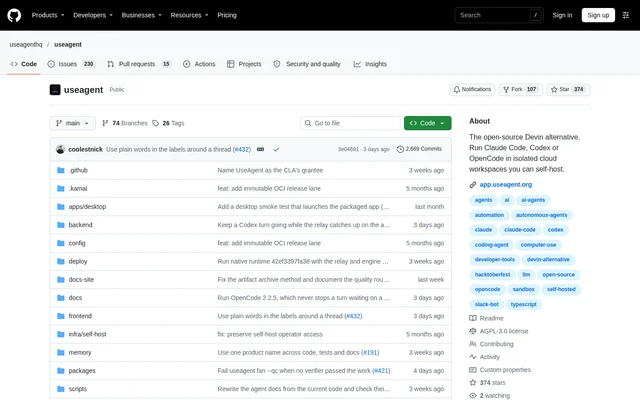
What is UseAgent?
UseAgent is an open-source workspace around existing AI agents, rather than a new model. UseAgent runs Claude Code, Codex, OpenCode and Pi with repositories, a terminal, a browser and team tools. Developers and teams can delegate a code change, research report, website or spreadsheet, follow progress live and retain the resulting files.
UseAgent describes itself as an open-source Devin alternative, while explicitly stating that UseAgent is not a proven replacement for every Devin workflow. Deployment options include the hosted service, an organization's servers or a laptop. A shared event format lets teams change agent engines while carrying threads, files and memory forward.
What UseAgent can do
UseAgent combines agent execution with reusable procedures, persistent context and file handling. Each thread receives an isolated computer, and users can inspect the desktop or terminal and take control when needed. Supported workpieces have revisioned edits and native exports, while knowledge pages and optional team memory keep context beside the work.
- UseAgent runs research in a browser and commands in a terminal.
- UseAgent works with repositories and returns pull requests or files.
- UseAgent imports skills from GitHub and pins playbooks to tasks.
- UseAgent creates documents, spreadsheets, presentations, PDFs, images and videos.
- UseAgent schedules recurring tasks and exposes their history.
- UseAgent pauses gated tools for approval before resuming execution.
How UseAgent works
UseAgent accepts work through the web app, Slack, email, REST API, CLI, MCP and schedules. In the hosted app, users register with an email address, start a thread, describe the task and select a model. Provider connections allow a ChatGPT account for Codex or API keys for additional models. Users watch browser and terminal activity, answer questions and open generated files.
UseAgent stores each step, tool call and approval in an append-only Postgres log, supporting replay and recovery after backend restarts. Credentials stay on the control plane, outside the sandbox. Native integrations include Slack and GitHub, while connectors cover Gmail, Linear, Notion and HubSpot. Sandbox options include Daytona, CubeSandbox and Box.
Who UseAgent is for
UseAgent serves teams that want AI agents to handle both software work and browser-based or document-based tasks. Self-hosting addresses teams that want code, prompts and files to remain where they deploy them. Shared knowledge, playbooks, approval records and separate personal and organization memory support workflows that need reusable procedures and inspectable execution.
- Developers can delegate fixes in connected repositories.
- Teams can request research reports and retain the resulting files.
- Slack users can mention an agent, attach files and receive artifacts in the thread.
- Teams can reuse versioned procedures for recurring work.
UseAgent pricing and access
UseAgent is free and open-source software under GNU AGPL v3.0, identified as AGPL-3.0-only. The hosted app requires no installation or credit card and always offers free models. Users can also connect an existing ChatGPT plan for Codex or bring API keys. Those options use the user's own provider accounts rather than establishing a stated UseAgent subscription price.
UseAgent offers commercial licensing for proprietary embedding, distribution without AGPL obligations, and OEM or white-label products. Source installation requires bun and Postgres with pgvector; running a real agent task also requires sandbox-provider and model keys. Self-hosting documentation covers Linux hosts, a Terraform reference host, a deployment script and Docker Compose.
UseAgent strengths and limitations
UseAgent combines deployment control, inspectable task records and engine portability. Teams can host the workspace themselves, keep credentials outside isolated agent computers and review recorded approvals. The same session interface and event format work across supported engines. These capabilities come with an explicit alpha-stage warning and technical requirements for source-based deployment.
- UseAgent APIs and schemas may change between releases.
- UseAgent recommends pinning a release tag when stability is needed.
- UseAgent model choices, login methods and tools depend on the engine and configuration.
- UseAgent self-hosting requires infrastructure setup and task-provider credentials.
UseAgent FAQ
What is UseAgent?
UseAgent is an open-source workspace that runs Claude Code, Codex, OpenCode and Pi in isolated environments. UseAgent combines repositories, a browser, a terminal and team tools so users can delegate coding, research and file creation while following progress.
Is UseAgent free?
UseAgent is free and open-source software under AGPL-3.0-only, and the hosted app offers free models without a credit card. UseAgent also supports existing ChatGPT accounts and API keys, and offers commercial licensing for uses such as proprietary embedding.
Can UseAgent be self-hosted?
UseAgent can be self-hosted on a Linux host, including AWS, Google Cloud, Azure or bare metal. UseAgent provides deployment documentation, a Terraform reference host, a deployment script and Docker Compose guidance. Source setup requires bun and Postgres with pgvector.
Which integrations does UseAgent support?
UseAgent provides native Slack and GitHub integrations, plus connectors for Gmail, Linear, Notion and HubSpot. UseAgent accepts tasks through the web app, Slack, email, REST API, CLI, MCP and schedules, with integration tokens kept sealed on the server.
What can you use UseAgent for?
UseAgent supports repository fixes, website creation, research reports, spreadsheets and other file-based tasks. UseAgent lets users observe browser and terminal activity, intervene during execution, reuse skills and playbooks, and schedule recurring work with an inspectable history.
Is UseAgent stable for production workflows?
UseAgent is explicitly described as alpha software, although the repository says UseAgent runs real daily workloads. UseAgent APIs and schemas can change between releases, and the documentation recommends pinning a tag when stability is needed.
From the community
No reviews yet
Be the first to review this tool. What you write helps the next person choose.