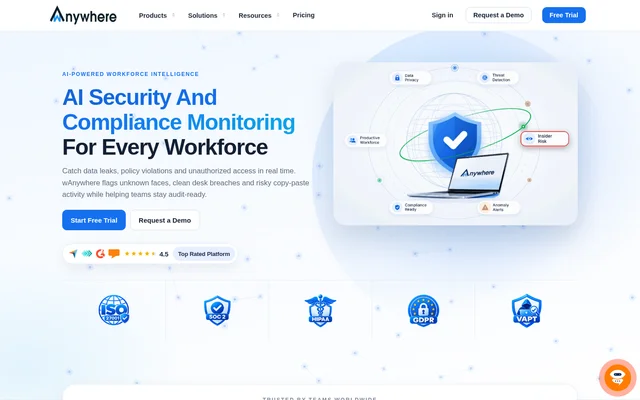
What is wAnywhere?
wAnywhere is AI-powered workforce monitoring software for organizations managing remote, hybrid and on-site employees. wAnywhere brings employee activity visibility, security monitoring and workforce management into a shared tool. The website describes support for small businesses and enterprises, with capabilities spanning productivity analysis, attendance, time tracking, integrated business apps and remote IT support.
wAnywhere connects workforce visibility with security policy monitoring. Managers can review employee activities, working hours and performance, while security teams can monitor potential data leaks, unauthorized access and clean desk policy breaches. The software also provides dashboards and reports intended to support decisions about productivity, resource allocation and workplace compliance.
What wAnywhere can do
wAnywhere groups its capabilities around AI security, productivity, integrated apps, remote support, time tracking and attendance. These functions cover both daily workforce administration and monitoring of employee activity or security events. The website also names screenshot capture, desktop tracking, field force monitoring, geofencing and screen blocking among the available capabilities.
- wAnywhere detects unknown people, multiple people, mobile usage and no-person scenarios.
- wAnywhere supports clean desk monitoring and PII masking.
- wAnywhere tracks active time, breaks, application usage and website usage.
- wAnywhere provides productivity dashboards, drill-down views and downloadable reports.
- wAnywhere records attendance using facial recognition, a mobile app or a web portal.
- wAnywhere enables secure remote device access and live troubleshooting.
- wAnywhere includes apps for leave, projects, timesheets, assets and shifts.
How wAnywhere works
wAnywhere measures active time using keyboard and mouse activity, identifies breaks and monitors application and website usage. Managers can examine activity and performance through dashboards and reports. Security monitoring checks for events such as unknown faces and mobile usage, while attendance can be verified through AI facial recognition or recorded through mobile and web options.
wAnywhere supports installation on Windows, Mac, Chromebook and Linux. The website describes deployment in minutes and synchronization with project management, HRMS and collaboration tools, without naming specific external products. IT teams can connect securely to employee devices for troubleshooting, while integrated management apps bring tasks such as leave and timesheet administration into the same workflow.
Who wAnywhere is for
wAnywhere serves organizations that need visibility into distributed or office-based work alongside security controls. The website identifies BPOs, call centers, healthcare, banking and financial services, global capability centers, IT teams, startups and freelancers. The stated applications range from protecting sensitive information to reviewing workloads, shift adherence and project activity across different work settings.
- wAnywhere helps contact centers track agent activity, idle time and shift adherence.
- wAnywhere helps healthcare teams safeguard patient data and review administrative workloads.
- wAnywhere helps financial services teams mask PII and maintain audit trails.
- wAnywhere helps startups track time, manage tasks and understand team productivity.
- wAnywhere helps freelancers manage projects using task management and timesheet tools.
wAnywhere pricing and access
wAnywhere offers a free trial and a demo request through its website. The supplied page does not publish subscription prices, billing terms or plan comparisons, so the available text does not establish the cost of ongoing use. The website separately lists an ROI Calculator and a System Audit Tool as free tools.
wAnywhere strengths and limitations
wAnywhere combines security monitoring, productivity analytics and employee management functions rather than presenting them as unrelated tools. Support for different work models and operating systems broadens the deployment options described on the page. Attendance alternatives are another practical strength: employees can use the mobile app or web portal when facial recognition is not feasible.
wAnywhere FAQ
What is wAnywhere?
wAnywhere is AI-powered workforce monitoring software that combines security and compliance monitoring, productivity analytics, time tracking, attendance and remote support. wAnywhere is designed for organizations managing remote, hybrid and on-site teams.
Is wAnywhere free?
wAnywhere offers a free trial, but the supplied page does not state subscription prices or whether ongoing use includes a free plan. wAnywhere also lists an ROI Calculator and a System Audit Tool as separate free tools.
How does wAnywhere track productivity?
wAnywhere tracks productivity by measuring active time through keyboard and mouse activity, identifying breaks and monitoring application and website usage. wAnywhere provides dashboards, drill-down reports and downloadable reports to help managers review employee activities and performance.
What security monitoring does wAnywhere provide?
wAnywhere provides AI security monitoring for unknown or multiple people, mobile usage, no-person scenarios and clean desk policy breaches. wAnywhere also lists PII masking, risky copy-paste detection, screenshot capture and screen blocking among its security and monitoring capabilities.
Which operating systems does wAnywhere support?
wAnywhere supports Windows, Mac, Chromebook and Linux, according to the website. wAnywhere also offers mobile app and web portal options for recording attendance when facial recognition is not feasible.
Who is wAnywhere for?
wAnywhere serves small businesses and enterprises managing remote, hybrid or on-site employees. The website names BPOs, call centers, healthcare organizations, banking and financial services, global capability centers, IT teams, startups and freelancers as audiences.
From the community
No reviews yet
Be the first to review this tool. What you write helps the next person choose.