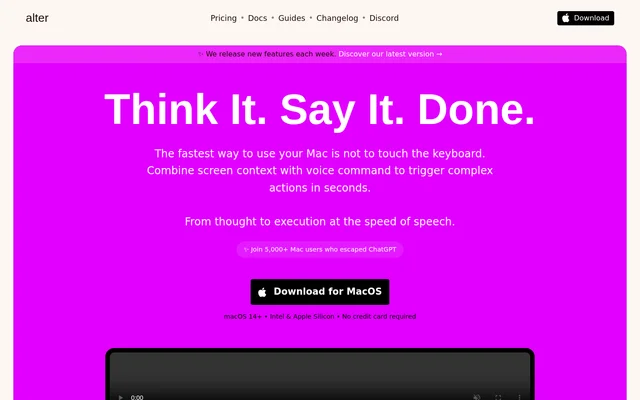
What is Alter?
Alter is a native macOS AI assistant for Mac power users who want help within their existing apps. Alter draws on screen and app context to assist with writing, research, meetings, and everyday tasks. Appsense is compatible with all macOS apps, while native integrations let Alter interact with Apple applications such as Notes, Calendar, and Keynote.
Alter combines conversational assistance with actions that affect the current workflow. Instead of requiring users to move every task into a separate chat window, Alter can insert responses directly into apps, accept files through drag-and-drop, and use voice input. Alter also supports cloud models and locally running models.
What Alter can do
Alter brings contextual assistance, speech tools, and workflow actions into a Mac environment. Alter includes a library of built-in actions and supports creating custom actions for specific needs. Meeting tools cover recording and summaries, with speaker identification and faster speech processing depending on the plan. Pro adds integrated cloud-model access and remote service connections.
- Alter automatically inserts AI responses into apps.
- Alter turns webpages into conversations for extracting insights.
- Alter supports voice commands and dictation.
- Alter records meetings and generates summaries and reports.
- Alter accepts files including PDF, XLSX, and DOCX.
- Alter connects Pro users to services including Gmail, Notion, and Linear.
How Alter works
Alter runs on macOS Ventura 13 and newer, with support for Apple Silicon and Intel processors. Alter uses Appsense to understand app context and offers native actions for Apple applications. Users can work with built-in actions, create custom actions, attach files, or ask questions about websites without leaving the browser.
Alter connects to personal AI providers through API keys and supports routers with OpenAI-compatible endpoints, including LiteLLM, OpenRouter, and Together. For offline processing, Alter connects to Ollama or LM Studio after installation and configuration. Ollama works on all Mac computers according to the page, while LM Studio is limited to Apple Silicon.
Who Alter is for
Alter is aimed at Mac power users who work across multiple apps and want contextual AI assistance without repeated copying and pasting. Alter supports writing tasks, document and website research, meeting capture, and control of native apps. Local model connections also serve users who want AI processing to remain on their device.
- Alter helps writers draft messages and insert responses into apps.
- Alter helps meeting participants record discussions and review summaries.
- Alter helps researchers question webpages, articles, and reports.
- Alter helps Mac users automate Calendar, Mail, and connected services.
Alter pricing and plans
Alter offers a free plan using personal AI provider keys or local models and a 7-day trial with access to integrated AI models, without a credit card. Local+ costs $29/year and adds advanced local speech models. Pro costs $240/year and includes access to 50+ cloud models, remote tools, and meeting intelligence; unlimited requests are subject to fair use.
Alter also offers Lifetime access for $720, including permanent access and future platform upgrades. Lifetime can be used on multiple devices, but only one device at a time. Special pricing is available for nonprofit organizations, students, and academics through direct contact.
Alter strengths and limitations
Alter combines Mac app context, direct text insertion, native actions, and local AI support in a single assistant. Alter states that prompts and data sent to models are encrypted, that user data is not used for training, and that anonymous usage analytics can be disabled. Feature availability and speech-processing performance differ across plans.
- Alter requires macOS Ventura 13 or newer.
- Alter reserves remote tools and integrated cloud-model access for Pro.
- Alter lists free-plan meeting recording as very slow and excludes speaker identification.
- Alter requires a separate local model setup for offline processing.
Alter FAQ
What is Alter?
Alter is a native macOS AI assistant that uses screen and app context to help with writing, voice commands, meeting summaries, and automation. Alter can insert responses into apps, interact with native Apple applications, and connect to cloud or local AI models.
Is Alter free?
Alter offers a free plan using personal AI provider keys or local models, plus a 7-day trial of integrated AI models without a credit card. Alter also offers paid Local+, Pro, and Lifetime options, with integrated cloud-model access and remote tools included in Pro.
Can Alter work offline with local models?
Alter supports offline AI processing through Ollama and LM Studio, keeping local-model processing on the device. Alter requires users to install a supported local tool, follow the setup guide, and select local models. LM Studio is available only for Apple Silicon devices.
What are Alter's system requirements?
Alter requires macOS Ventura 13 or newer and supports both Apple Silicon and Intel processors as a universal app. Alter's Appsense technology is compatible with all macOS apps, although the LM Studio local-model integration requires Apple Silicon.
Does Alter support personal API keys and model routers?
Alter supports personal AI provider API keys and router services that provide an OpenAI-compatible endpoint. Alter lists LiteLLM, OpenRouter, and Together as supported options. Router setup requires entering the service's API endpoint and authentication key in Alter's settings.
Can Alter record and summarize meetings?
Alter records meetings, generates summaries and reports, and supports questions about meeting content. Alter's plan comparison lists speaker identification for Local+ and Pro, but not Free. Free-plan meeting recording is described as very slow, while paid options support real-time processing.
From the community
No reviews yet
Be the first to review this tool. What you write helps the next person choose.