What is AudioPen?
AudioPen is an AI-powered voice-to-text app that converts spoken thoughts into rewritten text rather than stopping at a transcript. AudioPen is designed for people who prefer talking through ideas, including writers, creators and professionals preparing notes or correspondence. The app produces a draft in a selected writing style for the user to review.
AudioPen lists access through iPhone, iPad, Android, Mac, Windows, web and a browser extension. The product combines voice capture with writing controls, allowing users to decide how extensively their words are rewritten. A free plan provides access to the core workflow, while Prime adds longer recordings and additional note-processing capabilities.
What AudioPen can do
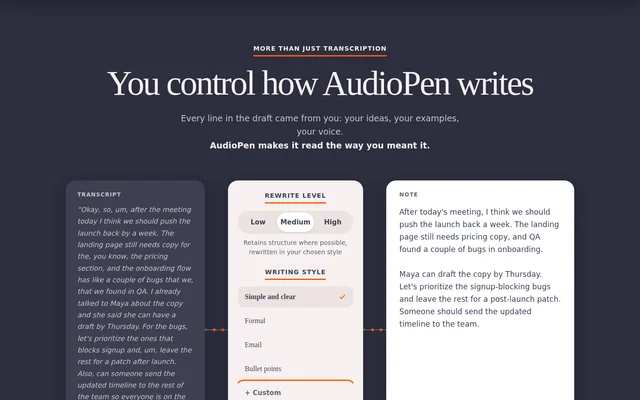
AudioPen offers controls for rewriting intensity, output length and writing style. The available rewrite levels range from removing filler words and grammatical errors to fully rewriting the material in the selected style and length. AudioPen also supports custom styles described in words or supplied through a sample of the user's writing.
- AudioPen transcribes recordings and rewrites the resulting text.
- AudioPen offers styles including formal writing, email and bullet points.
- AudioPen can produce written output in a different language from the spoken input.
- AudioPen combines notes into SuperSummaries with Prime.
- AudioPen processes uploaded audio files and text notes with Prime.
- AudioPen supports chatting with notes through the AudioPen MCP with Prime.
How AudioPen works
AudioPen follows a record, select and draft workflow: users record their thoughts, choose a library or custom writing style, and receive transcribed and rewritten text. On iPhone, the AudioPen Keyboard supports speaking into apps such as Messages, Gmail and WhatsApp. On Android, a floating recording bubble inserts cleaned text into the app where the user is typing.
AudioPen provides desktop hotkeys on macOS and Windows. Holding the hotkey types the user's exact words, while double-tapping requests rewriting in a chosen style; the text appears at the cursor. AudioPen also lists webhooks on the free plan and Zapier on Prime for sending notes onward.
Who AudioPen is for
AudioPen identifies audiences whose work involves turning thoughts into written material, from authors and creators to salespeople, lawyers and therapists. AudioPen also addresses people capturing ideas away from a desk and people who find typing slow or painful, including users with RSI or dyslexia. The page separately describes use for busy minds and people with ADHD.
- AudioPen helps writers turn spoken ideas into drafts and memoir pages.
- AudioPen turns creators' ideas into scripts, captions or newsletters.
- AudioPen helps salespeople write notes after calls.
- AudioPen supports dictating legal case notes, client letters and therapy session notes.
AudioPen pricing and plans
AudioPen offers a free plan and paid Prime passes. The free plan includes recordings up to 3 minutes, selected and custom writing styles, cross-language output, webhooks and a limited number of voice typing sessions. Prime costs USD 33 for 3 months, USD 99 for 1 year or USD 159 for 2 years.
AudioPen Prime includes unlimited recordings, voice typing and AI rewrites, with individual recordings up to 15 minutes. Prime also adds unlimited note storage, audio uploads, text note processing, adding to existing notes and restyling existing notes. AudioPen states that one account works across the user's devices.
AudioPen strengths and limitations
AudioPen combines speech capture, rewriting and style controls in a workflow available across mobile, desktop and web. Custom styles and cross-language output are included in the free offering, while device-specific tools place text into other apps. The main constraints are recording duration and plan-based access to advanced note processing and integrations.
- AudioPen free recordings are limited to 3 minutes.
- AudioPen free voice typing has a limited number of sessions.
- AudioPen Prime recordings are limited to 15 minutes.
- AudioPen reserves uploads, Zapier and AudioPen MCP access for Prime.
AudioPen FAQ
What is AudioPen?
AudioPen is an AI-powered voice-to-text app that transcribes spoken thoughts and rewrites them into shareable text. AudioPen lets users choose a writing style, adjust rewriting intensity and output length, or create a custom style from a description or writing sample.
Is AudioPen free?
AudioPen offers a free plan with recordings up to 3 minutes, selected and custom writing styles, cross-language output, webhooks and limited voice typing sessions. AudioPen also sells Prime passes for USD 33 for 3 months, USD 99 for 1 year or USD 159 for 2 years.
Which devices does AudioPen support?
AudioPen lists iPhone, iPad, Android, Mac, Windows, web and a browser extension. AudioPen also provides an iPhone keyboard, an Android floating recording bubble and macOS and Windows hotkeys for entering dictated or rewritten text where the cursor is.
Can AudioPen write in a different language from the recording?
AudioPen supports speaking in one language and choosing another language for the written output. AudioPen lists languages including English, Spanish, French, Hindi, Japanese, Arabic and German, and includes cross-language writing in the free plan.
Who is AudioPen for?
AudioPen is for writers, memoir writers, creators, salespeople, lawyers and therapists who want to turn speech into written drafts or notes. AudioPen also describes uses for people on the move, people with ADHD and people who find typing difficult because of RSI or dyslexia.
Does AudioPen support integrations?
AudioPen supports sending notes through webhooks on the free plan and through Zapier with Prime. AudioPen Prime also includes the AudioPen MCP for chatting with notes. AudioPen provides mobile and desktop input tools for placing text into other apps.
From the community
No reviews yet
Be the first to review this tool. What you write helps the next person choose.